liveBook · Manning

Windows Server with Desktop Experience

As explained in 100 SQL Server Mistakes and How to Avoid Them

Windows Server with Desktop Experience is a Windows Server installation option that includes the standard graphical user interface and related desktop components.

Windows Server with Desktop Experience supplies the graphical interface and desktop components. Choosing it for a production SQL Server instance can add unnecessary operating-system bloat when Server Core would suffice. section 8.4

Mistake #36: installing the GUI because developers use Visual Studio.

  • Visual Studio cannot run on Server Core, but it should not be installed on production servers merely to develop SSIS packages. section 8.4
  • Desktop Experience consumes more disk space, processor, and memory, and leaves more components and services exposed to attack. section 8.4
  • Keep IDEs on developer workstations or, where necessary, development servers; connect them to development databases instead. section 8.4

The Windows Server 2022 SSIS instance

A DBA team installs SQL Server on Windows Server 2022 with Desktop Experience because developers build SSIS packages in Visual Studio. The safer design separates development tooling from the production server and considers Server Core. section 8.4
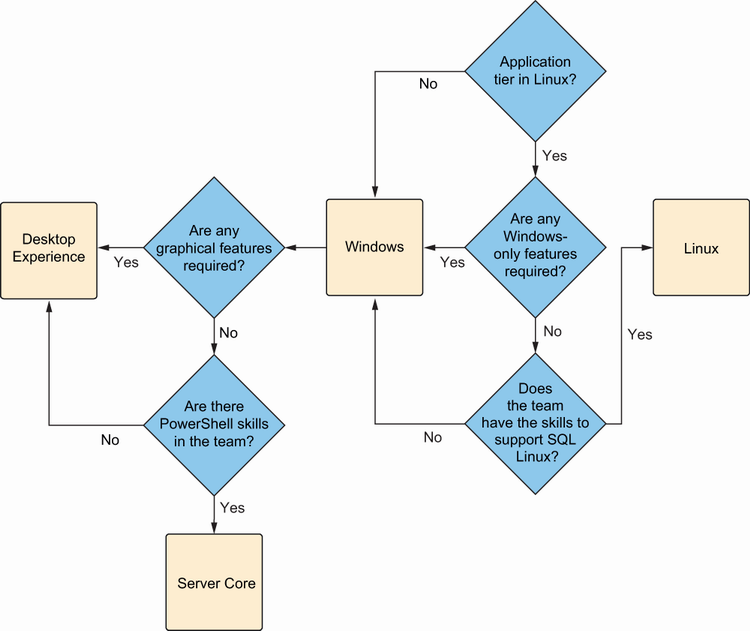
Figure 8.2 Decision tree including Server Core

Use the decision tree to weigh Server Core against Desktop Experience during SQL Server installation. section 8.4

How 100 SQL Server Mistakes and How to Avoid Them covers it

How deep it goes
Contrasts Desktop Experience with Server Core and explains resource and security consequences, but does not provide installation commands.
Examples
Uses a Windows Server 2022 SQL Server instance whose developers build SSIS packages with Visual Studio.
What it assumes
Assumes basic familiarity with SQL Server, SSIS, Visual Studio, and Windows Server while defining Server Core from zero.
What you can do after
Evaluate whether production SQL Server needs Desktop Experience or can separate development tooling and use Server Core.
How it connects
Connects Windows Server Core with PowerShell, SQL Server, SSIS, Visual Studio, and integrated development environments.

Related concepts

This explainer was generated by Manning's knowledge graph from the text of 100 SQL Server Mistakes and How to Avoid Them. The section links point to the parts of the book it draws on.