@WithMockUser establishes a test SecurityContext containing a mock authenticated user, allowing security tests to skip the authentication process and exercise authorization behavior. section 18.1
Use it to test authenticated behavior in several Spring Security scenarios:
- Annotate a MockMvc test method to call a protected endpoint as an authenticated user. section 18.1
- Rely on default user attributes when the test only needs authentication, or configure username, roles, or authorities when authorization depends on them. section 18.1
- Annotate method-security tests that directly invoke an injected bean instead of calling an HTTP endpoint. section 18.4
- Use the same annotation with WebTestClient for reactive endpoint tests. section 18.8
Authenticated MockMvc request
@Test @WithMockUser(username = "mary") public void helloAuthenticated() throws Exception { mvc.perform(get("/hello")) .andExpect(content().string("Hello, mary!")) .andExpect(status().isOk()); } section 18.1
Method-security authorization cases
@Test @WithMockUser(authorities = "read") void rejectsWrongAuthority() { assertThrows(AccessDeniedException.class, () -> nameService.getName()); } @Test @WithMockUser(authorities = "write") void acceptsRequiredAuthority() { assertEquals("Fantastico", nameService.getName()); } section 18.4
Figure 18.3 We skip the shaded components in the Spring Security authentication flow when executing a test. The test directly uses a mock SecurityContext, which contains the mock user you define to call the tested functionality.
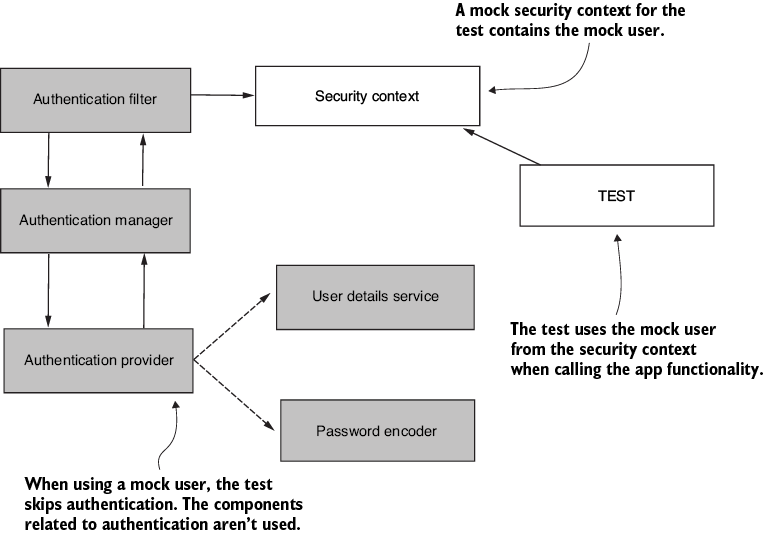
Trace how the test bypasses authentication and places the mock user directly into the SecurityContext used by the tested functionality. section 18.1
