A workflow editor is a graphical workspace for creating and modifying GitHub Actions workflow YAML files in `.github/workflows`. It combines the editing surface with syntax highlighting, autocomplete, error checking, workflow documentation, and Marketplace access so that a workflow can be assembled and tested before its YAML syntax is studied in depth. section 2.0 section 2.2 section 2.6
Use the editor to build a first workflow in small steps:
- Rename the workflow file, then use Ctrl-Space autocomplete to add a workflow `name`. section 2.2
- Add `on` triggers such as `push`; replace the short form with branch parameters when runs should target `main` only. section 2.2
- Add `workflow_dispatch` to allow manual runs. section 2.2
- Define `jobs`, supply a job name, choose a runner, and add steps; job names require manual entry because they are user-defined. section 2.2
- Consult embedded documentation, copy Marketplace actions into the YAML, and use highlighted errors and suggestions to correct the file. section 2.2 section 2.6
Hello World workflow
A first job can run on `ubuntu-latest` and print a greeting. The editor helps place the job, runner, and step at the required YAML indentation. section 2.2
For workflow authoring in active repositories, changes can be made in a branch and merged through a pull request, but manual `workflow_dispatch` runs require the trigger on `main` or API triggering. Webhook-triggered workflows are better tested in a fork to avoid disrupting developers. A Visual Studio Code GitHub Actions extension adds workflow management, run monitoring, expression highlighting, validation, completions, and inline documentation for referenced actions and reusable workflows. section 3.9 section 3.9
Figure 2.3 The workflow editor
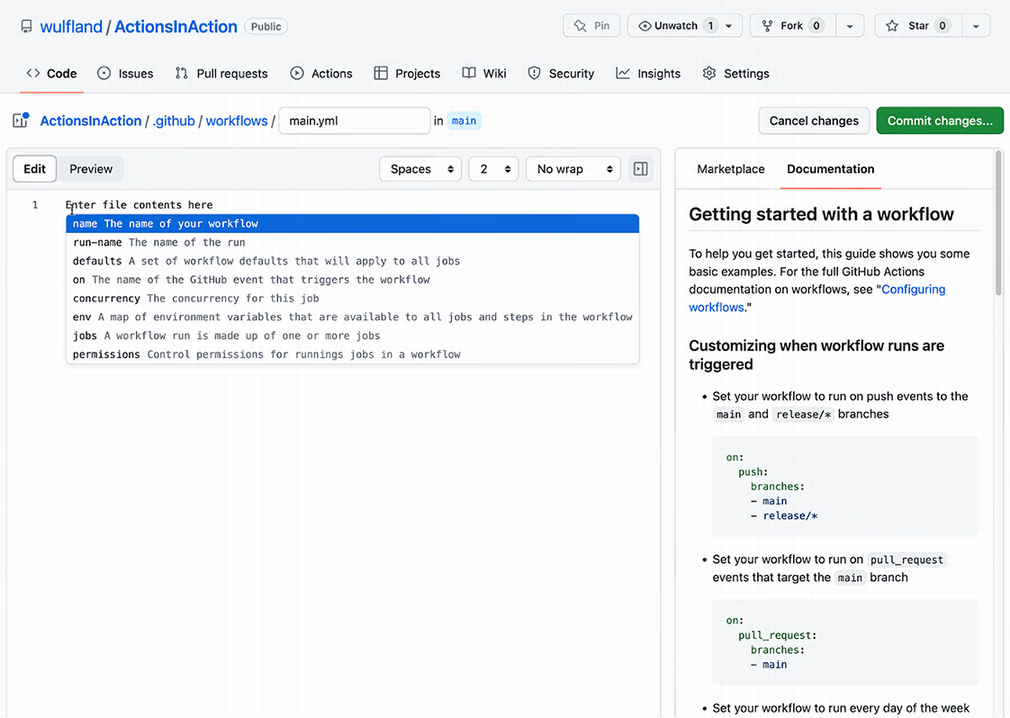
Inspect the editor layout to locate the YAML workspace, documentation, and Marketplace panels. section 2.2
