Workload placement schedules Kubernetes workloads onto nodes that satisfy resource, location, and policy requirements. Labels attract eligible workloads; taints repel workloads unless they declare a matching toleration. section 3.4.1
Configure placement by matching node metadata with workload scheduling rules:
- Label fast-disk nodes with disk=fast and select them with nodeSelector. section 3.4.1
- Taint GPU-only nodes with workload=gpu:NoSchedule, label them for selection, and add a matching toleration to GPU workloads. section 3.4.1
Three-zone GKE placement
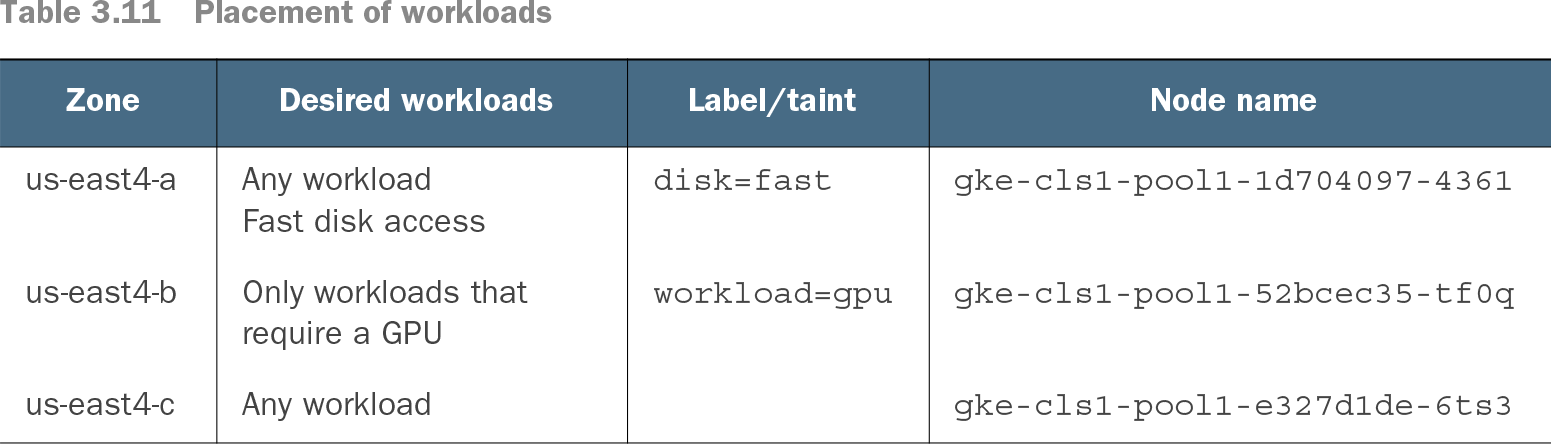
In a cluster spanning three GCP zones, place an NGINX Pod on a fast-disk node with nodeSelector disk: fast, or on a GPU node with nodeSelector workload: gpu and a workload=gpu NoSchedule toleration. Verify placement from kubectl output showing the assigned node. section 3.4.1
Table 3.11 Placement of workloads (view table figure)
Use the placement table to compare zone requirements, node labels or taints, and node names. section 3.4.1