A Cargo workspace is a container project that groups related Rust packages and lets Cargo manage them as one unit. It can contain binary and library projects while keeping their source trees and manifests organized under a shared root. section 2.2.2 section 1.3.2
Declare the workspace in the root Cargo.toml with a [workspace] table and a members list. Each listed package remains an independent Cargo project, but commands can target it from the workspace root. section 2.2.2 section 3.1.1
A TCP and HTTP workspace
Create scenario1, then add tcpserver, tcpclient, httpserver, and the library package http. The root manifest lists all four members. Run a selected binary with `cargo run -p tcpserver`; the same structure supports separate server, client, protocol, and application projects in one repository. section 2.2.2
A web-service workspace
Create ezytutors as the root, declare `tutor-nodb` as a member, and add the web service beneath it. Run its named binary with `cargo run -p tutor-nodb --bin basic-server`, then access the `/health` route. section 3.1.1
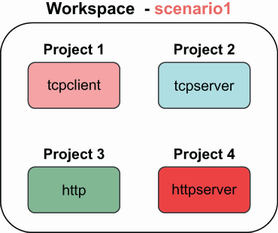
Use the workspace diagram to see the root project and its binary and library members as one project structure. section 2.2.2

