A writable layer gives each container its own filesystem space above shared, read-only image layers. Docker creates it when the container starts and removes it when the container is removed; stopping alone preserves it. section 6.1
Use the writable layer for container-local, short-lived changes:
- New files are recorded in the layer and remain independent between containers. section 6.1
- Edits to image files use copy-on-write: Docker copies the file into the writable layer before changing it. section 6.1
- Cache data can fit here, but persistent application data belongs in a volume or another shared storage option. section 6.5
See container-local data disappear
Run two random-number containers and copy their output files to the host; the contents differ because each container has its own writable layer. Create another file-display container, copy input.txt into it, run it again, then remove the container. Its writable-layer data is transient and cannot be recovered after removal. section 6.1
Figure 6.2 The container filesystem is built from image layers and a writable layer.
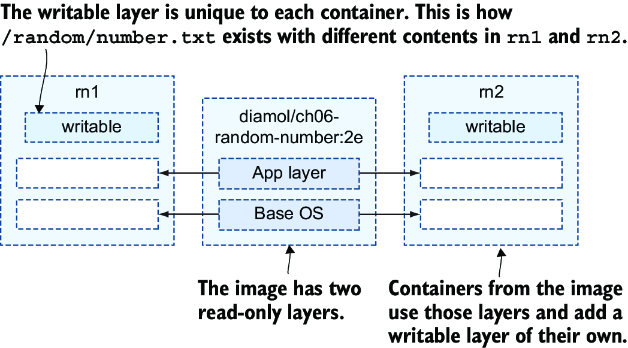
Inspect how shared image layers combine with one writable layer to present a single container filesystem. section 6.1
