Write-Host displays text in the hosting application's screen and writes a record to PowerShell's information stream. It runs like a cmdlet but does not place its text in the pipeline, so it is for messages rather than pipeline data. section 17.3
Use Write-Host when you need to show a message while a command runs:
- Add -ForegroundColor and -BackgroundColor to request alternate text colors, but remember that hosting applications may ignore unsupported colors. section 17.3
- Control Write-Host output through $InformationPreference because Write-Host uses Write-Information under the hood. section 17.5
- Prefer pipeline-producing output when another command must consume the result; do not use Write-Host to manually format tables. section 17.3
Display a value
Write-Host (100*10) Write-Host "COLORFUL!" -ForegroundColor Yellow -BackgroundColor Magenta The first command displays 1000. The second displays colored text when the host supports those colors. section 17.3 section 17.7
Figure 17.2 Write-Host bypasses the pipeline and writes directly to the hosting application’s display.
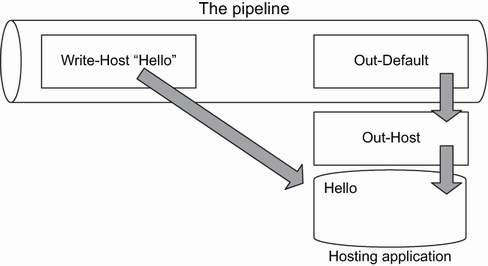
Use the figure to see how Write-Host reaches the hosting application's display instead of placing text into the pipeline. section 17.3

