XML comments are structured C# source-code documentation written with triple slashes. Development and documentation tools can use elements such as <summary>, <param>, and <returns> to describe API actions and their inputs and outputs. section 11.2.2 section 11.2.3
To expose XML comments through SwaggerUI:
- Place three slashes above an action method and its attributes; Visual Studio generates documentation boilerplate and identifies parameters such as RegisterDTO input. section 11.2.3
- Fill the <summary>, <param>, and <returns> elements with the endpoint’s purpose, input description, and response. section 11.2.3
- Enable <GenerateDocumentationFile>true</GenerateDocumentationFile> in the project file; optionally suppress warning 1591 for undocumented members. section 11.2.3
- Use Assembly and IncludeXmlComments to locate the generated XML file and make it available to Swashbuckle. section 11.2.3
Documenting an endpoint
/// <summary>\n/// Registers a new user.\n/// </summary>\n/// <param name="input">A DTO containing the user data.</param>\n/// <returns>A 201 - Created Status Code in case of success.</returns>\npublic async Task<ActionResult> Register(RegisterDTO input) section 11.2.3
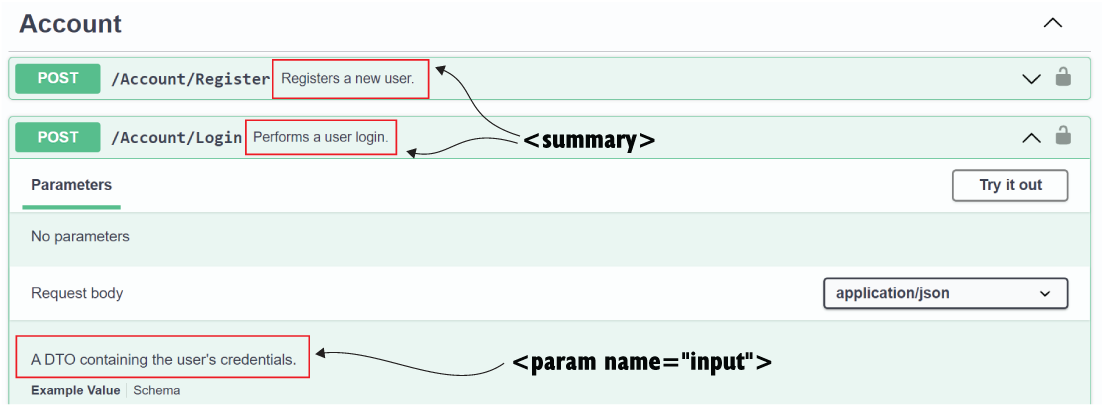
SwaggerUI can display XML documentation fetched through Swashbuckle, turning source comments into endpoint reference information. section 11.2.3
