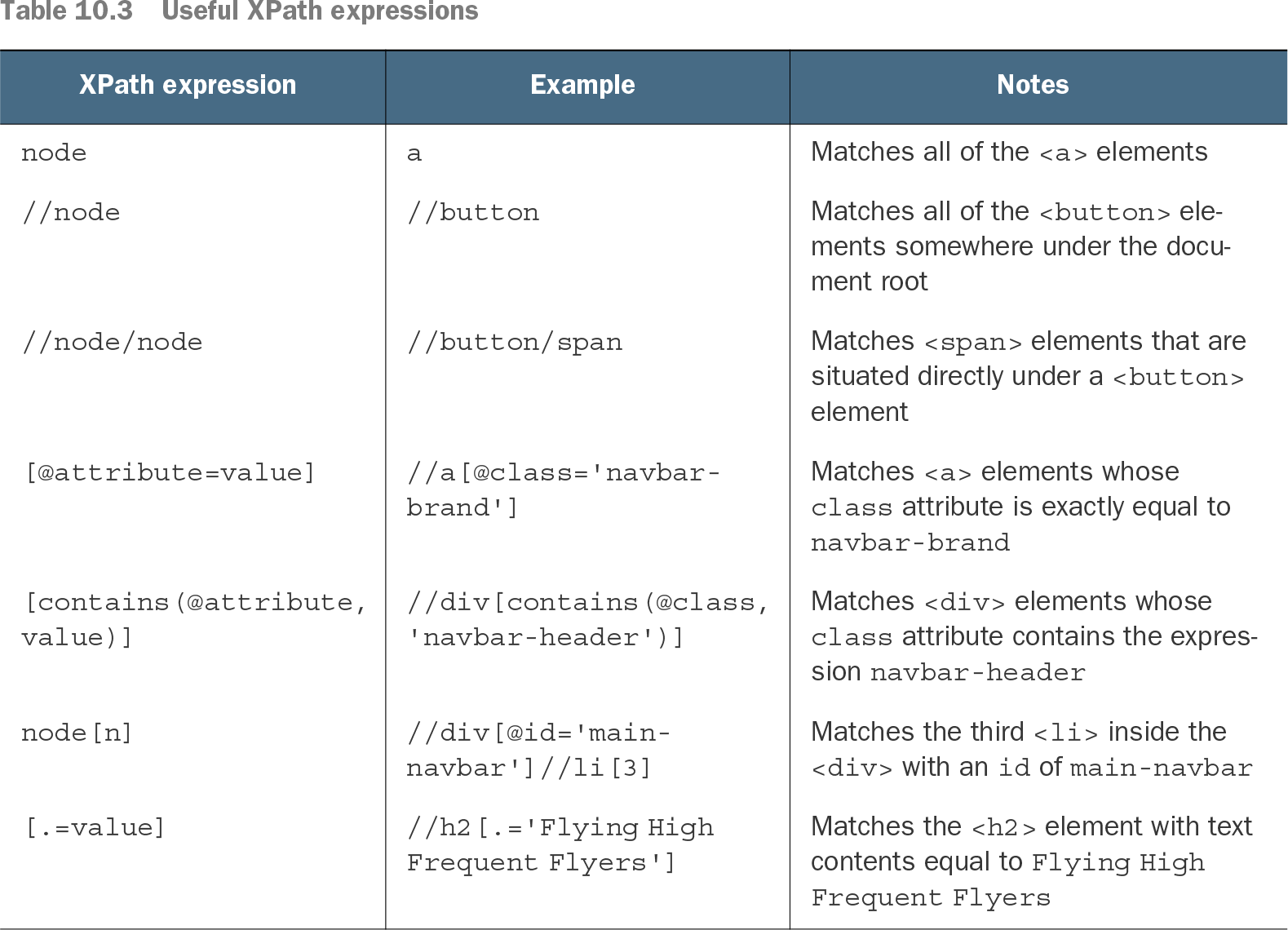
An acceptance test may need to find more than a button with a known ID. It might need to check a destination’s displayed price or click a registration option identified by its visible label. XPath selects elements in an HTML page by their position, attributes, or text; in WebDriver, pass the expression to `By.xpath()`. section 10.2.12 section 10.2.13
Start with a CSS selector when it identifies the element clearly. XPath is useful when that selector runs into limits, particularly when the test needs to follow the page structure from one element to another. The trade-off is that XPath generally requires more knowledge of that structure and can be more verbose for simple selections. section 10.2.12
Choose an expression that matches what the test needs to identify:
- `//h3[@id='welcome-message']` finds a heading by its ID; use it with `driver.findElement(By.xpath(...))` when one element is expected. section 10.2.12
- `//span[@class='destination-title']` matches an exact class attribute. `//*[contains(@class,'destination-title')]` allows other class text and does not require a particular element name. section 10.2.12
- `//label[.='Window']` finds a label by its text, allowing WebDriver to click the label associated with a radio-button choice. section 10.2.13
Find the price beside a destination
Given a destination entry containing `<span class="destination-title">Singapore</span>` and a sibling price span, `//span[.='Singapore']/../span[contains(@class,'destination-price')]` starts at the title, moves to its parent, and selects the price within that entry. This is more targeted than finding every price on the page. section 10.2.12
Select a registration preference
A registration step can construct `String seatPreference = String.format("//label[.='%s']", newMember.getSeatPreference());` and then call `driver.findElement(By.xpath(seatPreference)).click();`. The label text comes from the persona used by the step, so the same interaction can select the corresponding preference. section 10.2.13
Table 10.3 Useful XPath expressions (view table figure)
Compare paths, attribute predicates, positions, and exact-text matches when choosing a locator. section 10.2.12