Cross-site scripting is a vulnerability in which attacker-controlled content becomes part of a web page and executes JavaScript in another user's browser. An attacker may submit malicious input through a legitimate form, wait for it to be displayed, and then steal cookies, impersonate users, or compromise their sessions. section 29.1
A typical XSS vulnerability follows this path:
- An attacker submits crafted content, such as a name containing a script tag, through an ordinary input form. section 29.1
- The application stores the content and later renders it in a page viewed by other users. section 29.1
- Unsafe rendering makes the input part of the page's HTML, allowing the browser to execute its JavaScript. section 29.1
- Prevent the attack by encoding unsafe input before writing it to the page. Razor Pages performs HTML encoding automatically unless rendering is deliberately made raw with @Html.Raw(). section 29.5
- Use the encoder for the output context: HTML encoding protects markup, while JavaScript encoding is needed when inserting a value into a script. section 29.1
Unsafe and safe output
Rendering a submitted name with @Html.Raw(name) writes a script tag directly into the document. Rendering the value with Razor's ordinary @ expression encodes the tag so it appears as text instead. When a value must reach JavaScript, encode it with JavaScriptEncoder, or pass it through an HTML data attribute and read the attribute from JavaScript. section 29.1 section 29.5
Figure 29.1 How an XSS vulnerability is exploited. An attacker submits malicious content to your app, which is displayed in the browsers of other users. If the app doesn’t encode the content when writing to the page, the input becomes part of the HTML of the page and can run arbitrary JavaScript.
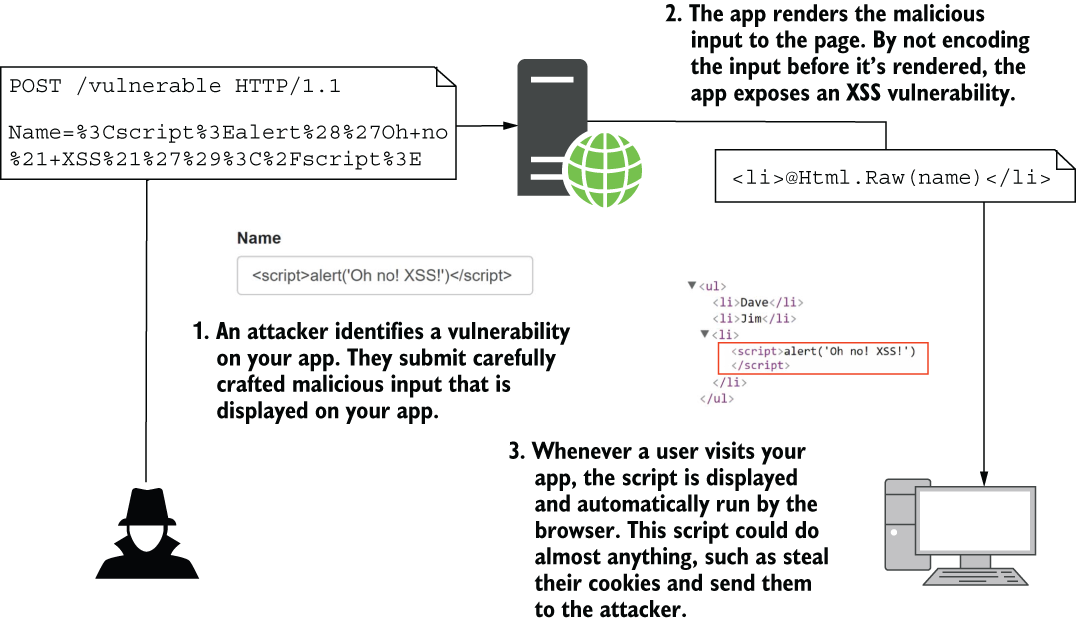
Trace how submitted malicious content moves through an application and executes in other users' browsers when output is not encoded. section 29.1
Figure 29.2 Protecting against XSS attacks by HTML-encoding user input using @ in Razor templates. The <script> tag is encoded so that it is no longer rendered as HTML and can’t be used to compromise your app.
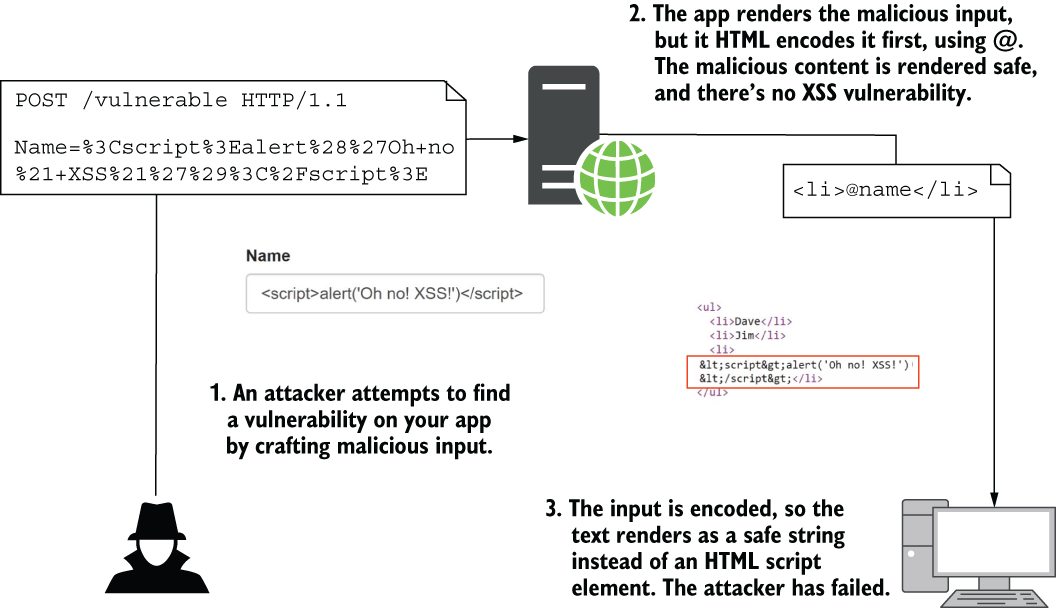
Compare unsafe markup with HTML-encoded output, where a script tag is displayed as text instead of becoming executable HTML. section 29.1


