A y-axis event reports that a joystick stick moved vertically. Each stick has x and y axes: vertical movement produces y-axis events, while horizontal movement produces x-axis events. For a two-motor robot, the left and right sticks can independently control forward and backward motion, with stick distance from center setting throttle level. section 7.3
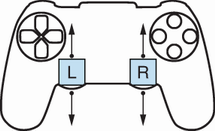
Use the stick’s up-and-down motion as the physical model for a y-axis event. section 7.3
A Python controller can read joystick data directly from a Linux device file, distinguish axis events from button events, and retain only the left_y and right_y axes. Axis events have type 2; the event number identifies the particular stick axis. section 7.5 section 7.5.1
Process a y-axis event in a small, reusable handler:
- Confirm that the event is an axis event, then map its number to an axis name and ignore every axis except left_y and right_y. section 7.5.4
- Use the sign of event.value to determine forward or backward direction. section 7.5.4
- Divide the absolute value by MAX_VAL (32767), then multiply by 100 to express displacement from center as a percentage. section 7.5.4
- For motor control, round the normalized value to a small level, send a throttle change only when that level differs from the previous one, and map each y axis to its motor. section 7.7.1
Print direction and stick position
A handler for left_y and right_y labels a negative value as forward and a positive value as backward, then prints the axis name, direction, and percentage. Moving a stick fully forward produces 100%; returning it to center produces 0%. section 7.5.4
Y-axis events can arrive quickly. Measuring 100 right-stick y-axis events with a timer reveals the event rate, helping determine whether sending a motor request for every physical movement would overload the motor server. section 7.6.1
