liveBook · Manning

Zero baseline

As explained in D3.js in Action, Third Edition

A zero baseline is the chart reference level representing the numeric value zero.

A zero baseline is the chart reference level representing the numeric value zero. In stacked charts, the offset setting controls whether shapes sit above it or distribute around it. section 5.2.4

Use the stack offset to control the chart’s relationship with zero:

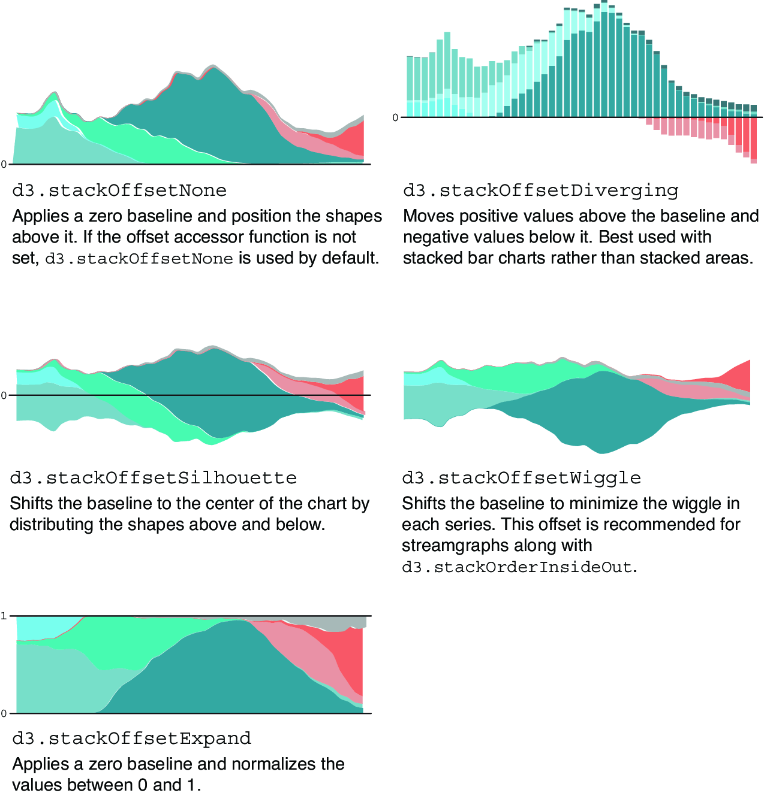
  • d3.stackOffsetNone is the default and places all shapes above the zero baseline. section 5.2.4
  • Other offsets distribute shapes above and below the baseline, supporting diverging or centered visual arrangements. section 5.2.4
Figure 5.20 D3 allows controlling how the shapes are positioned in regard to the baseline with the offset() accessor function. Here we see examples with stacked areas and stacked bars.
figure

Compare stacked areas and bars positioned above, below, or around their baseline. section 5.2.4

How D3.js in Action, Third Edition covers it

How deep it goes
Explains the offset accessor and default behavior, but does not detail every built-in offset.
Examples
Shows stacked areas and bars positioned around a baseline through offset comparisons.
What it assumes
Assumes familiarity with stacked charts and introduces baseline positioning through D3 stack configuration.
What you can do after
Apply it via D3’s stack generator by selecting an offset that positions series above or around zero.
How it connects
Connects stacked bar charts, stacked area charts, streamgraphs, stack layouts, and offset accessors.

This explainer was generated by Manning's knowledge graph from the text of D3.js in Action, Third Edition. The section links point to the parts of the book it draws on.