A zombie thread remains open and runs without purposeful work. It can waste CPU, consume memory, drain battery, and make performance problems difficult to investigate. section 1.2.3 section 5.2.2
Investigate suspected zombie threads by checking:
- CPU usage that remains high without corresponding useful work; VisualVM can show process CPU consumption separately from garbage-collection activity. section 5.2.2
- Memory usage and garbage-collection activity; high CPU with almost no memory activity can indicate threads repeatedly executing without producing results. section 5.2.2
- The Threads tab, which shows alive threads and their statuses; investigate suspicious threads further with a thread dump. section 5.2.2
- Concurrency failures such as race conditions, exceptions, and missing synchronization, which can leave a multithreaded design behaving unpredictably. section 5.2.2
Producer-consumer application
Two producer threads and two consumer threads repeatedly access a shared ArrayList. Each thread loops forever, while producers add values and consumers remove them. Because ArrayList does not manage concurrent access, the unsynchronized operations can race, throw exceptions, and produce abnormal CPU usage. Synchronizing access to the list lowers CPU consumption; naming the threads makes them easier to group and inspect in VisualVM. section 5.2.2
Figure 5.6 The Threads tab offers a visual representation of the threads that are alive and their status. The widget shows all the process threads, including those started by the JVM, which helps you easily identify the threads you should pay attention to and eventually investigate deeper using a thread dump.
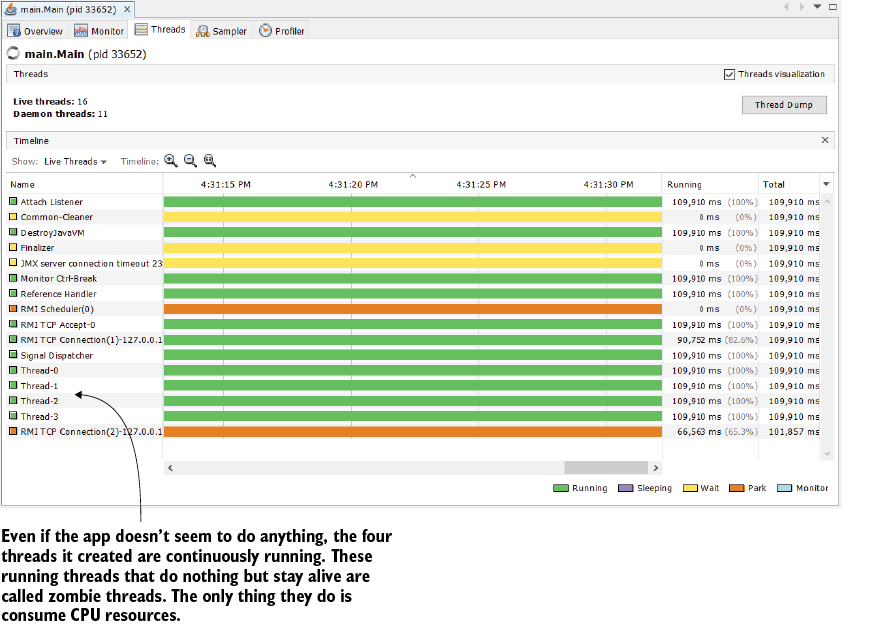
Use the thread-status visualization to distinguish live application threads from JVM threads and select candidates for deeper investigation. section 5.2.2
