Access Token
Definition and Overview
An access token is a credential used to access protected resources. It is typically issued by an authentication service, such as an OAuth2 server, after successful authentication. The access token must be included in the HTTP header of requests to access protected services. This token allows a client application to access resources on behalf of a user, ensuring that only authenticated and authorized requests are processed by the service.
OAuth2 and Access Tokens
In the context of OAuth2, access tokens play a crucial role in securing API endpoints. When a user successfully authenticates, the OAuth2 server issues an access token that the client application can use to access protected resources. This token is presented with each request to a protected service, ensuring that the request is authorized.
Refresh Token Flow
Access tokens are often short-lived for security reasons. To avoid forcing the user to re-authenticate frequently, OAuth2 provides a refresh token flow. This flow allows an application to obtain a new access token without requiring the user to re-authenticate. The following figure illustrates this process:
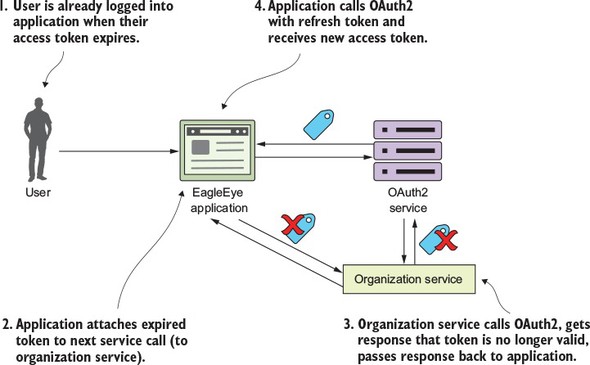 Figure B.5. The refresh token flow allows an application to get a new access token without forcing the user to re-authenticate.
Practical Use Case: GitHub API
Access tokens are not limited to OAuth2 scenarios. They are also used in other contexts, such as interacting with the GitHub API. For example, when tagging a code repository with the GitHub release API, an access token is used to authenticate the request. The following script demonstrates how to use a GitHub personal access token to tag a build:
echo "Tagging build with $BUILD_NAME"
export TARGET_URL="https://api.github.com/repos/carnellj/spmia-chapter10/releases?access_token=$GITHUB_TOKEN"                   #1
body="{                                                             #2
  \"tag_name\": \"$BUILD_NAME\",
  \"target_commitish\": \"master\",
  \"name\": \"$BUILD_NAME\",
  \"body\": \"Release of version $BUILD_NAME\",
  \"draft\": true,
  \"prerelease\": true
}"
curl –k -X POST \                                                   #3
   -H "Content-Type: application/json"   \
  -d "$body" \
  $TARGET_URL
#1 - Target endpoint for the GitHub release API
#2 - Body of the REST call
#3 - Uses curl to invoke the service used to kick off a build
In this script, the access_token is passed as an HTTP query parameter, allowing the script to perform actions via the GitHub REST API. The token is stored in an encrypted environment variable called GITHUB_TOKEN.
Example: OAuth2 Access Token in Service Calls
Access tokens are also used in service-to-service communication. For instance, when calling an organization service, an OAuth2 access token is passed to ensure the request is authorized. This is depicted in the following figure:
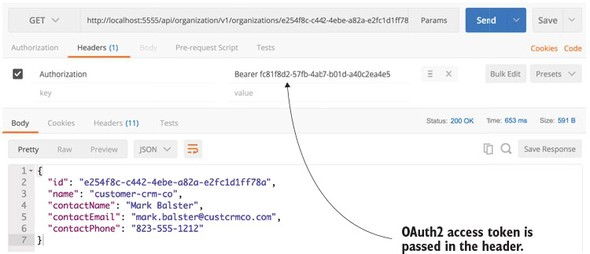 Figure 7.7. Passing in the OAuth2 access token on the call to the organization service
This use case demonstrates a simple method for protecting an endpoint using OAuth2, ensuring that only authorized requests are processed by the service.
FAQ (Frequently asked questions)
What is an access token?
How is an access token issued?
When is an access token presented?
What is the role of an access token in OAuth2?
How should an access token be included in requests?
What can an access token be used for?
Who issues an access token?
What is the refresh token flow?