Agent in Java
In the context of Java, the term "agent" can refer to different concepts depending on the specific application or framework being discussed. Below, we explore two primary contexts in which agents are used in Java: Clojure agents for asynchronous execution and Java debugging agents for remote debugging.
Agents in Clojure
In Clojure, an agent is a construct used for asynchronous, message-oriented execution. Agents are designed to handle functions sent to them from other threads, executing these functions within a threadpool managed by the Clojure runtime. This design ensures that only the final state of the agent is visible to the outside world, not any intermediate states. This characteristic makes agents particularly useful for scenarios where you want to perform state changes asynchronously without exposing inconsistent states.
Characteristics of Agents
-
Asynchronous Execution: Agents process messages (functions) asynchronously, meaning they do not block the sending thread. This allows for non-blocking operations and can improve performance in concurrent applications.
-
Message-Oriented: Agents receive messages in the form of functions. These functions are applied to the agent's state, and the result becomes the new state of the agent.
-
Threadpool Management: Agents are not threads themselves. Instead, they are scheduled on a threadpool managed by the Clojure runtime, which handles the execution of the functions sent to the agents.
-
Atomic State Visibility: The state of an agent is isolated and atomic. This means that any observer of the agent's state will only see the final state after all queued functions have been applied, ensuring consistency.
Example of Agents in Clojure
The following example demonstrates the use of agents in Clojure. It shows how to define an agent, send a function to it, and observe the state changes.
user=> (defn wait-and-log [coll str-to-add]
  (do (Thread/sleep 10000)
    (let [my-coll (conj coll str-to-add)]
      (Thread/sleep 10000)
      (conj my-coll str-to-add))))
#'user/wait-and-log

user=> (def str-coll (agent []))
#'user/str-coll

user=> (send str-coll wait-and-log "foo")
#object[clojure.lang.Agent 0x38499e48 {:status :ready, :val []}]

user=> @str-coll
[]

// Wait to allow message to be handled

user=> @str-coll
["foo" "foo"]
In this example, a function wait-and-log is defined, which takes a collection and a string to add. It simulates a delay using Thread/sleep and then adds the string to the collection twice. An agent str-coll is created with an initial empty vector []. The send function is used to dispatch the wait-and-log function to the agent str-coll with the string "foo". Initially, dereferencing str-coll with @str-coll returns an empty vector [], as the function has not yet been applied. After waiting for the function to be processed, dereferencing str-coll again shows the final state ["foo" "foo"], demonstrating that only the final state is visible, not any intermediate states.
Agents in Java Debugging
An agent in the context of Java applications is a specialized piece of software that is attached to the application's execution environment to facilitate remote debugging. This agent acts as an intermediary, allowing a debugger tool to connect and perform various debugging operations such as pausing execution at breakpoints, stepping through code, and inspecting variables. However, the use of an agent can introduce performance overhead and potential security vulnerabilities, as it requires specific network ports to be open for communication.
Attaching a Debugger Agent
To enable remote debugging, a debugger agent must be attached to the Java application at startup. This is achieved by adding the -agentlib:jdwp parameter to the java command line. The parameter specifies the port number that the debugger tool will use to connect to the agent. The agent essentially acts as a server, listening for incoming connections from the debugger tool on the configured port.
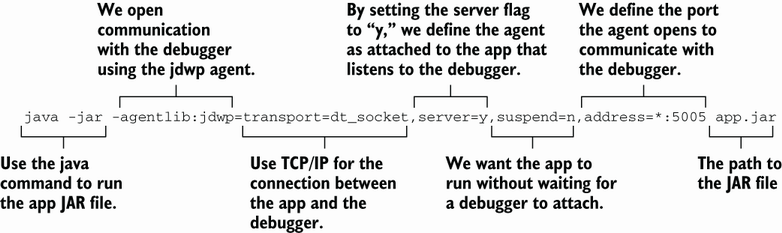 Figure 4.5 When debugging an app locally, the IDE attaches the debugger. But when running an app in a remote environment, you must attach a debugger agent at the app start yourself.
Starting the Application with a Debugger Agent
When the application is started with the debugger agent attached, a message is printed to the console indicating that the agent is listening on the specified port. This confirms that the agent is ready to accept connections from a debugger tool.
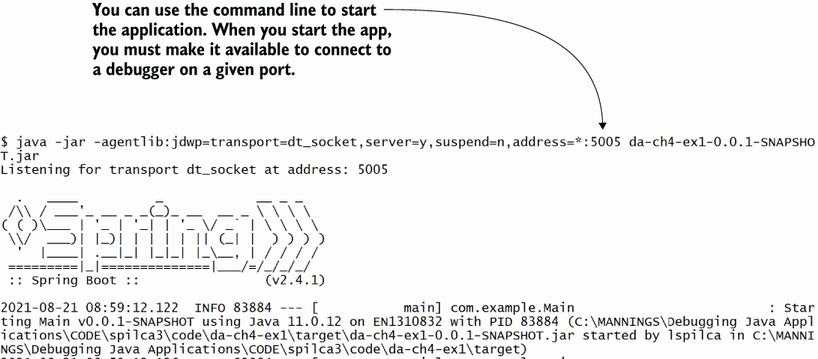 Figure 4.6 When you run the command to start the app, you can see that the app begins executing. At the same time, you can see that the debugging agent printed a line showing that it is listening for a debugger to attach on the configured port 5005.
Configuring the Debugger Tool
To connect a debugger tool to the running application, you must configure the tool to attach to the debugger agent. This involves creating a new run configuration in your Integrated Development Environment (IDE), such as IntelliJ IDEA Community, specifying the address and port of the debugger agent.
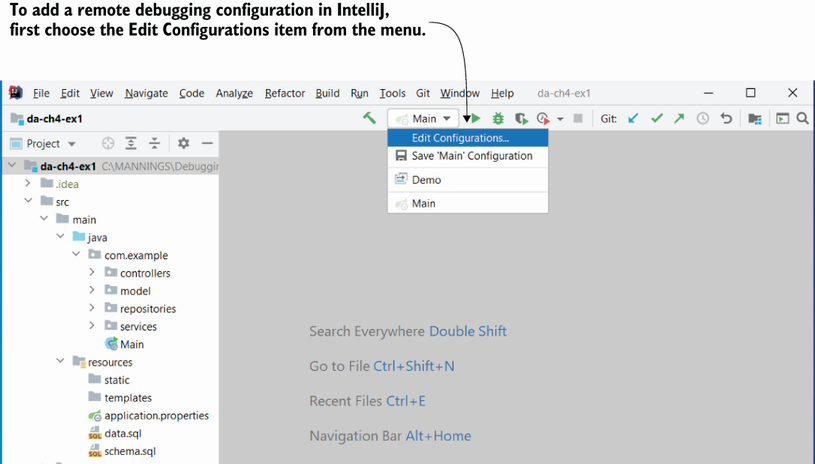 Figure 4.7 You can use an IDE to configure the debugger to attach to an already running app in a particular environment, as long as the app has a debugger agent attached to it. In IntelliJ IDEA Community, you need to create a new running configuration to tell the debugger to attach to an already running app. You can add a new run configuration by selecting Edit Configurations.
Remote Debugging Configuration
For remote debugging, you need to specify the address of the environment and the port on which the debugger agent is listening. In a local setup, this might be localhost, but in a distributed environment, you would use the IP address of the system running the application.
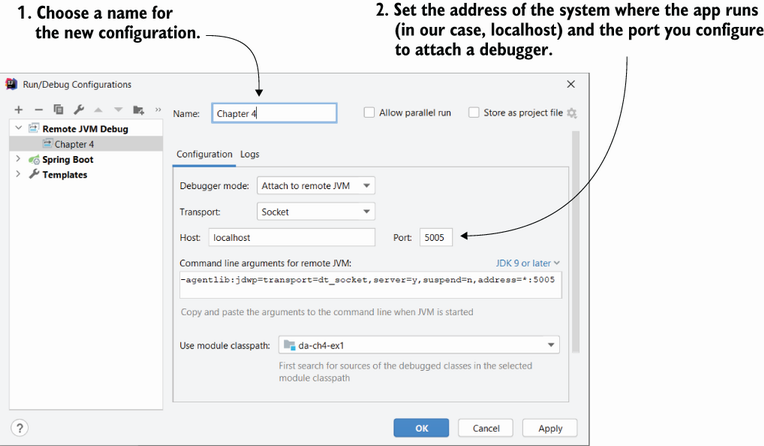 Figure 4.10 Give a name to the new configuration you add and specify the address of the environment and port you configured the debugger agent to listen on (here, port 5005 when starting the app).
Connecting the Debugger Tool
Once configured, the debugger tool on the developer's computer connects to the debugger agent on the specified port. This connection allows the debugger tool to control the application, enabling the developer to perform debugging tasks.
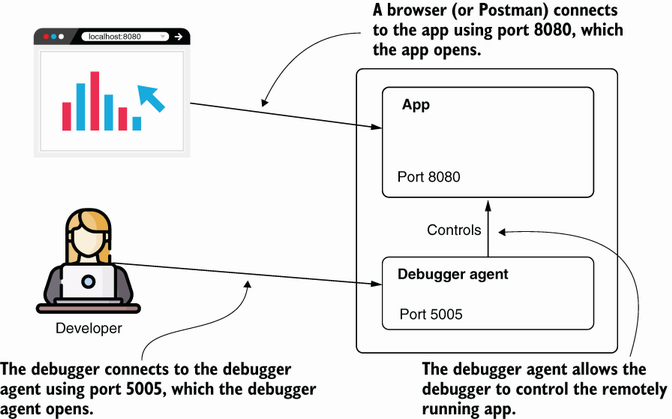 Figure 4.11 The debugger tool that runs on the developer’s computer connects to the debugger agent on port 5005. The debugger agent allows the debugger tool to control the app. The app also opens a port, but this port is for its clients (the browser, in the case of a web app).
In summary, agents in Java can refer to constructs for asynchronous execution in Clojure or tools for remote debugging in Java applications. Each context provides unique functionalities and benefits, enhancing the capabilities of Java applications in different ways.
| Book Title | Usage of agent | Technical Depth | Connections to Other Concepts | Examples Used | Practical Application |
|------------|----------------|-----------------|-------------------------------|---------------|-----------------------|
| [The Well-Grounded Java Developer, Second Edition](https://www.manning.com/books/the-well-grounded-java-developer-second-edition) | Discusses agents in Clojure as constructs for asynchronous, message-oriented execution. [more](https://livebook.manning.com/book/the-well-grounded-java-developer-second-edition/chapter-16/280) | Explains asynchronous execution, message-oriented processing, and threadpool management. [more](https://livebook.manning.com/book/the-well-grounded-java-developer-second-edition/chapter-16/281) | Connects to concepts of state management and concurrency. [more](https://livebook.manning.com/book/the-well-grounded-java-developer-second-edition/chapter-16/281) | Provides a Clojure example demonstrating agent usage. [more](https://livebook.manning.com/book/the-well-grounded-java-developer-second-edition/chapter-16/292) | Highlights use in scenarios requiring asynchronous state changes. [more](https://livebook.manning.com/book/the-well-grounded-java-developer-second-edition/chapter-16/281) |
| [Troubleshooting Java: Read, debug, and optimize JVM applications](https://www.manning.com/books/troubleshooting-java) | Describes agents as tools for remote debugging in Java applications. [more](https://livebook.manning.com/book/troubleshooting-java/chapter-4/10) | Details the process of attaching a debugger agent and configuring it. [more](https://livebook.manning.com/book/troubleshooting-java/chapter-4/10) | Links to debugging concepts and network communication. [more](https://livebook.manning.com/book/troubleshooting-java/chapter-4/10) | Includes figures and step-by-step instructions for setting up a debugger agent. [more](https://livebook.manning.com/book/troubleshooting-java/chapter-4/10) | Focuses on practical debugging tasks and remote application management. [more](https://livebook.manning.com/book/troubleshooting-java/chapter-4/10) |
FAQ (Frequently asked questions)
What is an agent in the context of remote debugging?
What are the potential drawbacks of using an agent for remote debugging?
What are agents used for in Clojure?
How do agents execute functions in Clojure?
What state do agents ensure is visible in Clojure?
How do you define an agent in Clojure?
How do you send a function to an agent in Clojure?
What is the initial value of an agent in Clojure before processing?
What is the final value of the agent after processing in the example?
What is an agent in Clojure?
Are agents in Clojure threads themselves?
How do agents ensure data consistency in Clojure?