Amazon Web Services (AWS) in Spring Microservices
Overview
Amazon Web Services (AWS) is a comprehensive cloud computing platform that provides a wide range of services, including computing power, storage options, and networking capabilities. In the context of microservices, AWS is utilized to host the EagleEye microservices infrastructure, facilitating the transition from self-managed to cloud-managed infrastructure. This setup involves various AWS services such as RDS for databases, ElastiCache for Redis, and ECS for Docker containers.
AWS Services for Microservices
Amazon RDS and ElastiCache
Amazon RDS (Relational Database Service) is used to manage databases in the cloud, providing scalability, availability, and security. ElastiCache, on the other hand, is employed for caching, specifically using Redis, to enhance the performance of applications by reducing the load on the database.
Amazon ECS
Amazon ECS (Elastic Container Service) is a fully managed container orchestration service that allows you to run and scale containerized applications. In the EagleEye microservices architecture, ECS is used to manage Docker containers, ensuring that services are efficiently deployed and managed in the cloud.
Deployment Process
The deployment process involves several steps, as outlined in the .travis.yml build configuration file. This file is crucial for automating the build and deployment of services to AWS. Below is an excerpt from the .travis.yml file:
Listing 10.1. Anatomy of the .travis.yml build
language: java
jdk:
  - oraclejdk8
cache:
  directories:
    - "$HOME/.m2"
sudo: required
services:
  - docker
notifications:
  email:
  - youremail@gmail.com
  on_success: always
  on_failure: always
branches:
  only:
    - master
env:
  global:
before_install:
  - gem install travis -v 1.8.5 --no-rdoc --no-ri
  - sudo curl -o /usr/local/bin/ecs-cli https://s3.amazonaws.com/amazon-ecs-cli/ecs-cli-linux-amd64-latest
  - sudo chmod +x /usr/local/bin/ecs-cli
  - export BUILD_NAME=chapter10-$TRAVIS_BRANCH-$(date -u "+%Y%m%d%H%M%S")-$TRAVIS_BUILD_NUMBER
  - export CONTAINER_IP=52.53.169.60
  - export PLATFORM_TEST_NAME="chapter10-platform-tests"
script:
  - sh travis_scripts/tag_build.sh
  - sh travis_scripts/build_services.sh
  - sh travis_scripts/deploy_to_docker_hub.sh
  - sh travis_scripts/deploy_amazon_ecs.sh
  - sh travis_scripts/trigger_platform_tests.sh
This configuration file sets up the environment for building and deploying services, including installing necessary tools, tagging builds, building Docker images, and deploying them to Amazon ECS.
Deployment Architecture
The deployment architecture involves running applications inside a single virtual machine image, with each service running as a Docker container. The database server (PostgreSQL) and caching server (Redis) are separated from Docker and moved to Amazon's cloud, while other services continue to run as Docker containers within a single-node Amazon ECS cluster.
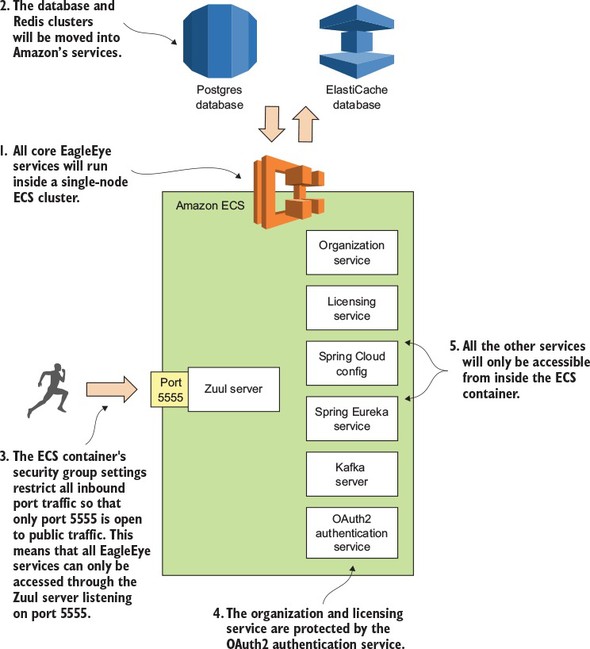 Figure 10.1. By using Docker, all your services can be deployed to a cloud provider such as Amazon ECS.
This figure illustrates the deployment of the EagleEye services to the Amazon cloud, showcasing the integration of Docker with AWS services to achieve a scalable and efficient microservices architecture.
FAQ (Frequently asked questions)
What is Amazon RDS used for in the context of AWS?
What AWS services are mentioned for hosting microservices infrastructure?
What transition is highlighted in the chapter regarding infrastructure?
What does Amazon refer to in the context of this chapter?
What types of services does AWS offer?