Amazon Elastic Container Service (ECS)
Amazon Elastic Container Service (ECS) is a highly scalable, high-performance container management service that allows you to run and manage Docker containers on a cluster of Amazon EC2 instances. ECS is a service provided by Amazon Web Services (AWS) that simplifies the deployment, management, and scaling of containerized applications using Docker.
Overview
ECS is designed to facilitate the deployment of applications in the cloud by managing the underlying infrastructure required for running Docker containers. It automates the provisioning and management of the servers needed for the Docker cluster and continuously monitors the health of the containers. This makes it an ideal choice for deploying microservices architectures, such as the EagleEye services, which are configured to run within a single-node ECS cluster.
The deployment process with ECS involves configuring the ECS Command Line Interface (CLI) with Amazon credentials, selecting a region, and defining a default ECS cluster. The ECS CLI allows for manual deployment of services using Docker-compose files, which simplifies the transition from a desktop development environment to a cloud environment.
Deployment Process
The deployment of services to ECS can be managed through a series of commands and configurations. Below is an example of how to configure the ECS CLI and deploy services using Docker-compose:
Configuring ECS CLI
To configure the ECS CLI, you can use the following command:
ecs-cli configure --region us-west-1 \
                  --access-key $AWS_ACCESS_KEY \
                  --secret-key $AWS_SECRET_KEY \
                  --cluster spmia-tmx-dev
This command sets the region, access key, secret key, and the name of the cluster (spmia-tmx-dev) for your deployment.
Deploying with Docker-compose
Once the ECS CLI is configured, you can deploy your services using a Docker-compose file:
ecs-cli compose --file docker/common/docker-compose.yml up
This command allows you to reuse your Docker-compose file from your desktop development environment, significantly simplifying the deployment of your services to Amazon ECS.
Monitoring Services
After deploying the services, you can validate that they are running and discover the IP address of the servers by issuing the following command:
ecs-cli ps
Build Process
The build process for deploying services to ECS can be automated using a .travis.yml file. Below is an example of such a configuration:
Listing 10.1. Anatomy of the .travis.yml build
language: java
jdk:
  - oraclejdk8
cache:
  directories:
    - "$HOME/.m2"
sudo: required
services:
  - docker
notifications:
  email:
  - youremail@gmail.com
  on_success: always
  on_failure: always
branches:
  only:
    - master
env:
  global:
before_install:
  - gem install travis -v 1.8.5 --no-rdoc --no-ri
  - sudo curl -o /usr/local/bin/ecs-cli https://s3.amazonaws.com/amazon-ecs-cli/ecs-cli-linux-amd64-latest
  - sudo chmod +x /usr/local/bin/ecs-cli
  - export BUILD_NAME=chapter10-$TRAVIS_BRANCH-$(date -u "+%Y%m%d%H%M%S")-$TRAVIS_BUILD_NUMBER
  - export CONTAINER_IP=52.53.169.60
  - export PLATFORM_TEST_NAME="chapter10-platform-tests"
script:
  - sh travis_scripts/tag_build.sh
  - sh travis_scripts/build_services.sh
  - sh travis_scripts/deploy_to_docker_hub.sh
  - sh travis_scripts/deploy_amazon_ecs.sh
  - sh travis_scripts/trigger_platform_tests.sh
This configuration sets up the core runtime environment, installs necessary tools, builds the services, and deploys them to ECS.
Visual Representation
The deployment of services to Amazon ECS can be visualized as shown in the following figures:
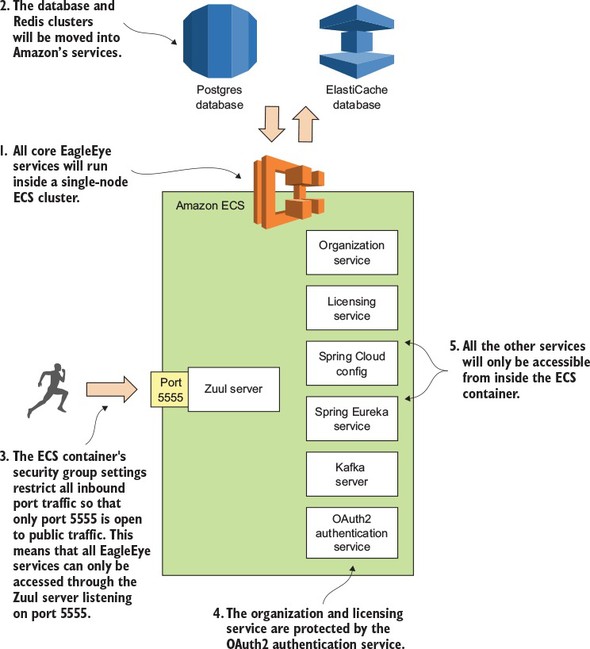 Figure 10.1. By using Docker, all your services can be deployed to a cloud provider such as Amazon ECS.
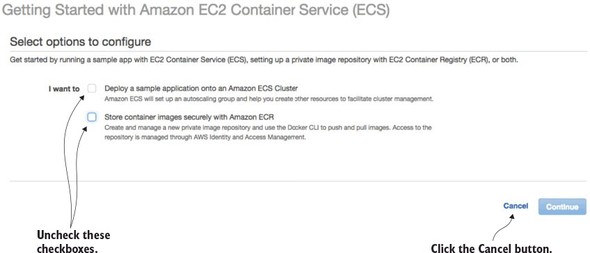 Figure 10.8. ECS offers a wizard to bootstrap a new service container. You’re not going to use it.
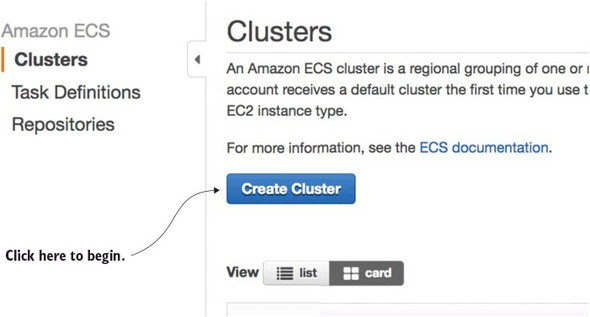 Figure 10.9. Starting the process of creating an ECS cluster
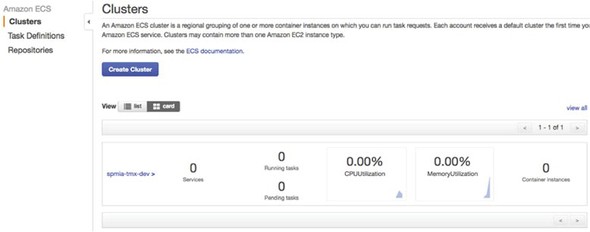 Figure 10.13. The ECS cluster up and running
These figures illustrate the process of deploying services to the Amazon cloud using ECS, from initial setup to having a fully operational cluster.
FAQ (Frequently asked questions)
What is Amazon Elastic Container Service (ECS) used for?
How is ECS configured in the chapter?
What does ECS manage in a Docker cluster?
How can services be deployed to a cloud provider using Docker?
What is Amazon Elastic Container Service (ECS)?
How are EagleEye services deployed to ECS?
What tool simplifies the transition from a desktop development environment to a cloud environment?
What does Amazon ECS allow you to do?
What can you do with containerized applications using Amazon ECS?