Cloud Foundry
Overview
Cloud Foundry is an open-source cloud application platform that operates under the platform-as-a-service (PaaS) model. It is designed to simplify the process of building, testing, deploying, and scaling applications by allowing developers to focus solely on the application and data. The underlying infrastructure is managed by Cloud Foundry, which supports multiple cloud platforms and offers a variety of developer frameworks and application services. This model significantly accelerates the development lifecycle and reduces the complexity associated with infrastructure management.
Cloud Foundry in the PaaS Model
Cloud Foundry is a prime example of the PaaS model, where the responsibility of managing the infrastructure is shifted from the developer to the service provider. This is illustrated in Figure 9.5, which compares the traditional IT model, Infrastructure as a Service (IaaS), PaaS, and Software as a Service (SaaS).
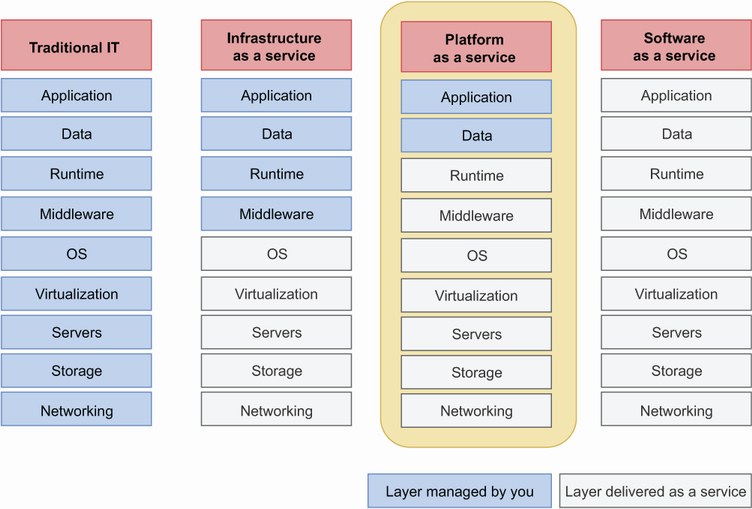 Figure 9.5 Layers of technology stacks required by an application. In traditional IT, all layers of infrastructure are managed by you. In the IaaS model, the core infrastructure is delivered as a service. In the PaaS model, only the application and data need to be managed by you, and the rest of all layers are delivered as a service. In the SaaS model, all layers are delivered as a service. We’ve highlighted the PaaS model, as Cloud Foundry belongs to this model.
Deploying Applications to Cloud Foundry
Logging In
To deploy an application to Cloud Foundry, you first need to log in to your Cloud Foundry instance. This can be done using the cf login command, as shown in Listing 9.17.
Listing 9.17 Cloud Foundry login
cf login -a <CLOUDFOUNDRY_API_ENDPOINT> -u <USERNAME>
The CLOUDFOUNDRY_API_ENDPOINT is the URL of your Cloud Foundry instance, and USERNAME is your login ID. After executing the command, you will be prompted to enter your password, as demonstrated in Listing 9.18.
Listing 9.18 Login to Cloud Foundry
cf login -a https:/ /api.cf.eu10.hana.ondemand.com/ -u ****@gmail.com
API endpoint: https:/ /api.cf.eu10.hana.ondemand.com/

Password:

Authenticating...
OK

Targeted org 6****986trial.

Targeted space dev.

API endpoint:   https:/ /api.cf.eu10.hana.ondemand.com
API version:    3.102.0
user:           ****@gmail.com
org:            6****86trial
space:          dev
Preparing the Application
Before deploying, you need to build your application. For a Spring Boot application, this can be done using the mvn clean install command. The resulting JAR file will be used for deployment.
Creating the Manifest File
Instead of deploying the raw JAR file, you should define a manifest.yml file in the root directory of your application. This file provides Cloud Foundry CLI with the necessary configuration details for deployment. Listing 9.19 shows an example of a manifest.yml file.
Listing 9.19 The manifest.yml file to deploy into Cloud Foundry
applications:
- name: course-tracker-app-cf
  instances: 1
  memory: 1024M
  path: target/course-tracker-app-cf-1.0.0.jar
  random-route: true
  buildpacks:
  - java_buildpack
This configuration file specifies the application name, the number of instances, memory allocation, and the path to the application executable. The random-route option instructs Cloud Foundry to assign a random route for the deployed application, while the buildpacks configuration allows Cloud Foundry to select a Java buildpack to run the application.
Deploying the Application
With the manifest.yml file in place, you can deploy your application using the cf push command, as shown in Listing 9.20.
Listing 9.20 Cloud Foundry push command to start deployment
cf push
This command uploads the application artifacts and initiates the deployment process. Once completed, you can use the cf apps command to view the running application and its associated URL.
FAQ (Frequently asked questions)
What is the purpose of the manifest.yml file in Cloud Foundry?
How do you specify the application name in a Cloud Foundry manifest file?
What does the 'random-route' attribute do in a Cloud Foundry manifest file?
Which buildpack is used in the provided Cloud Foundry manifest file?
What is Cloud Foundry?
What model does Cloud Foundry belong to?
What does Cloud Foundry manage for developers?
Does Cloud Foundry support multiple cloud platforms?
What layers of technology stacks are managed by you in the PaaS model?
How does the PaaS model differ from the IaaS model?
What is highlighted in Figure 9.5 regarding Cloud Foundry?