Container in Java
In the context of Java, a "container" refers to a lightweight, standalone, and executable package that includes everything needed to run a piece of software, ensuring consistent behavior across different environments. Containers are a crucial part of modern software development and deployment, providing isolated environments for applications to run efficiently and reliably.
Overview
Containers encapsulate application code along with its dependencies, runtime, system tools, and libraries. This encapsulation ensures that applications run consistently regardless of the environment, whether it be development, testing, or production. Containers are created from container images, which are lightweight and standalone software packages. At runtime, these images become containers, providing a reliable execution environment.
Benefits of Containers
Containers offer several advantages:
- Isolation: Each container operates in its own isolated environment, which includes its own filesystem and limits on memory, CPU, network, and disk usage. This isolation reduces interference between applications.
- Consistent Packaging: Containers provide a consistent environment for deployment, which helps in maintaining uniformity across development, testing, and production environments.
- Efficient Resource Use: By sharing a single operating system kernel, containers are lighter than virtual machines, which require a full copy of their own operating system. This allows for more efficient use of computing resources.
- Developed Ecosystem: Containers have a well-developed ecosystem that supports various tools and services for container management and orchestration.
Disadvantages of Containers
Despite their benefits, containers also have some drawbacks:
- Complexity in Configuration and Deployment: The isolation provided by containers can complicate development processes, requiring special handling and configuration. Real-world deployment can be complex, especially when applications expect full access to host resources or need to communicate with other processes.
- Finite Resources: Containers run on finite resources provided by the underlying hardware. Developers must manage these resources within the limits of the host system.
Container Environments
Containers can run on host operating systems or Type 1 hypervisors. A Type 1 hypervisor is installed on bare metal and serves as a lightweight operating system, dedicating resources to virtual machines. However, in more pure container environments, dedicated container host machines are used, which remove the hypervisor and guest operating system layers.
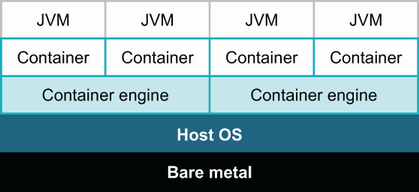 Figure 12.2 Target environment for Java applications on dedicated container engines
Docker
Docker is a popular platform for managing containers. A Docker container is an isolated environment for running applications, providing a separate filesystem and network. Containers can be configured to expose ports, run specific commands, and interact with other containers or services.
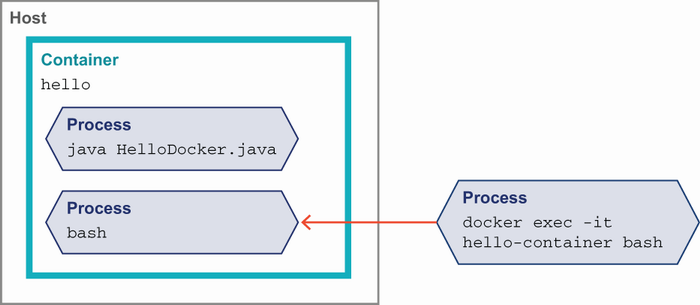 Figure 12.8 docker exec into a container
Container Images
A container image is a lightweight, standalone, executable software package that includes all necessary components for an application to run. These components include application code, runtime, system tools, settings, and libraries. At runtime, a container image becomes a container.
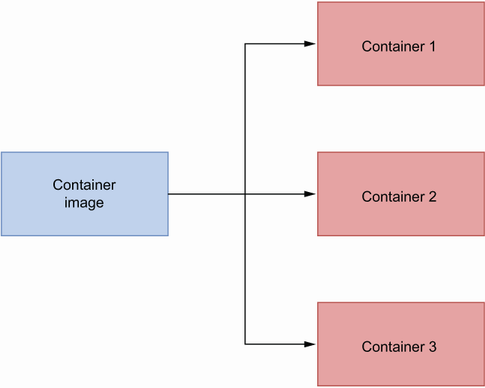 Figure 9.6 A container image can be used to create one or more containers.
Running Containers
To run a container, a container runtime environment, such as Docker, is used. The infrastructure required to run a container includes the host operating systems and the container runtime environment, which is responsible for running the containers.
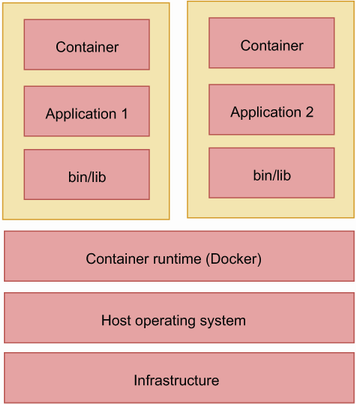 Figure 9.7 Various components to run a container.
Containerizing Applications with Docker
To containerize an application with Docker, you need to create a Dockerfile that defines the image. The image is then built using the docker build command, and the resulting image is run as a container using the docker run command. This process ensures reliable execution across different environments.
Example: Running a Docker Container
docker run -p 8080:8080 course-tracker:v1
Container Image Structure
A Docker container image consists of multiple layers. The base image is the starting point, and additional layers are added based on the instructions specified in the Dockerfile. For example, in a typical Dockerfile, you might start with a base image like adoptopenjdk:11-jre-hotspot and add a Spring Boot application JAR file as a new layer.
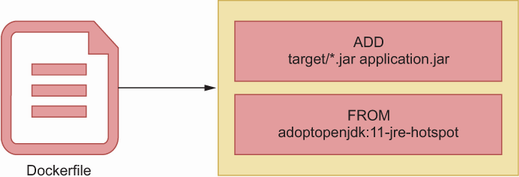 Figure 9.8 Various layers in a container image.
To explore the various layers of a Docker image, you can use the dive tool. This tool allows you to view the layers of a created image by executing dive course-tracker:latest.
| Book Title | Usage of Container | Technical Depth | Connections to Other Concepts | Examples Used | Practical Application |
|------------|--------------------|-----------------|-------------------------------|---------------|-----------------------|
| [The Well-Grounded Java Developer, Second Edition](https://www.manning.com/books/the-well-grounded-java-developer-second-edition) | Discusses containers as isolated environments for running applications, emphasizing resource efficiency and consistent packaging. [more](https://livebook.manning.com/book/the-well-grounded-java-developer-second-edition/chapter-12/37) | Explores the technical aspects of container environments, including Docker and hypervisors. [more](https://livebook.manning.com/book/the-well-grounded-java-developer-second-edition/chapter-12/24) | Connects containers to concepts like isolation, resource management, and orchestration tools. [more](https://livebook.manning.com/book/the-well-grounded-java-developer-second-edition/chapter-12/1) | Uses figures and examples to illustrate Docker commands and container environments. [more](https://livebook.manning.com/book/the-well-grounded-java-developer-second-edition/chapter-12/figure--12-8) | Highlights practical challenges and benefits of using containers in real-world scenarios. [more](https://livebook.manning.com/book/the-well-grounded-java-developer-second-edition/chapter-12/51) |
| [Spring Boot in Practice](https://www.manning.com/books/spring-boot-in-practice) | Describes containers as standalone packages ensuring consistent application behavior across environments. [more](https://drek4537l1klr.cloudfront.net/musib/Figures/09-06.png) | Details the structure of container images and the process of containerizing applications with Docker. [more](https://drek4537l1klr.cloudfront.net/musib/Figures/09-08.png) | Links containers to the concept of container images and runtime environments. [more](https://drek4537l1klr.cloudfront.net/musib/Figures/09-07.png) | Provides examples of Docker commands and the structure of Dockerfiles. [more](https://drek4537l1klr.cloudfront.net/musib/Figures/09-08.png) | Focuses on the practical steps to containerize applications using Docker. [more](https://drek4537l1klr.cloudfront.net/musib/Figures/09-07.png) |
FAQ (Frequently asked questions)
What are the benefits of using containers?
What are the drawbacks of using containers?
How do containers improve resource efficiency?
What ecosystem advantages do containers offer?
Do containers provide infinite resources?
Can containers run on Type 1 hypervisors?
Why are containers lighter than virtual machines?
What role do container engines play?
What is a container in computing?
How do containers reduce interference between applications?
What challenges do containers present in development?
Why can real-world deployment of containers be complex?
What do containers encapsulate?
How can containers be managed?