Docker in Java Development
Docker is a powerful platform that enables developers to build, ship, and run applications in containers. Containers are a form of lightweight virtualization that encapsulate an application and its dependencies, allowing it to run consistently across different environments. This consistency is one of Docker's key advantages, as it ensures that applications behave the same way regardless of where they are deployed, whether on a developer's local machine, a test environment, or in production on a cloud provider.
Overview
Docker provides a suite of tools and abstractions that streamline the process of containerization. It allows developers to build, share, and run applications in containers, ensuring consistency and isolation across different environments. This is achieved through Docker images, which serve as the blueprint for containers. Docker is chosen as the container platform for its portability across multiple cloud providers and its lightweight nature. This makes it possible to deploy multiple containers efficiently, which is particularly beneficial in microservices architectures where applications are composed of many small, independent services.
Docker Images
Docker images are constructed from Dockerfiles, which define the structure and contents of the image. These images include all necessary dependencies and configurations required to run applications. Once built, images can be tagged for easier reference and shared through container registries such as Docker Hub. Selecting an appropriate base image is crucial and involves considering factors like the vendor, operating system, system architectures, support availability, security updates, and cloud deployment considerations.
Building Images with Gradle and Maven
Building Docker images with Gradle involves using a Dockerfile to define the image's structure. This process includes copying application files and dependencies into the image. Gradle tasks, such as installDist, are used to prepare the application for deployment within the container. Similarly, the Spotify Maven plugin can be used to package services as Docker images, configured in the pom.xml file of each service.
Dockerfile Example
A Dockerfile is used to create a Docker image by providing step-by-step instructions on how the image should be provisioned. Below is an example Dockerfile for a licensing service:
FROM openjdk:8-jdk-alpine
RUN apk update && apk upgrade && apk add netcat-openbsd
RUN mkdir -p /usr/local/licensingservice
ADD licensing-service-0.0.1-SNAPSHOT.jar /usr/local/licensingservice/
ADD run.sh run.sh
RUN chmod +x run.sh
CMD ./run.sh
Networking and Ports
Docker provides isolated network environments for containers, allowing them to communicate with each other and with external services. Containers can expose ports for external access, which can be mapped from the host to the container using the -p flag. This enables communication with services running inside the container. Additionally, when running locally, Docker can use host.docker.internal to facilitate communication between containers and host services.
Local Development with Docker Compose
Docker Compose is a tool that simplifies local development by allowing developers to define and run multi-container applications. It manages dependencies and services, ensuring a consistent environment and reducing the need for manual setup. A docker-compose.yml file is used to configure the application's services.
Example docker-compose.yml:
version: '2'
services:
  configserver:
    image: johncarnell/tmx-confsvr:chapter3
    ports:
       - "8888:8888"
    environment:
      ENCRYPT_KEY: "IMSYMMETRIC"
  database:
    image: postgres
    ports:
      - "5432:5432"
    environment:
      POSTGRES_USER: "postgres"
      POSTGRES_PASSWORD: "p0stgr@s"
      POSTGRES_DB: "eagle_eye_local"
  licensingservice:
    image: johncarnell/tmx-licensing-service:chapter3
    ports:
      - "8080:8080"
    environment:
      PROFILE: "default"
      CONFIGSERVER_URI: "http://configserver:8888"
      CONFIGSERVER_PORT: "8888"
      DATABASESERVER_PORT: "5432"
      ENCRYPT_KEY: "IMSYMMETRIC"
Debugging and Logging
Debugging within Docker involves using tools like docker exec to access the container's shell and inspect running processes. Developers can also set up remote debugging using the JDK's debugging facilities, allowing them to diagnose and fix issues within the containerized environment. Docker captures logs written to STDOUT and STDERR streams, storing them in well-known file locations on the host. This centralized log management simplifies configuration and helps avoid data loss, making it easier to forward logs to other systems for analysis.
Visualizing Docker Image Layers
Docker images consist of multiple layers, each representing a set of instructions from the Dockerfile. These layers are added on top of the base image as per the instructions specified in the Dockerfile. Tools like dive can be used to inspect these layers, providing insights into the composition and size of Docker images.
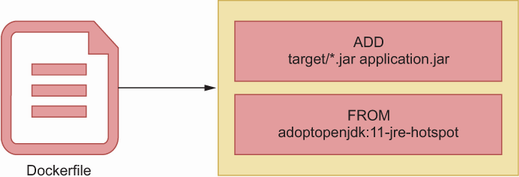 Figure 9.8 Various layers in a container image.
For more detailed information, you can refer to the following resources:
| Book Title | Usage of Docker | Technical Depth | Connections to Other Concepts | Examples Used | Practical Application |
|------------|-----------------|-----------------|-------------------------------|---------------|-----------------------|
| [The Well-Grounded Java Developer, Second Edition](https://www.manning.com/books/the-well-grounded-java-developer-second-edition) | Discusses Docker as a platform for containerization, focusing on building, sharing, and running applications in containers. [more](https://livebook.manning.com/book/the-well-grounded-java-developer-second-edition/chapter-12/100) | Covers Docker images, Dockerfiles, and multistage builds, emphasizing security and image size reduction. [more](https://livebook.manning.com/book/the-well-grounded-java-developer-second-edition/chapter-12/58) | Explores Docker's integration with Gradle, networking, and Docker Compose for local development. [more](https://livebook.manning.com/book/the-well-grounded-java-developer-second-edition/chapter-12/167) | Provides examples of building images with Gradle and running builds in Docker. [more](https://livebook.manning.com/book/the-well-grounded-java-developer-second-edition/chapter-12/118) | Focuses on debugging, logging, and using Docker Compose for practical development scenarios. [more](https://livebook.manning.com/book/the-well-grounded-java-developer-second-edition/chapter-12/187) |
| [Spring Microservices in Action](https://www.manning.com/books/spring-microservices-in-action) | Highlights Docker's role in microservices architectures, emphasizing portability and consistency. [more](https://livebook.manning.com/book/spring-microservices-in-action/chapter-10/260) | Details Docker Compose and the use of the Spotify Maven plugin for building images. [more](https://livebook.manning.com/book/spring-microservices-in-action/appendix-a/52) | Connects Docker with cloud environments and microservices deployment strategies. [more](https://livebook.manning.com/book/spring-microservices-in-action/chapter-10/149) | Includes `docker-compose.yml` and Dockerfile examples for service configuration and image creation. [more](https://livebook.manning.com/book/spring-microservices-in-action/appendix-a/52) | Demonstrates running services with scripts and managing output from Docker containers. [more](https://livebook.manning.com/book/spring-microservices-in-action/appendix-a/85) |
| [Spring Boot in Practice](https://www.manning.com/books/spring-boot-in-practice) | Describes Docker as a container technology for consistent application execution. [more](https://drek4537l1klr.cloudfront.net/musib/Figures/09-07.png) | Explains Docker's layered architecture and multi-stage builds for optimized images. [more](https://drek4537l1klr.cloudfront.net/musib/Figures/09-08.png) | Discusses Docker's integration with Spring Boot and the use of tools like `dive` for image inspection. [more](https://drek4537l1klr.cloudfront.net/musib/Figures/09-09.png) | Provides Dockerfile examples for building and running Spring Boot applications. [more](https://drek4537l1klr.cloudfront.net/musib/Figures/09-10.png) | Focuses on optimizing Docker images and visualizing image layers for better efficiency. [more](https://drek4537l1klr.cloudfront.net/musib/Figures/09-10.png) |
FAQ (Frequently asked questions)
What are Docker containers?
How are Docker images created?
What are Docker images?
How can Docker images be shared?
What is Docker used for in Java application development?
How does Docker ensure consistency in application development?
What factors should be considered when selecting a base image for Docker?
How do you build a Docker image with Gradle?
What is a multistage build process in Docker?
How can Docker containers expose ports for external access?
How does Docker facilitate communication between containers and host services?
What is Docker Compose used for?
How can you debug applications in Docker?
How does Docker handle logging?
Why is Docker chosen as a container platform?
What is Docker used for?
Why are containers considered beneficial?
What operating systems does Docker run on?
What does Docker allow you to do on your desktop?
Where is the output from Docker containers written?
What is the purpose of the docker-compose.yml file?
How does Docker Compose find the target image to start?
How are port numbers defined in Docker Compose?
How are environment variables set in Docker Compose?
How can services in Docker Compose access each other?