Dynamic View in Web Applications
Overview
A dynamic view in web applications is a web page that displays different content based on the data sent by the server. Unlike static pages, which remain the same for every user, dynamic views can change their content for different users or requests. This adaptability is crucial for applications like online shopping carts, where the content must reflect the specific products a user has added to their cart.
Definition
A dynamic view is a web page that displays different content for different requests by getting variable data from the controller. This means that the content of the page is not fixed but is generated based on the data provided by the server for each specific request.
Example: Shopping Cart Functionality
Consider the example of a shopping cart page on an online shop. This page should not display the same data for every user. Instead, it should show the products that a particular user has added to their cart. Even for the same user, the content can change over time as they add or remove products from their cart.
[Figure 8.1: Dynamic View in a Shopping Cart](https://livebook.manning.com/book/spring-start-here/chapter-8/12)
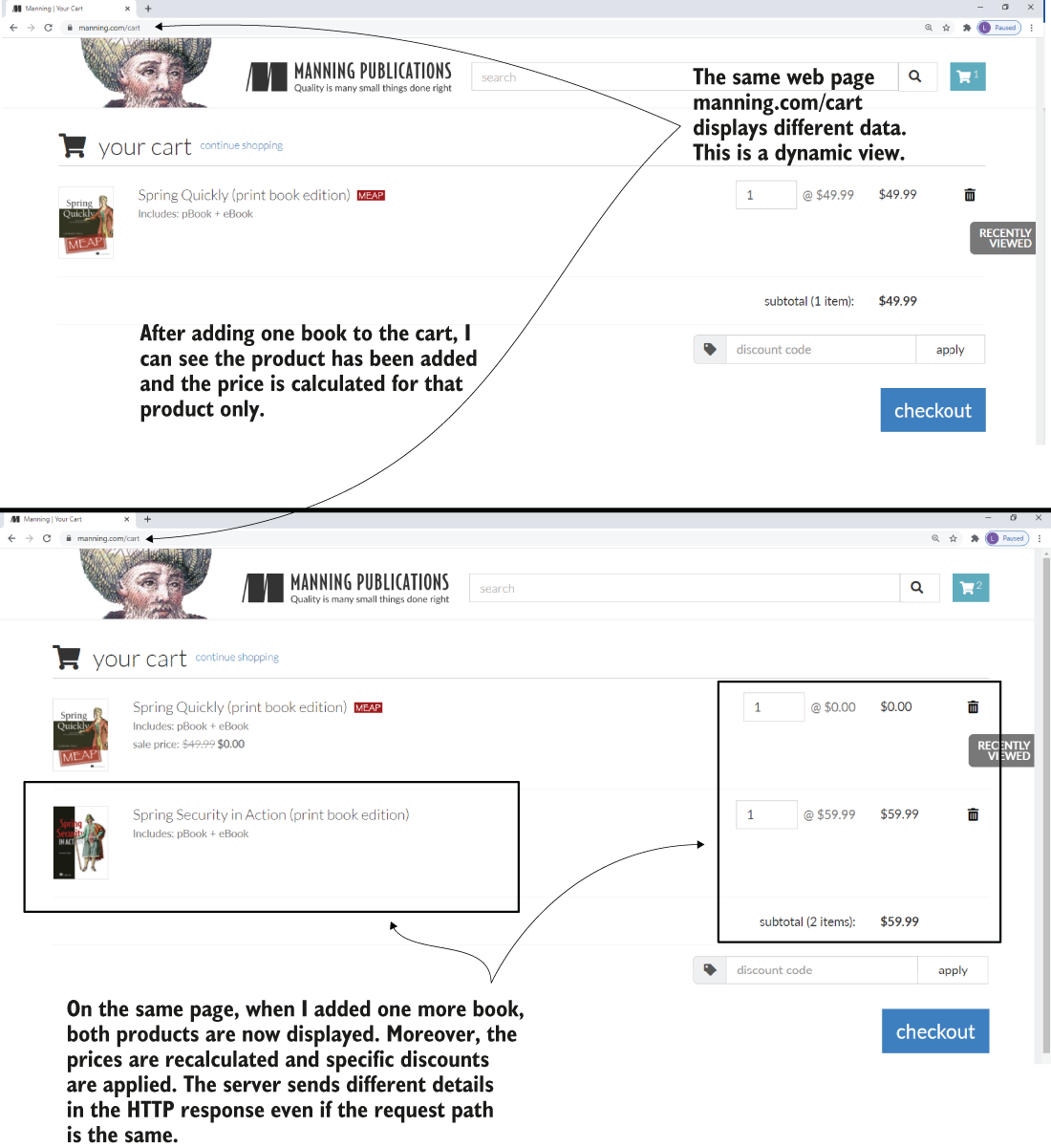 Figure 8.1 A dynamic view presented with the Manning shopping cart functionality. Even if the requested page is the same, the content of the page is different. The backend sent different data in the response before and after adding one more product to the cart.
In this figure, you can see how requests to the same page, such as manning.com/cart, receive different data in response. The information displayed is different, even if the page is the same, demonstrating the dynamic nature of the view.
Implementing a Dynamic View
To implement a dynamic view, the controller in a web application must send data to the view. This data can vary for each request, allowing the view to display different content based on the user's actions or other factors.
[Listing 8.2: Example of a Dynamic View](https://livebook.manning.com/book/spring-start-here/chapter-8/34)
Below is an example of a simple dynamic view using Thymeleaf, a popular Java template engine:
<!DOCTYPE html>
<html lang="en" xmlns:th="http://www.thymeleaf.org">   #1

  <head>
    <meta charset="UTF-8">
    <title>Home Page</title>
  </head>

  <body>
    <h1>Welcome
    <span th:style="'color:' + ${color}"               #2
          th:text="${username}"></span>!</h1>          #2
  </body>

</html>
#1 Defines the Thymeleaf “th” prefix
#2 Uses the “th” prefix to use the values sent by the controller
In this example, the ${username} and ${color} are placeholders for dynamic data sent from the controller. The th prefix is used to bind these values to the HTML elements, allowing the page to display personalized content for each user.
The Spring MVC Flow
In a Spring MVC application, the process of creating a dynamic view involves several steps:
- The user sends an HTTP request to the server.
- The server processes the request and the controller prepares the data.
- The controller sends the data to the view.
- The view incorporates this data to generate the HTTP response.
[Figure 8.3: Spring MVC Flow](https://livebook.manning.com/book/spring-start-here/chapter-8/12)
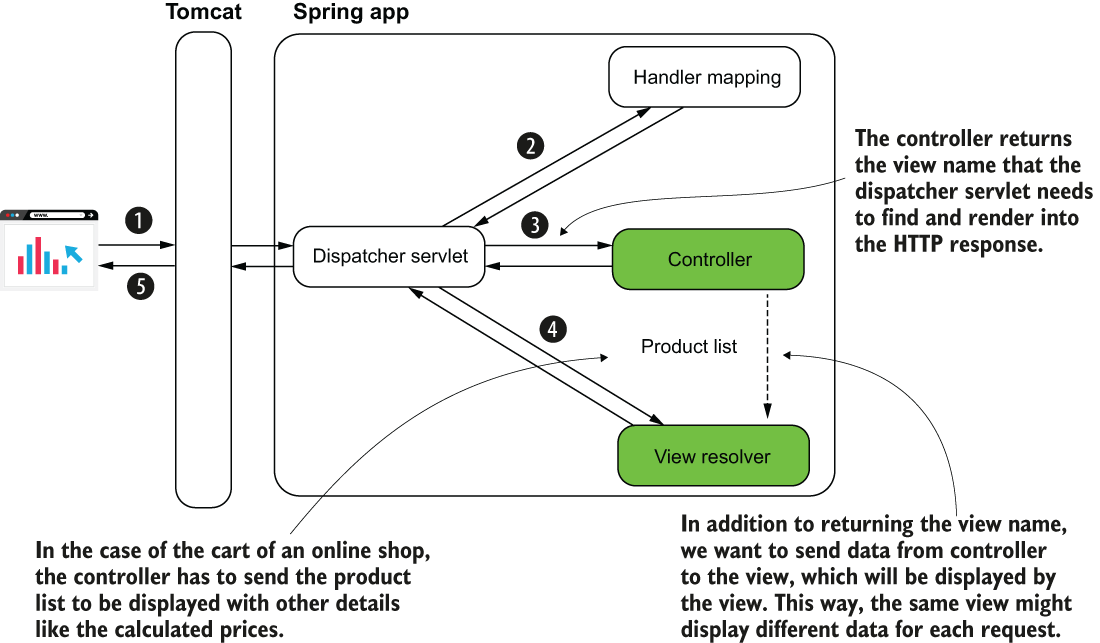 Figure 8.3 The Spring MVC flow. To define a dynamic view, the controller needs to send data to the view. The data the controller sends can be different for each request. For example, in an online shop’s cart functionality, the controller initially sends a list of one product to the view. After the user adds more products, the list the controller sends contains all the products in the cart. The same view shows different information for these requests.
This flow ensures that the view can display different content based on the data it receives, making it dynamic and responsive to user interactions.
FAQ (Frequently asked questions)
What is a dynamic view in web applications?
How does a dynamic view differ from a static page?
Can you give an example of a dynamic view?
How does the Manning shopping cart demonstrate a dynamic view?
What does the home.html file represent in the context of dynamic views?
How does Thymeleaf facilitate dynamic views in web applications?