HTTP in Java
HTTP, or Hypertext Transfer Protocol, is a fundamental protocol used for transferring data over the web. It serves as the backbone of data communication on the internet, enabling clients and servers to exchange requests and responses. In Java, HTTP is crucial for the functioning of web applications, allowing for the retrieval of web pages, submission of form data, and interaction with web services.
Overview
HTTP operates as a stateless, text-based, request-response protocol within the client-server computing model. This means that each request from a client to a server is independent, and the information exchanged is in plain text. HTTP defines how clients and servers communicate, with the client making requests and the server responding accordingly.
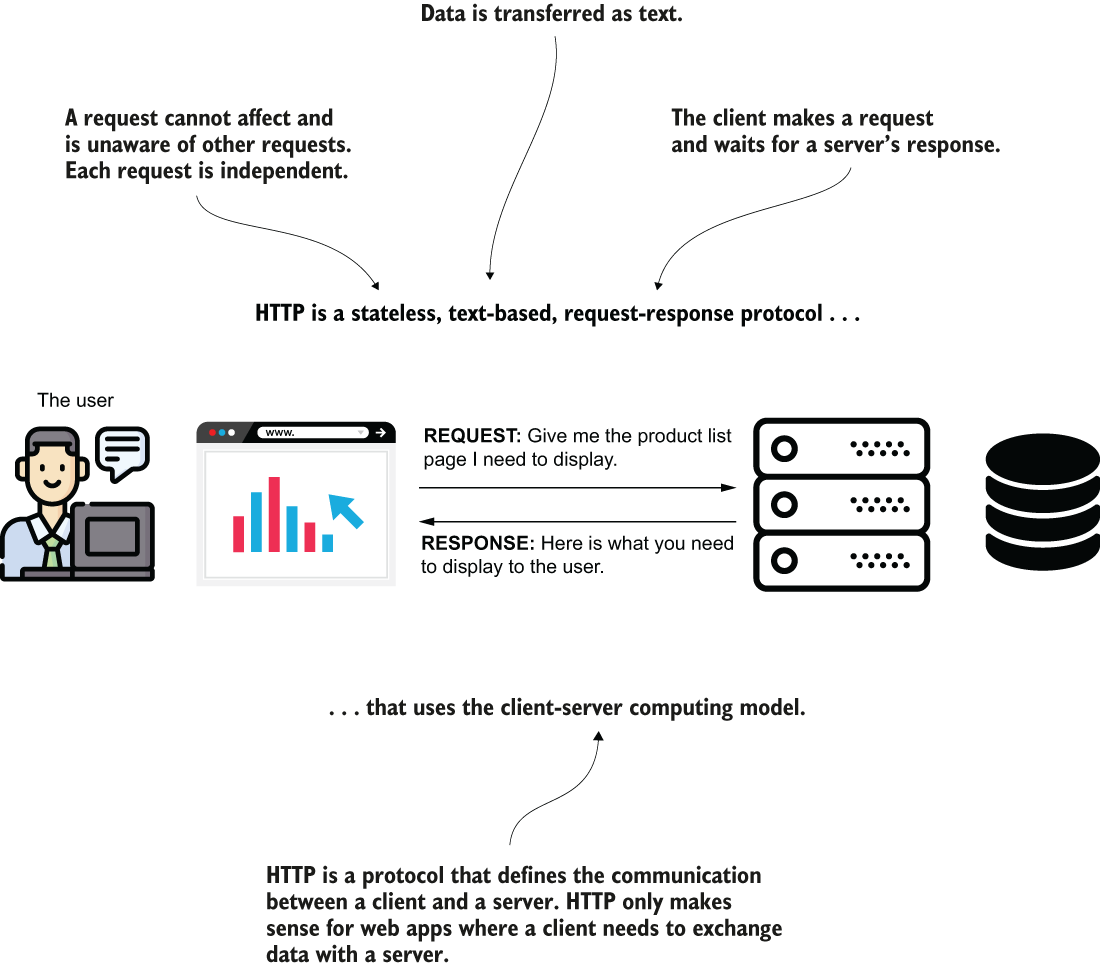 Figure: HTTP is a protocol that describes how a client and a server talk. HTTP assumes a client makes a request, and the server responds. The protocol describes what the client’s request and the server’s response look like. HTTP is stateless, meaning the requests are independent of one another, and text-based, which means the information is exchanged as plain text.
HTTP Methods
HTTP uses various methods to define the actions a client wants to perform on a resource. Some of the most common methods include:
-
GET: Used to retrieve data from the server without making any changes.
GET http://example.com/products -
POST: Used to send data to the server to create or update a resource.
POST /servlet/default.jsp HTTP/1.1 Accept: text/plain; text/html Accept-Language: en-gb Connection: Keep-Alive Host: localhost Referer: http://localhost/ch8/SendDetails.html User-Agent: Mozilla/4.0 (MSIE 4.01;Windows 98) Content-Length: 33 Content-Type: application/x-www-form-urlencoded Accept-Encoding: gzip, deflate lastName=Einstein&firstName=Albert -
DELETE: Used to remove a resource from the server.
DELETE http://example.com/products
HTTP Request and Response
An HTTP request consists of a method, a URI, and various headers and parameters. The URI identifies the resource the client wants to interact with.
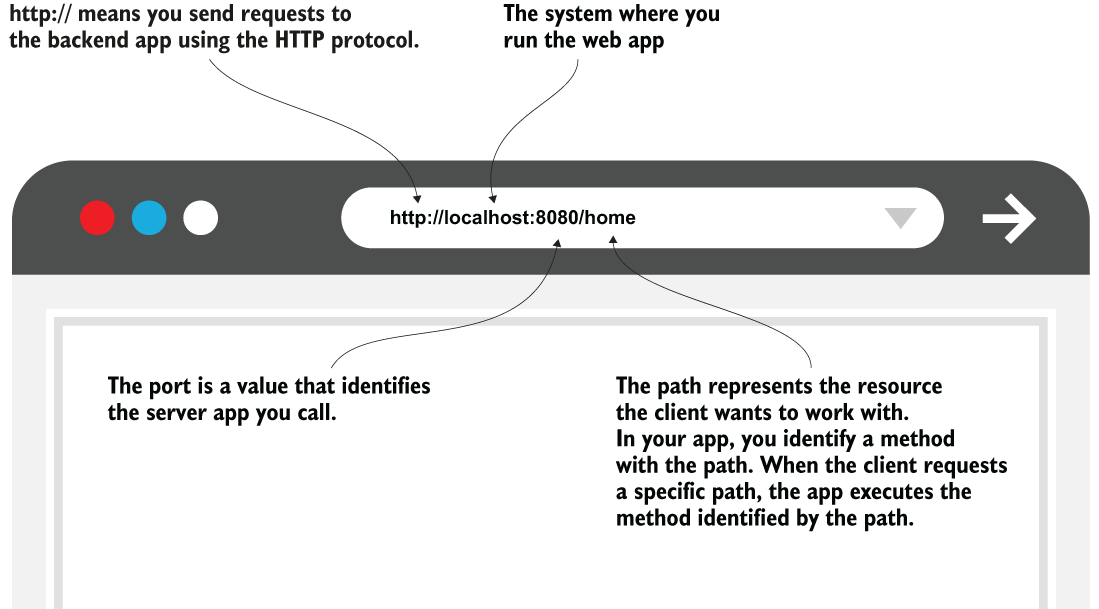 Figure: The HTTP request URI identifies the resource the client requests to work with. The first part of the URI identifies the protocol and the server that runs the server app. The path identifies a resource exposed by the server.
An HTTP response includes a status code, headers, and a body. The status code indicates whether the request was successful or if there were issues.
HTTP/1.1 200 OK
Server: Microsoft-IIS/4.0
Date: Mon, 14 May 2012 13:13:33 GMT
Content-Type: text/html
Last-Modified: Mon, 14 May 2012 13:03:42 GMT
Content-Length: 112

<html>
<head><title>HTTP Response</title></head>
<body>Hello Albert!</body>
</html>
HTTP Sessions
While HTTP is stateless, there are scenarios where the server needs to maintain state across multiple requests, such as in an online shopping cart. This is achieved using HTTP sessions. The server assigns a unique session ID to a client, which is included in subsequent requests to maintain continuity.
 Figure: The HTTP session mechanism. The server identifies the client with a unique session ID it generates. The client sends the session ID in the next requests, so the backend app knows which memory location it reserved earlier for the client.
Redirecting HTTP to HTTPS
To ensure that all data is transmitted securely, it is common practice to redirect HTTP requests to HTTPS. This can be achieved through server configuration. Below is a code listing that demonstrates how to configure a Spring Boot application to redirect HTTP requests to HTTPS.
@Bean
public ServletWebServerFactory servletContainer() {
    TomcatServletWebServerFactory tomcat = new
    TomcatServletWebServerFactory() {
        @Override
        protected void postProcessContext(Context context) {
            SecurityConstraint securityConstraint = new
            SecurityConstraint();
            securityConstraint.setUserConstraint("CONFIDENTIAL");
            SecurityCollection collection = new SecurityCollection();

            collection.addPattern("/*");                   #1
            securityConstraint.addCollection(collection);
            context.addConstraint(securityConstraint);
        }
    };
    tomcat.addAdditionalTomcatConnectors(redirectConnector());
    return tomcat;
}

private Connector redirectConnector() {
    Connector connector = new
    Connector("org.apache.coyote.http11.Http11NioProtocol");
    connector.setScheme("http");
    connector.setPort(8080);
    connector.setRedirectPort(8443);                      #2
    return connector;
}
#1 We have provided the pattern of /* to include all incoming requests.
#2 Default HTTP port is set to 8080, and the redirect port is configured to HTTPS port 8443.
In this configuration, a TomcatServletWebServerFactory bean is defined to customize the embedded Tomcat server. The postProcessContext method is overridden to add a SecurityConstraint that marks all requests as "CONFIDENTIAL", which means they should be redirected to HTTPS.
Monitoring HTTP Requests with JProfiler
When developing and troubleshooting Java applications, it is crucial to monitor HTTP requests to understand the application's behavior and performance. JProfiler is a powerful tool that can be used to record and analyze HTTP client events.
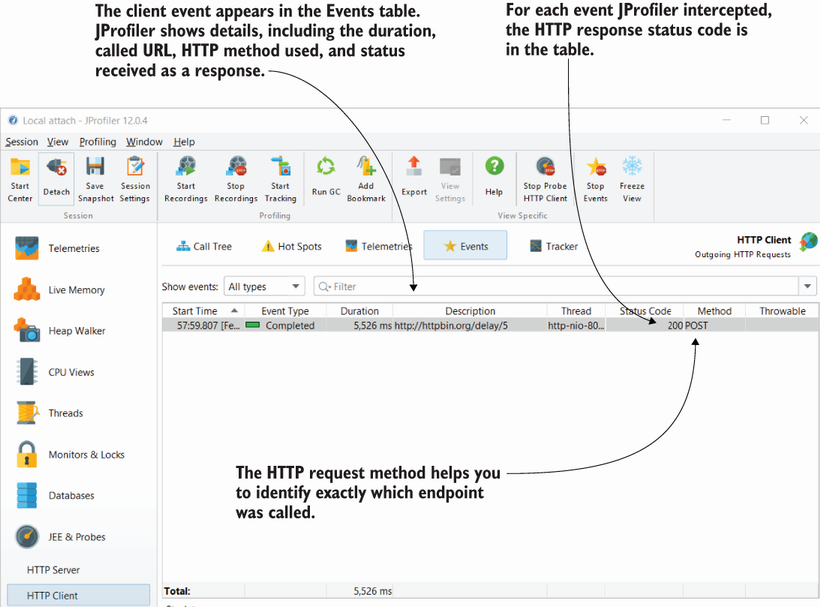 Figure: You can record all the HTTP requests the app sends regardless of the way they’re sent (what technology your app uses) in JProfiler, which displays details such as the duration, the status code, the HTTP method and URI called, and whether an exception has been encountered.
By analyzing the information provided by JProfiler, developers can gain insights into the performance and behavior of their applications. Key details such as the call duration, response status code, and any encountered exceptions can help identify potential issues and optimize the application's performance.
Here's a markdown table comparing how different Java books discuss the term 'http':
| Book Title | Usage of http | Technical Depth | Connections to Other Concepts | Examples Used | Practical Application | |------------|---------------|-----------------|-------------------------------|---------------|-----------------------| | Spring Boot in Practice | Discusses HTTP in the context of web security, particularly focusing on redirecting HTTP to HTTPS for secure communication. more | Provides detailed configuration examples for redirecting HTTP to HTTPS using Spring Boot. more | Connects HTTP with HTTPS, SSL/TLS encryption, and server configuration. more | Includes code listings for configuring a Spring Boot application to redirect HTTP requests to HTTPS. more | Focuses on enhancing application security by ensuring all data is transmitted securely. more | | Spring Start Here | Covers HTTP as a stateless, text-based protocol used for client-server communication. more | Explains HTTP methods, request and response structure, and sessions in detail. more | Discusses HTTP methods like GET, POST, DELETE, and their roles in web communication. more | Provides examples of HTTP requests and responses, including headers and status codes. more | Explains the use of HTTP sessions for maintaining state in web applications. more | | Troubleshooting Java: Read, debug, and optimize JVM applications | Focuses on monitoring HTTP requests to understand application behavior and performance. more | Discusses the use of JProfiler to record and analyze HTTP client events. more | Connects HTTP monitoring with application performance optimization. more | Demonstrates how to use JProfiler to monitor HTTP requests, including duration, status codes, and exceptions. more | Aids in identifying issues related to HTTP requests and optimizing application performance. more |
This table provides a comparative overview of how each book approaches the topic of HTTP, highlighting their unique focus areas and practical applications.
FAQ (Frequently asked questions)
What is HTTP?
What is the role of HTTP in internet communication?
What is HTTP?
What are some HTTP methods and their purposes?
What is the HTTP GET method used for?
How is the GET method used in the context of the chapter?
What is the HTTP POST method used for?
How is the POST method used in the context of the chapter?
What is HTTP in terms of protocol type?
How does HTTP describe communication in a web app?
How does HTTP assume communication between a client and a server?
What does it mean that HTTP is stateless?
What does it mean that HTTP is text-based?