HTTP Request Body
Overview
The HTTP request body is a crucial component used to send data from the client to the server, particularly when interacting with REST endpoints. It is recommended to utilize the request body for transmitting larger quantities of data, typically more than 50 to 100 characters. In the context of Spring, you can annotate a parameter with @RequestBody to leverage the request body, allowing Spring to decode the JSON string into the specified parameter type.
Definition
An endpoint can receive data from the client through various means, including request parameters, path variables, or the HTTP request body. The HTTP request body is an optional segment of an HTTP request, designed to send substantial amounts of data from the client to the server. It is particularly useful when the client needs to transmit data consisting of several hundred characters.
HTTP GET Request Allowing
In 2014, the HTTP specification was updated to permit the use of a request body with an HTTP GET call. This change can lead to confusion, as many resources may not reflect this update and continue to present outdated information.
Example: Using the HTTP Request Body in Spring
The following example demonstrates how to define a controller in a Spring application to handle data received in the HTTP request body. This example is part of the project "sq-ch10-ex7."
Listing 10.11 Getting data from the client in the request body
@RestController
public class PaymentController {

  private static Logger logger =
    Logger.getLogger(PaymentController.class.getName());

  @PostMapping("/payment")
  public ResponseEntity<PaymentDetails> makePayment(
      @RequestBody PaymentDetails paymentDetails) {   #1

      logger.info("Received payment " +
      paymentDetails.getAmount());                    #2

      return ResponseEntity                           #3
              .status(HttpStatus.ACCEPTED)
              .body(paymentDetails);
  }}
#1 We get the payment details from the HTTP request body.
#2 We log the amount of the payment in the server’s console.
#3 We send back the payment details object in the HTTP response body, and we set the HTTP response status to 202 ACCEPTED.
Using Postman to Test the Endpoint
To test the /payment endpoint, you can use Postman to specify the request body. The following figure illustrates how to use Postman to call the endpoint and provide the necessary JSON-formatted request body.
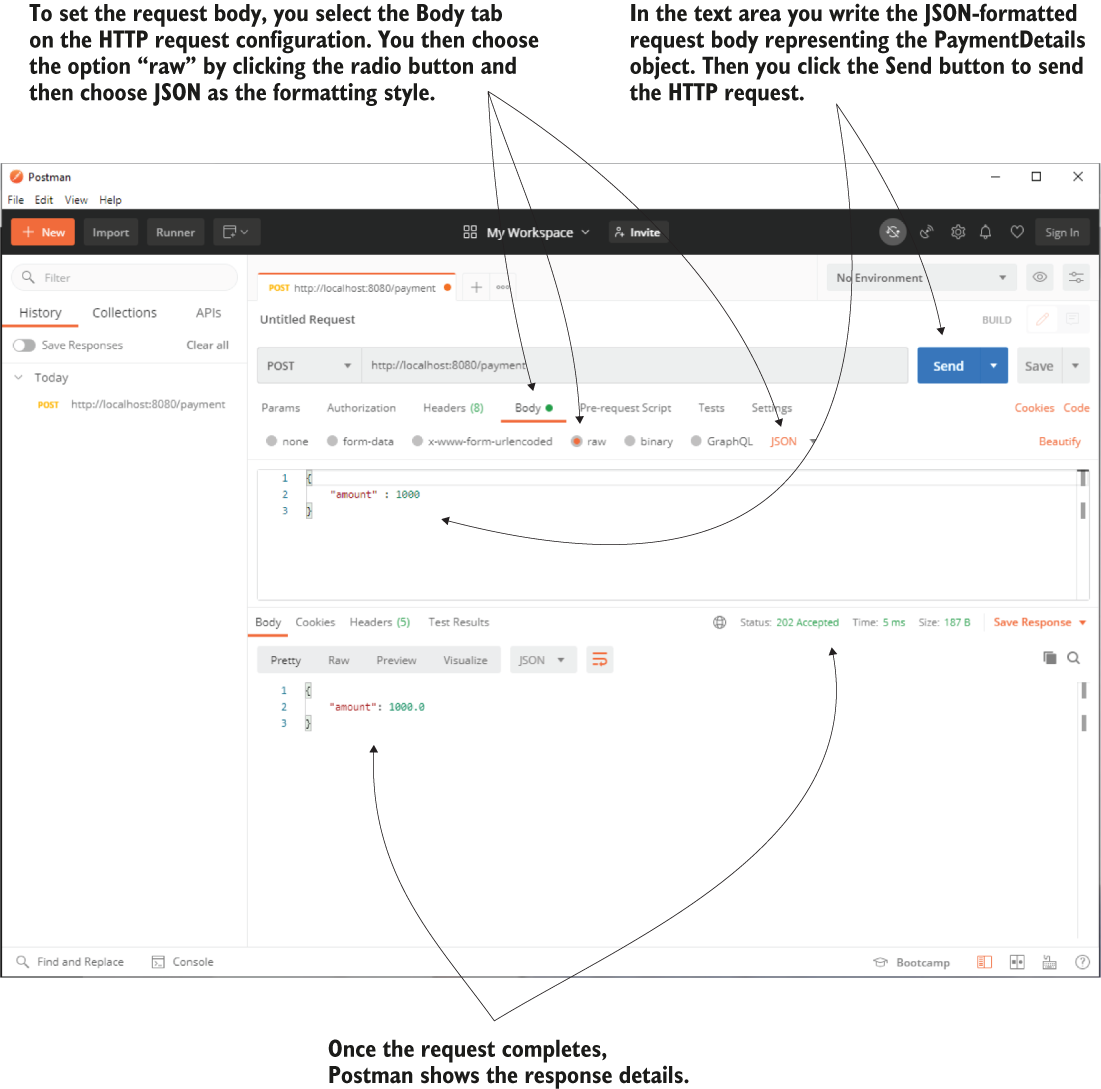 Figure 10.11 Using Postman to call the endpoint and specify the request body. You need to fill the JSON-formatted request body in the request body text area and select the data encoding as JSON. Once the request completes, Postman displays the response details.
FAQ (Frequently asked questions)
What is the purpose of the HTTP request body?
When should you use the HTTP request body?
How do you use the request body in Spring?
How do you specify the request body in Postman?
What happens after you send a request with a request body in Postman?
Can an HTTP GET request have a request body?
Why might there be confusion about using a request body with HTTP GET?
How can an endpoint receive data from a client?
Is the HTTP request body mandatory in an HTTP request?
When is the HTTP request body typically used?