Info Endpoint in Spring Boot
The info endpoint in Spring Boot Actuator is a powerful feature that provides information related to the application. By default, this endpoint does not return any information, but it can be customized to display application-specific data by configuring properties in the application.properties file or by using custom InfoContributors.
Configuring the Info Endpoint
To customize the info endpoint, you can set properties with the info.* prefix in the application.properties file. These properties will be rendered at the /info endpoint. Below is an example configuration:
Listing 4.23 The info properties
info.app.name= Spring Boot Actuator Info Application
info.app.description=Spring Boot application that explores the /info endpoint
info.app.version=1.0.0

management.endpoints.web.exposure.include=*     #1
management.info.env.enabled=true                #2
#1 To expose all actuator endpoints over Web
#2 Enable the Info environment contributor (needed for Spring Boot 2.6.x and above)
When you restart the application and access the http://localhost:8080/actuator/info endpoint, you will see the output as shown in Figure 4.10.
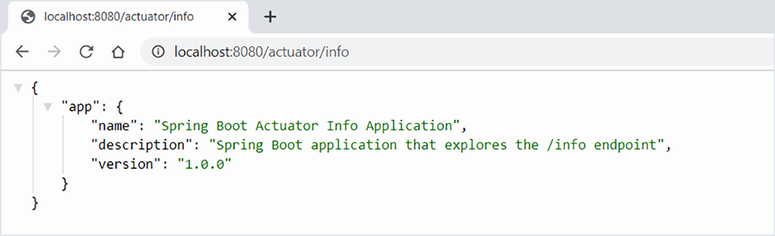 Figure 4.10 The Spring Boot Actuator info endpoint shows the application name, description, and version as configured in the application.properties file.
Displaying Project Details
You can also configure the info endpoint to display project details such as artifactId, groupId, and version. This can be done by setting properties in the application.properties file as shown in the following listing:
Listing 4.24 The info properties
info.build.artifact=@project.artifactId@
info.build.name=@project.name@
info.build.description=@project.description@
info.build.version=@project.version@
info.build.properties.java.version=@java.version@
Spring Boot automatically expands these properties from the Maven project. After restarting the application and accessing the http://localhost:8080/actuator/info endpoint, the output will be as shown in Figure 4.11.
 Figure 4.11 Spring Boot Actuator info endpoint with the application details. These details are sourced from the pom.xml file of the application.
Accessing Build and Git Information
The info endpoint can also provide build and git repository details. These details are managed through the BuildInfoContributor and GitInfoContributor classes, respectively. To generate the necessary files, you can modify the pom.xml file as shown below:
Listing 4.25 The pom.xml changes to generate the build.info and git.properties file
<build>
  <plugins>
    <plugin>
      <groupId>org.springframework.boot</groupId>
      <artifactId>spring-boot-maven-plugin</artifactId>
      <executions>
        <execution>
          <goals>
            <goal>build-info</goal>
          </goals>
        </execution>
      </executions>
    </plugin>
    <plugin>
      <groupId>pl.project13.maven</groupId>
      <artifactId>git-commit-id-plugin</artifactId>
    </plugin>
  </plugins>
</build>
When these configurations are in place, and the application is restarted, accessing the http://localhost:8080/actuator/info endpoint will display the build and git details as shown in Figure 4.13.
 Figure 4.13 Spring Boot Actuator info endpoint with git and build details. The git details are sourced from the git.properties file. The build details are sourced from the build-info.properties file. You can control the git details with the management.info.git.mode property in the application.properties file with values full or simple. Setting the property to full displays complete git details. By default, this default value of this property is simple, and it only shows git commit time and ID.
Custom Info Contributors
Lastly, you can provide a custom InfoContributor to supply additional application details. The GitInfoContributor is an example of such a class, which reads the git.properties file and presents the related data through the info endpoint. This allows for a high degree of customization and flexibility in the information provided by the info endpoint.