Kubectl
kubectl is a command-line tool that serves as the primary interface for interacting with Kubernetes clusters. It allows users to deploy applications, inspect and manage cluster resources, and view logs. This tool is essential for developers and system administrators working with Kubernetes, providing a convenient way to manage the complex orchestration of containerized applications.
Setting Up a Local Kubernetes Cluster
To begin using kubectl, you need a running Kubernetes cluster. There are several tools available to set up a local cluster, such as Minikube and Kind (Kubernetes IN Docker).
Using Minikube
Minikube is a tool that allows you to run Kubernetes locally. It creates a virtual machine on your local machine and deploys a simple, single-node Kubernetes cluster. Once Minikube is installed, you can start a local cluster with the following command:
$ minikube start
This command initializes a local Kubernetes cluster, and kubectl is automatically configured to use this cluster. For more details, refer to The Well-Grounded Java Developer, Second Edition.
Using Kind
Kind is another tool that allows you to run local Kubernetes clusters using Docker container nodes. It is particularly useful for testing and development purposes. To create a local Kubernetes cluster with Kind, execute the following command:
kind create cluster
This command sets up a new Kubernetes cluster and configures kubectl to use this cluster by default. For more information, see Spring Boot in Practice.
Interacting with the Cluster
Once your cluster is set up, kubectl provides a user-friendly interface to interact with it. You can describe nodes, inspect resources, and manage deployments.
Describing Nodes
To get detailed information about the nodes in your cluster, use the following command:
$ kubectl describe node
This command provides information about the node's roles, labels, addresses, and running pods. For a detailed guide, refer to The Well-Grounded Java Developer, Second Edition.
Deploying Applications
kubectl allows you to deploy applications to Kubernetes clusters by creating deployments and services.
Creating a Deployment
To deploy an application, you can use kubectl to create a deployment. For example, to deploy an echoserver container, use the following command:
$ kubectl create deployment echoes --image=k8s.gcr.io/echoserver:1.4
This command creates a deployment object that instructs the Kubernetes cluster to run the specified container image. For more details, see The Well-Grounded Java Developer, Second Edition.
Generating Deployment Configuration
You can also generate deployment configuration files using kubectl. This is useful for defining configurations in YAML files. Use the following command to generate a deployment configuration file:
kubectl create deployment course-tracker --image musibs/course-tracker --dry-run=client -o=YAML > deployment.yaml
This command generates a deployment.yaml file, allowing you to preview the deployment object without actually creating it. For more information, refer to Spring Boot in Practice.
Creating a Service
To expose your application as a network service, create a Kubernetes Service resource. Use the following command to generate the YAML for the service resource:
kubectl create service clusterip course-tracker-service --tcp 80:8080 -o yaml --dry-run=client > service.yaml
This command creates a service.yaml file that defines a ClusterIP service, making the application accessible within the cluster. For further details, see Spring Boot in Practice.
Applying Configurations
Once you have your YAML configuration files ready, apply them to the Kubernetes cluster using the following command:
kubectl apply -f .
This command applies all the configuration files in the current directory, creating the necessary deployments and services in the cluster. For more information, refer to Spring Boot in Practice.
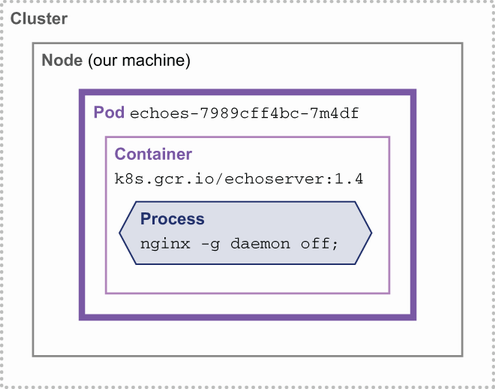 Figure 12.9 Kubernetes cluster with one pod running
By following these steps, you can effectively use kubectl to manage and deploy applications in a Kubernetes environment.
| Book Title | Usage of kubectl | Technical Depth | Connections to Other Concepts | Examples Used | Practical Application |
|------------|------------------|-----------------|-------------------------------|---------------|-----------------------|
| [The Well-Grounded Java Developer, Second Edition](https://www.manning.com/books/the-well-grounded-java-developer-second-edition) | Discusses `kubectl` as a tool for managing Kubernetes clusters, including setting up a local cluster with `minikube` and deploying applications. [more](https://livebook.manning.com/book/the-well-grounded-java-developer-second-edition/chapter-12/230) | Provides detailed commands and explanations for setting up clusters and deploying applications. [more](https://livebook.manning.com/book/the-well-grounded-java-developer-second-edition/chapter-12/230) | Connects `kubectl` usage with Kubernetes concepts like nodes, deployments, and pods. [more](https://livebook.manning.com/book/the-well-grounded-java-developer-second-edition/chapter-12/230) | Includes examples of creating deployments and inspecting nodes and pods. [more](https://livebook.manning.com/book/the-well-grounded-java-developer-second-edition/chapter-12/230) | Focuses on practical steps to deploy and manage applications using `kubectl`. [more](https://livebook.manning.com/book/the-well-grounded-java-developer-second-edition/chapter-12/230) |
| [Spring Boot in Practice](https://www.manning.com/books/spring-boot-in-practice) | Covers `kubectl` for interacting with Kubernetes clusters, using `Kind` for local cluster setup, and deploying applications. [more](https://livebook.manning.com/book/spring-boot-in-practice/chapter-9/235) | Explains the process of creating clusters and deploying applications with YAML configurations. [more](https://livebook.manning.com/book/spring-boot-in-practice/chapter-9/235) | Links `kubectl` with Docker and Kubernetes concepts, emphasizing YAML configuration. [more](https://livebook.manning.com/book/spring-boot-in-practice/chapter-9/235) | Provides examples of generating deployment and service YAML files and applying them. [more](https://livebook.manning.com/book/spring-boot-in-practice/chapter-9/235) | Guides on using `kubectl` for managing deployments and services in a Kubernetes environment. [more](https://livebook.manning.com/book/spring-boot-in-practice/chapter-9/235) |
FAQ (Frequently asked questions)
How do you create a deployment using kubectl?
What is the command to create a deployment named 'echoes' with a specific image using kubectl?
What happens when you run the kubectl create deployment command?
How do you create a local Kubernetes cluster with Kind?
What does the 'kind create cluster' command do?
What is the kubectl context set to after creating a cluster with Kind?
How can you get information about your Kubernetes cluster created with Kind?