Kubernetes in Java
Kubernetes is a powerful open-source platform designed to automate the deployment, scaling, and management of containerized applications. It is widely used in the Java ecosystem to ensure that applications run consistently across different environments. Kubernetes provides a robust set of tools and APIs to manage the lifecycle of applications, making it an essential tool for developers and operations teams working with Java applications.
Overview
Kubernetes orchestrates containers across a cluster of machines, providing essential tools to manage the lifecycle of applications, including deployment, scaling, and updates. It is accessible via the command line and a REST API, with a large ecosystem of supporting tools. Kubernetes manages objects like clusters, nodes, pods, deployments, and services to maintain the desired state of a system.
Setting Up a Local Kubernetes Cluster
To start working with Kubernetes locally, you can use tools like Kind (Kubernetes in Docker) or minikube. These tools simplify the process of setting up a local cluster.
Using Kind
Kind is a tool for running local Kubernetes clusters using Docker container "nodes". Once Kind is installed, you can create a local Kubernetes cluster with the following command:
kind create cluster
This command sets up a local cluster and configures the Kubernetes CLI (kubectl) to point to it. You can verify the setup with:
kubectl cluster-info
Using Minikube
Minikube is another tool that simplifies the process of setting up a local Kubernetes cluster. After installing Minikube, you can start a local cluster with:
minikube start
This command initializes the cluster and configures kubectl to use it by default.
Deploying Applications to Kubernetes
To deploy an application to Kubernetes, configurations are specified in YAML files. These configurations define the desired state of the application, including the number of replicas, the container image to use, and other settings. Once the YAML configuration files are ready, they can be applied to the Kubernetes cluster using the kubectl apply command:
kubectl apply -f .
This command creates a new deployment and service. You can check the status of the created Deployment and Service with:
kubectl get all
Managing Kubernetes Objects
Kubernetes provides a REST API for systems to interact with, but for human interaction, the kubectl command-line tool is more convenient. You can use kubectl to view, create, and edit objects in your cluster. For example, you can describe a node with:
kubectl describe node
Accessing the Application
To access the application from outside the Kubernetes cluster, you may need to use port forwarding. This is necessary because the service defined is accessible only within the Kubernetes cluster network. The port-forward command can be used to forward a local port to a port on the pod, allowing you to make HTTP requests to the application.
Exposing Services
To expose a deployment to external traffic, you can create a service. A NodePort service type makes a port available on each node in the cluster, forwarding traffic to the pods.
kubectl get services
Port-Forwarding
Port-forwarding allows you to access a service from outside the cluster by forwarding a local port to a port on the service. This setup is useful for testing and development purposes.
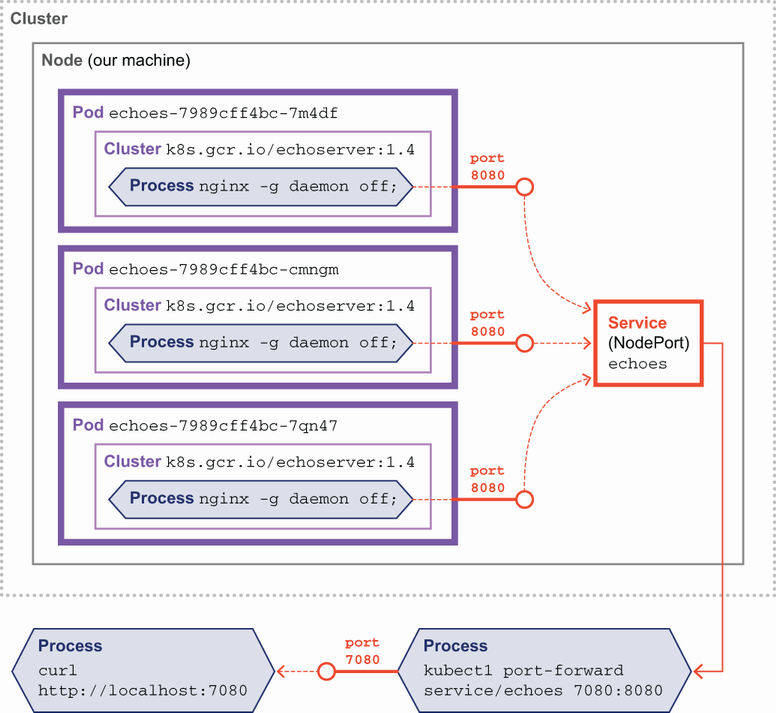 Figure 12.12 Port-forwarding into our Kubernetes cluster
With port-forwarding, you can access the service by visiting 127.0.0.1:7080 in your browser, where you will see your request echoed back.
Kubernetes is a versatile and powerful tool for managing Java applications in a containerized environment, providing a consistent and scalable platform for application deployment and management.
| Book Title | Usage of Kubernetes | Technical Depth | Connections to Other Concepts | Examples Used | Practical Application |
|------------|---------------------|-----------------|-------------------------------|---------------|-----------------------|
| [Spring Boot in Practice](https://www.manning.com/books/spring-boot-in-practice) | Discusses Kubernetes as a tool for automating deployment, scaling, and management of containerized applications. | Provides detailed instructions on setting up a local Kubernetes cluster using Kind and deploying applications. | Connects Kubernetes with container orchestration and lifecycle management. | Includes examples of creating a local cluster, deploying applications, and accessing them. | Focuses on practical steps for setting up and managing Kubernetes clusters. [more](https://www.manning.com/books/spring-boot-in-practice) |
| [The Well-Grounded Java Developer, Second Edition](https://www.manning.com/books/the-well-grounded-java-developer-second-edition) | Describes Kubernetes as a container orchestration platform with API-driven tools. | Explains setting up a local cluster with Minikube and managing Kubernetes objects. | Links Kubernetes with REST API usage and command-line tools. | Provides examples of deploying applications, viewing pods, and exposing services. | Emphasizes practical use of Kubernetes for development and testing environments. [more](https://www.manning.com/books/the-well-grounded-java-developer-second-edition) |
FAQ (Frequently asked questions)
How can Kubernetes be accessed?
What is Kubernetes?
How does Kubernetes manage the desired state of a system?
What is port-forwarding in Kubernetes?
What is the role of Kubernetes in managing containerized applications?
What kind of ecosystem does Kubernetes have?