Port in Java
In the realm of Java development, the term "port" is a fundamental concept that plays a crucial role in network communication, particularly in the context of microservices and containerized applications. A port serves as a communication endpoint, allowing data to be sent and received over a network. This entry synthesizes information from various Java books to provide a comprehensive understanding of ports in different contexts.
Port in Microservices
In microservices architecture, managing network ports is essential for securing applications. Ports act as communication endpoints for microservices, enabling them to interact over a network. However, if not properly managed, they can become vulnerabilities that expose the system to potential attacks.
Limiting the Attack Surface
One of the primary strategies for securing microservices is to limit the attack surface by locking down unnecessary network ports. This involves configuring the operating system to permit only the essential inbound and outbound access required for the service's functionality. By doing so, the risk of unauthorized data access and potential data leaks is significantly reduced.
Inbound and Outbound Ports
-
Inbound Ports: These are the ports through which external data enters the microservice. Securing inbound ports is crucial to prevent unauthorized entities from accessing the service.
-
Outbound Ports: These ports are used by the microservice to send data out to other services or systems. Securing outbound ports is equally important to prevent data from being leaked or sent to unauthorized destinations.
By carefully managing both inbound and outbound ports, microservices can communicate only with intended and authorized endpoints, thereby enhancing the overall security of the application.
For more details, refer to Spring Microservices in Action.
Port in Docker
In Docker, ports are vital for enabling communication between the host system and containerized applications. By exposing and mapping ports, services running inside a container can be accessed externally. This is typically achieved using the -p flag in Docker commands.
Exposing Ports
When running a Docker container, you can expose a port using the -p flag. This flag maps a port from the host to a port inside the container, allowing external access to the services running within the container. For example:
$ docker run -p 9000:8080 hello
In this command, port 9000 on the host is mapped to port 8080 inside the container. This means that any requests sent to port 9000 on the host will be directed to port 8080 in the container. As a result, port 9000 becomes accessible externally, while port 8080 is not directly accessible from outside the container.
Example Usage
$ curl http://localhost:9000/hello
Hello from HttpServer

$ curl http://localhost:8080/hello
curl: (7) Failed to connect to localhost port 8080: Connection refused
In this scenario, accessing http://localhost:9000/hello returns a successful response, while attempting to access http://localhost:8080/hello results in a connection failure, as port 8080 is not exposed externally.
Dockerfile and EXPOSE Directive
Exposing ports is a fundamental aspect of deploying containers. The Dockerfile can specify which ports an image is expected to provide using the EXPOSE directive. However, simply using EXPOSE does not automatically make the ports available externally. To bind the EXPOSE ports to the host, you can use the -P switch when running a container.
Using the -P Switch
The -P switch binds each EXPOSE port in the image to a random, or ephemeral, port on the host. This is useful when you want Docker to automatically assign a port without specifying it manually. To find out which ephemeral port has been assigned, you can use the docker ps command:
$ docker run -P hello

... In another terminal, some columns trimmed...
$ docker ps
CONTAINER ID   IMAGE     COMMAND             PORTS
94d7f125caad   hello     "./docker-gradle"   0.0.0.0:55031->8080/tcp
In this output, 0.0.0.0:55031->8080/tcp indicates that port 55031 on the host is bound to port 8080 inside the container.
Visual Representation
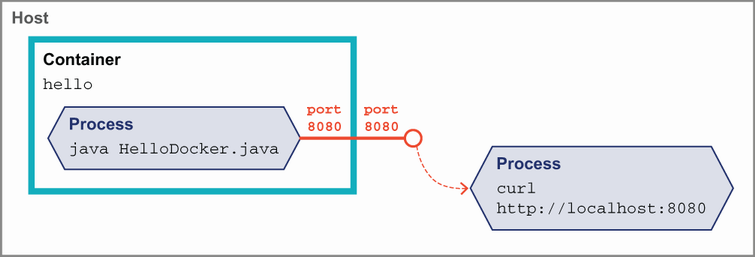 Figure 12.6 Exposing a port in Docker
This figure illustrates the concept of exposing a port in Docker, showing how external access is facilitated through port mapping.
For more details, refer to The Well-Grounded Java Developer, Second Edition.
| Book Title | Usage of port | Technical Depth | Connections to Other Concepts | Examples Used | Practical Application |
|------------|---------------|-----------------|-------------------------------|---------------|-----------------------|
| [Spring Microservices in Action](https://www.manning.com/books/spring-microservices-in-action) | Discusses ports as communication endpoints in microservices, emphasizing security by managing inbound and outbound ports. [more](https://livebook.manning.com/book/spring-microservices-in-action/chapter-7/275) | Explains the importance of securing ports to limit the attack surface and prevent unauthorized access. [more](https://livebook.manning.com/book/spring-microservices-in-action/chapter-7/275) | Connects port management to overall application security and microservices architecture. [more](https://livebook.manning.com/book/spring-microservices-in-action/chapter-7/275) | Provides examples of securing inbound and outbound ports to enhance security. [more](https://livebook.manning.com/book/spring-microservices-in-action/chapter-7/275) | Focuses on practical strategies for securing microservices by managing ports. [more](https://livebook.manning.com/book/spring-microservices-in-action/chapter-7/275) |
| [The Well-Grounded Java Developer, Second Edition](https://www.manning.com/books/the-well-grounded-java-developer-second-edition) | Describes ports in the context of Docker, focusing on enabling communication between host and containerized applications. [more](https://livebook.manning.com/book/the-well-grounded-java-developer-second-edition/chapter-12/144) | Details the use of the `-p` flag and `EXPOSE` directive for port mapping and exposure in Docker. [more](https://livebook.manning.com/book/the-well-grounded-java-developer-second-edition/chapter-12/145) | Links port usage to Docker container deployment and network configuration. [more](https://livebook.manning.com/book/the-well-grounded-java-developer-second-edition/chapter-12/144) | Includes command-line examples demonstrating port mapping and access. [more](https://livebook.manning.com/book/the-well-grounded-java-developer-second-edition/chapter-12/144) | Provides practical guidance on using Docker commands to manage port exposure for containerized applications. [more](https://livebook.manning.com/book/the-well-grounded-java-developer-second-edition/chapter-12/145) |
FAQ (Frequently asked questions)
What is the purpose of ports in Docker?
How can ports be exposed and mapped in Docker?
What does Figure 12.6 in 'The Well-Grounded Java Developer, Second Edition' illustrate?
How does Docker allow external access to container services?
What is the function of the -p flag in Docker?
Why is it important to limit the attack surface of microservices?
How can you limit the attack surface of microservices?
What should be secured to prevent unauthorized data access in microservices?