PostgreSQL in Java
PostgreSQL is a powerful, open-source relational database system that is widely used in Java applications for its robustness and feature-rich capabilities. It is often employed in various contexts, from production environments to integration testing, providing a reliable backend for data storage and management.
PostgreSQL in Microservices Architecture
In the context of microservices, PostgreSQL is often used as a database solution due to its ability to handle complex queries and large datasets efficiently. For instance, in the book Spring Microservices in Action, PostgreSQL is utilized within the EagleEye services, with management facilitated through Amazon RDS (Relational Database Service). This setup involves several steps to ensure the database is properly configured and secured, including selecting the appropriate database type, configuring necessary settings, and managing security and backup options to ensure data integrity and availability.
Setting Up PostgreSQL with Amazon RDS
The creation of a PostgreSQL database within Amazon RDS is a critical step in setting up services like EagleEye. The process begins with selecting PostgreSQL as the database type, followed by configuring various settings that align with the application's requirements. Security measures are also put in place to protect the data, and backup options are configured to prevent data loss. Once the database creation process is initiated, it may take several minutes to complete. After the database is successfully created, it is visible on the RDS dashboard, as depicted in Figure 10.5.
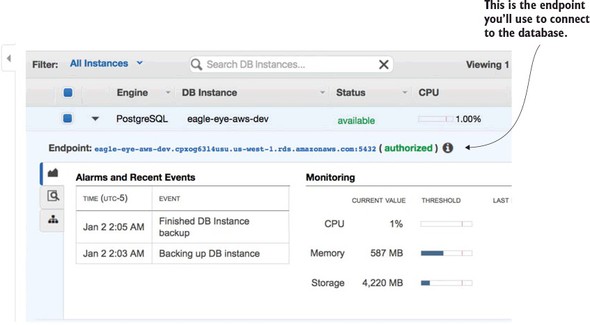
Configuring Services to Connect to PostgreSQL
After setting up the PostgreSQL database, services need to be configured to connect to it. This involves creating a new application profile for each microservice that requires access to the Amazon-based PostgreSQL database. A new Spring Cloud Config server application profile is added to the Spring Cloud Config GitHub repository, containing the necessary Amazon database connection information. This ensures that each microservice can access the new database configuration seamlessly.
PostgreSQL in Testing Environments
PostgreSQL is also extensively used in testing environments, particularly for integration testing. The book The Well-Grounded Java Developer, Second Edition discusses how PostgreSQL can be integrated into Java projects for testing purposes using Testcontainers. Testcontainers provide a convenient way to manage PostgreSQL containers, offering an isolated and controlled environment for database testing.
Dependency Management
To integrate PostgreSQL into a Java project, necessary dependencies must be included in the build configuration. This can be done using Maven or Gradle.
Maven Configuration
For Maven, add the following dependencies to your pom.xml file:
<dependency>
  <groupId>org.postgresql</groupId>
  <artifactId>postgresql</artifactId>
  <version>42.2.1</version>
</dependency>
<dependency>
  <groupId>org.testcontainers</groupId>
  <artifactId>postgresql</artifactId>
  <version>1.15.3</version>
  <scope>test</scope>
</dependency>
Gradle Configuration
For Gradle, include the following in your build.gradle file:
implementation("org.postgresql:postgresql:42.2.1")
testImplementation("org.testcontainers:postgresql:1.15.3")
Using PostgreSQL with Testcontainers
Testcontainers provide a specific class to wrap access to the PostgreSQL container, offering helpers for configuring database information such as the database name and credentials.
Configuring PostgreSQL Container
Here is an example of how to configure a PostgreSQL container using Testcontainers:
public static DockerImageName imageName =
            DockerImageName.parse("postgres:9.6.12");

@Container
public static PostgreSQLContainer postgres =
    new PostgreSQLContainer<>(imageName)
        .withDatabaseName("theater_db")
        .withUsername("theater")
        .withPassword("password");
Establishing a Connection
To interact with the PostgreSQL container, establish a connection using JDBC. The connection parameters are derived from the Testcontainer object:
private static Connection getConnection() throws SQLException {
    String url = String.format(
            "jdbc:postgresql://%s:%s/%s",
            postgres.getHost(),
            postgres.getFirstMappedPort(),
            postgres.getDatabaseName());

    return DriverManager.getConnection(url,
                                        postgres.getUsername(),
                                        postgres.getPassword());
}
Lifecycle Management
Proper lifecycle management of the database container is crucial in a testing environment. This includes applying the necessary schema before the database is usable. While many database migration tools can automate this process, it is also possible to use JDBC directly to apply the schema, ensuring transparency in the setup process.
| Book Title | Usage of postgresql | Technical Depth | Connections to Other Concepts | Examples Used | Practical Application |
|------------|---------------------|-----------------|-------------------------------|---------------|-----------------------|
| [Spring Microservices in Action](https://www.manning.com/books/spring-microservices-in-action) | PostgreSQL is used as the database solution for EagleEye services, managed through Amazon RDS. | Discusses database configuration, security, and backup options. | Connects PostgreSQL with Amazon RDS and Spring Cloud Config. | Provides a step-by-step setup process and configuration examples. | Focuses on setting up and configuring PostgreSQL for microservices. [more](https://livebook.manning.com/book/spring-microservices-in-action/chapter-10/40) |
| [The Well-Grounded Java Developer, Second Edition](https://www.manning.com/books/the-well-grounded-java-developer-second-edition) | PostgreSQL is used for integration testing with Testcontainers. | Covers dependency management and container configuration. | Links PostgreSQL with Testcontainers and Java project dependencies. | Includes code snippets for Maven, Gradle, and Testcontainers setup. | Emphasizes testing environments and lifecycle management. [more](https://livebook.manning.com/book/the-well-grounded-java-developer-second-edition/chapter-14/39) |
FAQ (Frequently asked questions)
What is PostgreSQL?
How is PostgreSQL used in integration testing?
What tool can manage PostgreSQL containers for testing?
What is the Maven dependency for PostgreSQL?
What is the Maven dependency for Testcontainers with PostgreSQL?
What database is used for EagleEye services?
How is the PostgreSQL database managed for EagleEye services?
What does the chapter detail about setting up a PostgreSQL database?
What does Figure 10.5 depict in the context of PostgreSQL?