Profile in Java
In the Java ecosystem, the term "profile" is used in various contexts to manage configurations and optimize application performance. This entry explores the concept of profiles as discussed in Java Persistence with Spring Data and Hibernate, and Spring Microservices in Action.
Profiles in Java Persistence with Spring Data and Hibernate
In the context of Java Persistence with Spring Data and Hibernate, profiles are used to manage fetch strategies and application configurations.
Hibernate Fetch Profiles
A fetch profile in Hibernate is a mechanism that allows developers to override the default lazy fetch plan for specific entity associations and collections. This is particularly useful for enabling eager fetching strategies, such as using a JOIN for a particular unit of work. By defining fetch profiles, you can optimize the performance of your application by reducing the number of SQL queries executed and controlling the data retrieval strategy.
Example Usage
Path: Ch12/profile/src/test/java/com/manning/javapersistence/ch12/profile
 /Profile.java

Item item = em.find(Item.class, ITEM_ID);                                 #1
em.clear();
em.unwrap(Session.class).enableFetchProfile(Item.PROFILE_JOIN_SELLER);    #2
item = em.find(Item.class, ITEM_ID);
em.clear();
em.unwrap(Session.class).enableFetchProfile(Item.PROFILE_JOIN_BIDS);      #3
item = em.find(Item.class, ITEM_ID);
#1 The Item#seller is mapped lazily, so the default fetch plan only retrieves the Item instance.
#2 Fetch the Item#seller with a join in the same SQL statement whenever an Item is loaded with this EntityManager.
#3 Fetch Item#seller and Item#bids with a join in the same SQL statement whenever an Item is loaded.
Spring Boot Application Profiles
In Spring Boot, a profile is a way to segregate parts of your application configuration and make it available only in certain environments. This allows you to switch between different configurations, such as development and production, by specifying profiles in files named application-profilename.properties.
Example Configurations
-
Development Profile (
dev): Uses an in-memory H2 database and displays SQL queries during execution.Path: Ch20/2 spring profiles/src/main/resources /application-dev.properties spring.datasource.url=jdbc:h2:mem:ch20_testing spring.datasource.username=sa spring.datasource.password= spring.jpa.properties.hibernate.dialect=org.hibernate.dialect.H2Dialect spring.jpa.show-sql=true spring.jpa.hibernate.ddl-auto=create -
Production Profile (
prod): Uses a MySQL database and does not display SQL queries to conserve resources.Path: Ch20/2 spring profiles/src/main/resources /application-prod.properties spring.datasource.url= jdbc:mysql://localhost:3306/CH20_TESTING?serverTimezone=UTC spring.datasource.username=root spring.datasource.password= spring.jpa.properties.hibernate.dialect=org.hibernate.dialect.MySQL8Dialect spring.jpa.show-sql=false spring.jpa.hibernate.ddl-auto=create
Switching Profiles
To switch between profiles, you can modify the application.properties file to set the active profile:
Path: Ch20/2 spring profiles/src/main/resources/application.properties

spring.profiles.active=dev
Alternatively, you can use the @ActiveProfiles annotation in your test classes to override the profile set in application.properties.
Testing with Profiles
The following test class demonstrates how to store, update, and retrieve entities using the dev profile:
Path: Ch20/2 spring profiles/src/test/java/com/manning/javapersistence
 /testing/SpringProfilesTest.java

@SpringBootTest
@Transactional
class SpringProfilesTest {

    @Autowired
    private UserRepository userRepository;

    @Test
    void storeUpdateRetrieve() {
        List<User> users = buildUsersList();
        userRepository.saveAll(users);

        assertEquals(getIterations(), userRepository.findAll().size());
    }

}
Execution Result
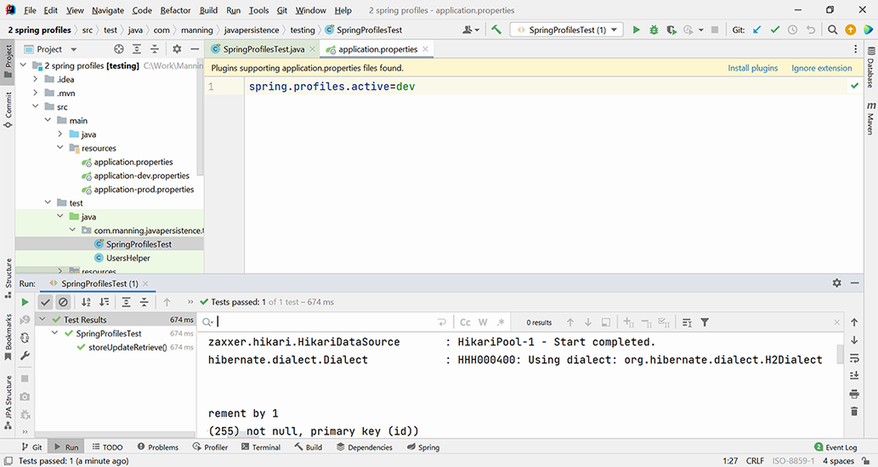 Figure 20.10 The result of running the test on the dev profile, using an H2 database and displaying the execution of the SQL queries
Profiles in Spring Microservices
In Spring Microservices, profiles are used to define environment-specific configurations, allowing applications to load specific configuration properties based on the environment they are running in.
Defining Profiles
Profiles in Spring are defined to manage different configurations for various environments. This is particularly useful in microservices architecture, where different services might need to operate under different configurations depending on the environment they are deployed in.
Example Configuration
Below is an example of how profiles can be configured in a bootstrap.yml file for a licensing service:
spring:
  application:
    name: licensingservice                      #1
  profiles:
    active:
      default                                   #2
  cloud:
    config:
      uri: http://localhost:8888                #3
#1 - Specify the name of the licensing service so that Spring Cloud Config client knows which service is being looked up.
#2 - Specify the default profile the service should run. Profile maps to environment.
#3 - Specify the location of the Spring Cloud Config server.
Overriding Default Profiles
To override default values and point to another environment, you can compile the licensingservice project down to a JAR and run it with a -D system property override. For example, to launch the licensing service with a non-default profile, you can use the following command:
java  -Dspring.cloud.config.uri=http://localhost:8888 \
      -Dspring.profiles.active=dev \
      -jar target/licensing-service-0.0.1-SNAPSHOT.jar
Retrieving Configuration Information
When the licensing service is started, it communicates with the Spring Cloud configuration service to retrieve configuration information. The process involves passing the Spring profile and the endpoint the licensing service should use to communicate with the configuration service. The Spring Cloud Config service retrieves the configuration information specific to the Spring profile value passed in on the URI and returns the appropriate property values to the licensing service. These values are then injected into the application by the Spring Boot framework.
Figures
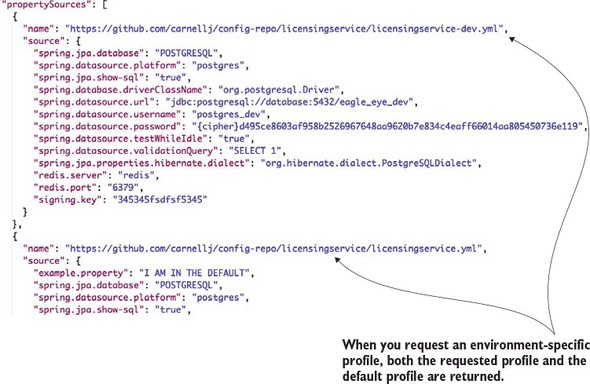 Figure 3.5. Retrieving configuration information for the licensing service using the dev profile
 Figure 3.6. Retrieving configuration information using the dev profile
These figures illustrate the process of retrieving configuration information using the dev profile, highlighting the interaction between the licensing service and the Spring Cloud configuration service.
| Book Title | Usage of Profile | Technical Depth | Connections to Other Concepts | Examples Used | Practical Application |
|------------|------------------|-----------------|-------------------------------|---------------|-----------------------|
| [Java Persistence with Spring Data and Hibernate](https://www.manning.com/books/java-persistence-with-spring-data-and-hibernate) | Discusses fetch profiles in Hibernate for optimizing data retrieval and application profiles in Spring Boot for environment-specific configurations. [more](https://livebook.manning.com/book/java-persistence-with-spring-data-and-hibernate/chapter-12/1) | Detailed explanation of fetch profiles and their impact on SQL execution and performance. [more](https://livebook.manning.com/book/java-persistence-with-spring-data-and-hibernate/chapter-12/1) | Connects fetch profiles to lazy and eager fetching strategies, and application profiles to environment configurations. [more](https://livebook.manning.com/book/java-persistence-with-spring-data-and-hibernate/chapter-12/1) | Provides Java code snippets for fetch profiles and configuration files for Spring Boot profiles. [more](https://livebook.manning.com/book/java-persistence-with-spring-data-and-hibernate/chapter-12/1) | Demonstrates practical use in optimizing database interactions and managing environment-specific settings. [more](https://livebook.manning.com/book/java-persistence-with-spring-data-and-hibernate/chapter-12/1) |
| [Spring Microservices in Action](https://www.manning.com/books/spring-microservices-in-action) | Profiles are used for environment-specific configurations in Spring Cloud, allowing flexible setups for different environments. [more](https://livebook.manning.com/book/spring-microservices-in-action/chapter-3/99) | Explains how profiles manage configurations in microservices, affecting database connections and API endpoints. [more](https://livebook.manning.com/book/spring-microservices-in-action/chapter-3/99) | Links profiles to Spring Cloud Config for managing service configurations across environments. [more](https://livebook.manning.com/book/spring-microservices-in-action/chapter-3/99) | Includes YAML configuration examples and command-line overrides for profile activation. [more](https://livebook.manning.com/book/spring-microservices-in-action/chapter-3/99) | Shows how to retrieve and apply configuration settings in microservices using profiles. [more](https://livebook.manning.com/book/spring-microservices-in-action/chapter-3/99) |
FAQ (Frequently asked questions)
What is a profile in the context of Hibernate?
How do you declare a Hibernate fetch profile?
What does the enableFetchProfile method do in Hibernate?
What is a profile in Spring Boot?
How are Spring Boot profiles specified?
What does Figure 20.10 illustrate in the context of Spring profiles?
How do you activate a Spring profile in the application.properties file?
What is a profile in Spring Cloud configuration?
How are profiles used in Spring Cloud configuration?
How can configuration information be retrieved for a service using a profile?
What is the purpose of a profile in Spring?
How do profiles benefit Spring applications?
What does Figure 3.6 illustrate in the context of Spring profiles?