RowMapper in Spring Framework
In the Spring Framework, the RowMapper interface is a key component used in conjunction with JdbcTemplate to map rows of a ResultSet to instances of a specified model class. This process is essential for converting the data retrieved from a database into objects that can be used within a Java application.
How RowMapper Works
The RowMapper interface provides a single method, mapRow, which is implemented to define how each row of the ResultSet should be mapped to an instance of a model class. This method takes two parameters: the ResultSet and the row number. The ResultSet contains the data retrieved from the database, and the row number indicates the current row being processed.
Example: Mapping to a Purchase Object
Consider the following example where a RowMapper is used to map rows from a ResultSet to Purchase objects:
@Repository
public class PurchaseRepository {

  // Omitted code

  public List<Purchase> findAllPurchases() {              #1
    String sql = "SELECT * FROM purchase";                #2

    RowMapper<Purchase> purchaseRowMapper = (r, i) -> {   #3
      Purchase rowObject = new Purchase();                #4
      rowObject.setId(r.getInt("id"));                    #4
      rowObject.setProduct(r.getString("product"));       #4
      rowObject.setPrice(r.getBigDecimal("price"));       #4
      return rowObject;                                   #4
    };

    return jdbc.query(sql, purchaseRowMapper);            #5
  }
}
- #1: The method returns a list of
Purchaseobjects. - #2: A
SELECTquery is defined to retrieve all records from thepurchasetable. - #3: A
RowMapperis implemented using a lambda expression to map each row to aPurchaseobject. - #4: The data from the
ResultSetis set into a newPurchaseinstance. - #5: The
querymethod ofJdbcTemplateis used to execute the query and map the results.
Example: Mapping to an Account Object
Another example demonstrates mapping rows to Account objects using a class that implements RowMapper:
public class AccountRowMapper
  implements RowMapper<Account> {                      #1

  @Override
  public Account mapRow(ResultSet resultSet, int i)    #2
    throws SQLException {
    Account a = new Account();                         #3
    a.setId(resultSet.getInt("id"));                   #3
    a.setName(resultSet.getString("name"));            #3
    a.setAmount(resultSet.getBigDecimal("amount"));    #3
    return a;                                          #4
  }
}
- #1: The
RowMapperinterface is implemented for theAccountclass. - #2: The
mapRowmethod is overridden to map the current row to anAccountinstance. - #3: The values from the
ResultSetare mapped to theAccountattributes. - #4: The mapped
Accountinstance is returned.
Visual Representation
The process of using RowMapper with JdbcTemplate can be visualized in the following diagram:
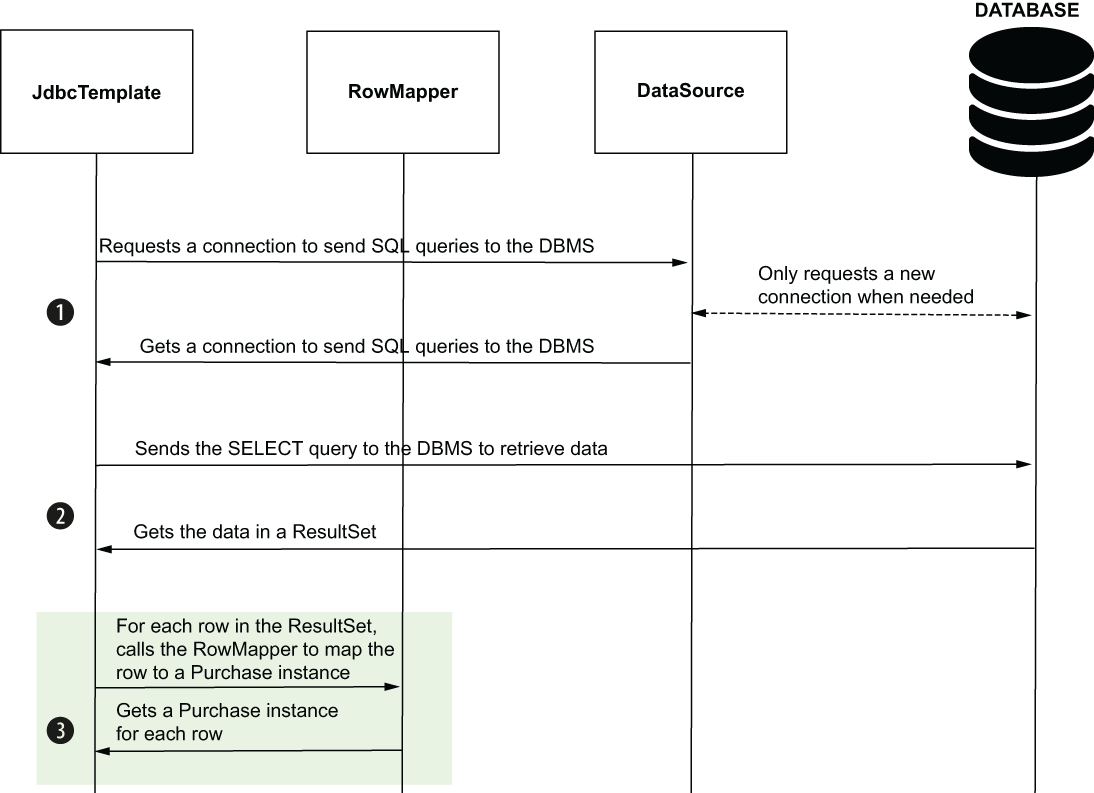 Figure 12.9 JdbcTemplate uses the RowMapper to change the ResultSet to a list of Purchase instances. For each row in the ResultSet, JdbcTemplate calls the RowMapper to map the row to a Purchase instance. The diagram presents all three steps JdbcTemplate follows to send the SELECT query: (1) get a DBMS connection, (2) send the query and retrieve the result, and (3) map the result to Purchase instances.
This figure illustrates the three main steps JdbcTemplate follows to execute a SELECT query and map the results using a RowMapper: obtaining a database connection, executing the query and retrieving the results, and mapping the results to model instances.
FAQ (Frequently asked questions)
What is the role of RowMapper in JdbcTemplate?
What are the steps JdbcTemplate follows to execute a SELECT query?
How does JdbcTemplate select records from a database?
What is the purpose of the RowMapper in the findAllPurchases method?
How is a row mapped to a model object using RowMapper?
What does the mapRow method do in the AccountRowMapper class?