Session Scope in Spring
Overview
Session scope in Spring is a concept that defines the lifecycle of a bean tied to an HTTP session. A session-scoped bean is instantiated once per session and is shared across multiple requests within that session. This allows data to be stored and accessed throughout the session, making it particularly useful for maintaining user-specific data, such as login information, across different requests.
Definition
In a Spring web application, session scope is a bean scope where Spring creates an instance of the bean per HTTP session of the client. This means that multiple requests from the same client can share the same instance of the bean. However, developers must consider concurrency issues if requests are made concurrently within the same session.
Creating a Session-Scoped Bean
Creating a session-scoped bean in Spring is straightforward with the use of the @SessionScope annotation. Below is an example of how to define a session-scoped bean to manage logged user details:
Listing 9.5 Defining a session-scoped bean to keep the logged user details
@Service                                    // #1
@SessionScope                               // #2
public class LoggedUserManagementService {

  private String username;

  // Omitted getters and setters
}
// #1 We add the @Service stereotype annotation to instruct Spring to manage this class as a bean in its context.
// #2 We use the @SessionScope annotation to change the scope of the bean to session.
In this example, the LoggedUserManagementService class is annotated with @SessionScope, indicating that its instance should be tied to the HTTP session. The username attribute can be used to store the logged-in user's name, which will be accessible throughout the session.
Usage and Benefits
When a user logs into a web application, they expect the application to remember their login status as they navigate through different pages. A session-scoped bean facilitates this by maintaining user-specific data across multiple requests within the same session. This is particularly useful for implementing features like user authentication and authorization.
Figures
 Figure 9.8 The session-scoped bean is used to keep a bean in the context throughout the client’s full HTTP session. Spring creates an instance of a session-scoped bean for each HTTP session a client opens. The client accesses the same instance for all the requests sent through the same HTTP session. Each user has their own session and accesses different instances of the session-scoped bean.
 Figure 9.9 A comparison between the request-scoped and session-scoped beans to help you visualize the differences between these two web bean scopes. You use request-scoped beans when you want Spring to create a new instance for each request. You use a session-scoped bean when you want to keep the bean (together with any details it holds) throughout the client’s HTTP session.
Example Use Case
In a typical login flow, when a user submits their credentials, the application checks their validity. If the credentials are correct, the username is stored in a session-scoped bean, and the user is redirected to the main page. If the credentials are invalid, the user is redirected back to the login page with an error message.
 Figure 9.11 The login flow implemented in the example. When the user submits their credentials, the login process begins. If the user's credentials are correct, the username is stored in the session-scoped bean, and the app redirects the user to the main page. If the credentials are not valid, the app redirects the user back to the login page and displays a failed login message.
To ensure that only authenticated users can access certain pages, a controller can check if the LoggedUserManagementService bean contains a username. If not, the user is redirected to the login page.
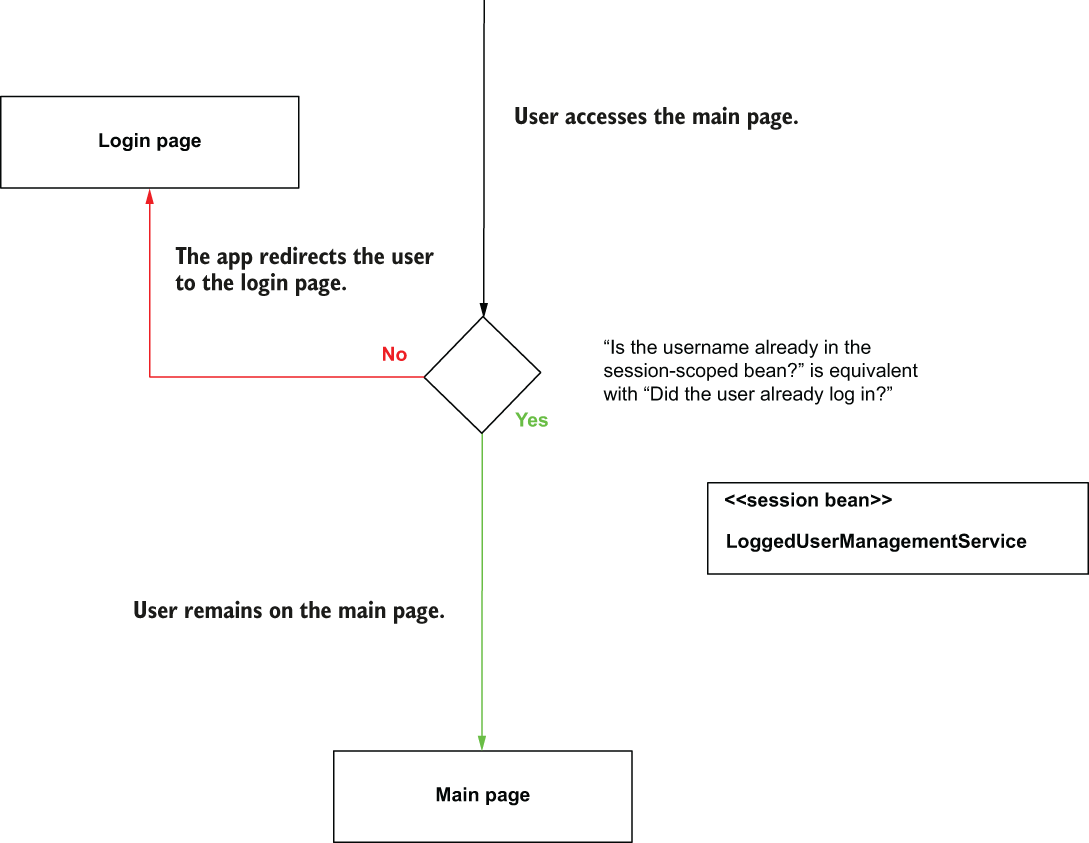 Figure 9.12 Someone can access the main page only after they are authenticated. When the app authenticates the user, it stores the username in the session-scoped bean. This way, the app knows the user had already logged in. When someone accesses the main page, and the username is not in the session-scoped bean (they did not authenticate), the app redirects them to the login page.
FAQ (Frequently asked questions)
What is session scope in Spring?
How often is a session-scoped bean created in Spring?
Can a session-scoped bean be shared across multiple requests?
What is the benefit of using session scope in Spring?
What is the session scope in a Spring web application?
How does session scope affect multiple requests from the same client?
What should be considered when using session scope with concurrent requests?