Testcontainers
Testcontainers is a powerful library designed to facilitate the management of containerized dependencies for testing purposes. It provides a straightforward API that allows developers to control containers directly from their test code, making it easier to create realistic testing environments without the need for complex setup processes. Testcontainers supports a wide variety of modules for common services, enabling developers to test their applications against real instances of databases, message brokers, and other services.
Installation
To use Testcontainers in your project, you need to add the org.testcontainers:testcontainers dependency. This can be done by including the following Maven dependency in your pom.xml file:
<dependency>
  <groupId>org.testcontainers</groupId>
  <artifactId>testcontainers</artifactId>
  <version>1.15.3</version>
  <scope>test</scope>
</dependency>
Alternatively, if you are using Gradle, you can add the equivalent dependency to your build.gradle file.
Features and Usage
Container Management
Testcontainers provides an API to manage the lifecycle of containers, allowing you to start, stop, and configure containers as needed for your tests. This is particularly useful for integration testing, where you need to ensure that your application interacts correctly with external services.
Example with Redis
One of the practical applications of Testcontainers is testing interactions with Redis. By spinning up a Redis container, you can test classes like CachedPrice to verify caching behavior. This approach ensures that your tests are run against a real Redis instance, providing more accurate and reliable results.
Example with Postgres
Testcontainers also supports integration testing with Postgres. By using a PostgreSQLContainer, you can manage the database lifecycle, configure the database name and credentials, and apply schema using JDBC. This setup allows you to run tests against a real Postgres database, ensuring that your application behaves as expected in a production-like environment.
End-to-End Testing with Selenium
For end-to-end testing, Testcontainers can be used to spin up a browser inside a container. By using a BrowserWebDriverContainer, you can configure a browser instance and perform tests that navigate to web pages and inspect results. This is particularly useful for testing web applications in a controlled and isolated environment.
Gathering Container Logs
Testcontainers provides the capability to access STDOUT and STDERR from containers. By using a Consumer<> interface, you can capture logs and write them to a file for later inspection. This feature provides valuable visibility into container operations during tests, helping you diagnose issues and understand the behavior of your application.
Execution
The execution of Testcontainers involves setting up the necessary containers, running the tests, and then tearing down the containers. This process is illustrated in the following figure:
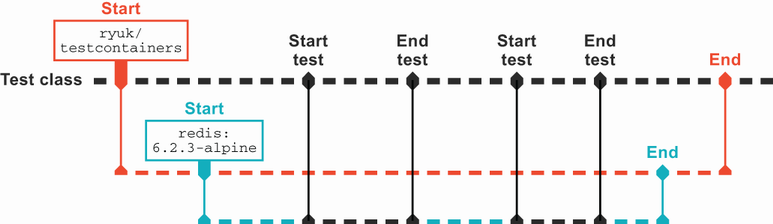 Figure 14.1 Testcontainers execution
By leveraging Testcontainers, developers can create robust and reliable tests that simulate real-world scenarios, ultimately leading to higher quality software.
FAQ (Frequently asked questions)
What is Testcontainers?
What does Testcontainers support?
How do you install Testcontainers?
What is the Maven dependency for Testcontainers?
How does Testcontainers integrate with test code?
How can Testcontainers be used with Redis?
What class is tested using Testcontainers with Redis?
How can you access container logs with Testcontainers?
Why is capturing container logs useful in Testcontainers?
How does Testcontainers support integration testing with Postgres?
How can Testcontainers be used for end-to-end testing with Selenium?
What dependencies are required for end-to-end testing with Selenium and Testcontainers?