Travis CI
Overview
Travis CI, commonly referred to as Travis, is a widely-used build engine that integrates seamlessly with GitHub to support continuous integration and deployment processes. Its popularity stems from its simplicity and ease of use, which is largely facilitated by the configuration file .travis.yml located in the root directory of a project. This file dictates the build and deployment instructions for the project.
In addition to the build engine, Travis also refers to the Travis CI command-line tool. This tool provides developers with the capability to interact programmatically with the Travis CI service. It allows for actions such as encrypting environment variables, triggering builds, and retrieving build information, thereby enhancing the automation and management of the CI/CD pipeline.
Anatomy of the .travis.yml Build
The .travis.yml file is the cornerstone of configuring Travis CI for a project. Below is an example of a typical .travis.yml file used for a Java project:
language: java                                                #1
jdk:
  - oraclejdk8
cache:
  directories:
    - "$HOME/.m2"
sudo: required
services:
  - docker
notifications:                                                #1
  email:
  - youremail@gmail.com
  on_success: always
  on_failure: always
branches:                                                     #1
  only:
    - master
env:                                                          #1
  global:
  # Remove for conciseness
before_install:                                               #2
  - gem install travis -v 1.8.5 --no-rdoc --no-ri
  - sudo curl -o /usr/local/bin/ecs-cli https://s3.amazonaws.com/amazon-ecs-cli/ecs-cli-linux-amd64-latest
  - sudo chmod +x /usr/local/bin/ecs-cli
  - export BUILD_NAME=chapter10-$TRAVIS_BRANCH-$(date -u "+%Y%m%d%H%M%S")-$TRAVIS_BUILD_NUMBER
  - export CONTAINER_IP=52.53.169.60
  - export PLATFORM_TEST_NAME="chapter10-platform-tests"
script:
  - sh travis_scripts/tag_build.sh                            #3
  - sh travis_scripts/build_services.sh                       #4
  - sh travis_scripts/deploy_to_docker_hub.sh                 #5
  - sh travis_scripts/deploy_amazon_ecs.sh                    #6
  - sh travis_scripts/trigger_platform_tests.sh               #7
#1 - (3) Sets up the core run-time configuration for the build
#2 - (4) Executes pre-build installations of needed command-line tools
#3 - (5) Executes a shell script that will tag the source code with the build name
#4 - (6) Builds the servers and local Docker images using Maven
#5 - (7) Pushes the Docker images to Docker Hub
#6 - (8) Starts the services in an Amazon ECS container
#7 - (9) Triggers a Travis build that execute the platform tests for the build services
Key Components
- Language and JDK: Specifies the programming language and the Java Development Kit version to be used.
- Caching: Caches the Maven dependencies to speed up the build process.
- Services: Indicates that Docker is required for the build.
- Notifications: Configures email notifications for build success or failure.
- Branches: Limits the build to the master branch.
- Environment Variables: Sets global environment variables for the build.
- Before Install: Installs necessary command-line tools and sets up environment variables.
- Script: Executes a series of shell scripts to tag the build, build services, deploy to Docker Hub, deploy to Amazon ECS, and trigger platform tests.
Build and Deployment Process
The build and deployment process defined in the .travis.yml file involves several concrete steps, as illustrated in Figure 10.17. These steps include tagging the source code, building Docker images, deploying to Docker Hub and Amazon ECS, and running platform tests.
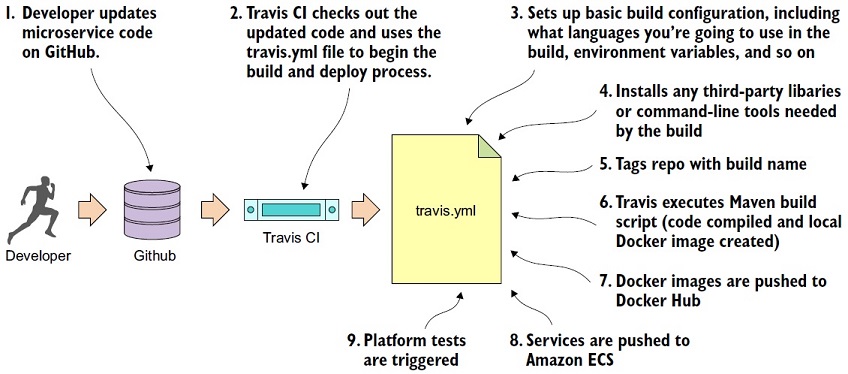 Figure 10.17. The concrete steps undertaken by the .travis.yml file to build and deploy your software
Once the deployment of the services is complete, the build process initiates a separate Travis CI project to run platform tests against the development environment, ensuring the integrity and functionality of the deployed services.
FAQ (Frequently asked questions)
How is Travis CI configured?
What is Travis CI?
Why is Travis CI known for its simplicity?
What is the Travis CI command-line tool used for?
How can developers interact with Travis CI programmatically?
What functionalities does the Travis CI command-line tool provide?