Travis CI
Overview
Travis CI is a cloud-based continuous integration (CI) service that is widely used for building and testing software projects hosted on platforms like GitHub. It automates the process of running tests and deploying applications, which helps developers detect issues early and maintain code quality. Travis CI is particularly known for its seamless integration with GitHub, making it a popular choice for open-source projects and private repositories alike.
The service is driven by a single configuration file, .travis.yml, located in the root directory of the project. This file defines the build and deployment pipeline, specifying the programming language, environment, and various scripts to be executed during the CI process. Travis CI supports multiple version control systems, including GitHub, Subversion, and Mercurial.
Usage in Microservices
In the context of microservices, Travis CI is used to build and deploy services efficiently. For instance, in the EagleEye microservices project, Travis CI is employed as the continuous integration engine. It integrates well with Docker, allowing for the provisioning of Docker images that can be deployed across different environments.
Anatomy of the .travis.yml Build
The .travis.yml file is the cornerstone of the Travis CI configuration. Below is an example of a .travis.yml file used in a Java project:
language: java                                                #1
jdk:
  - oraclejdk8
cache:
  directories:
    - "$HOME/.m2"
sudo: required
services:
  - docker
notifications:                                                #1
  email:
  - youremail@gmail.com
  on_success: always
  on_failure: always
branches:                                                     #1
  only:
    - master
env:                                                          #1
  global:
  # Remove for conciseness
before_install:                                               #2
  - gem install travis -v 1.8.5 --no-rdoc --no-ri
  - sudo curl -o /usr/local/bin/ecs-cli https://s3.amazonaws.com/amazon-ecs-cli/ecs-cli-linux-amd64-latest
  - sudo chmod +x /usr/local/bin/ecs-cli
  - export BUILD_NAME=chapter10-$TRAVIS_BRANCH-$(date -u "+%Y%m%d%H%M%S")-$TRAVIS_BUILD_NUMBER
  - export CONTAINER_IP=52.53.169.60
  - export PLATFORM_TEST_NAME="chapter10-platform-tests"
script:
  - sh travis_scripts/tag_build.sh                            #3
  - sh travis_scripts/build_services.sh                       #4
  - sh travis_scripts/deploy_to_docker_hub.sh                 #5
  - sh travis_scripts/deploy_amazon_ecs.sh                    #6
  - sh travis_scripts/trigger_platform_tests.sh               #7
#1 - (3) Sets up the core run-time configuration for the build
#2 - (4) Executes pre-build installations of needed command-line tools
#3 - (5) Executes a shell script that will tag the source code with the build name
#4 - (6) Builds the servers and local Docker images using Maven
#5 - (7) Pushes the Docker images to Docker Hub
#6 - (8) Starts the services in an Amazon ECS container
#7 - (9) Triggers a Travis build that execute the platform tests for the build services
Key Components
- Language and JDK: Specifies the programming language and the Java Development Kit version.
- Cache: Caches directories to speed up the build process.
- Services: Lists services like Docker that are required for the build.
- Notifications: Configures email notifications for build success or failure.
- Branches: Specifies which branches to build.
- Environment Variables: Sets global environment variables for the build.
- Before Install: Executes commands before the installation phase, such as installing necessary tools.
- Script: Contains the sequence of shell scripts to execute during the build process.
Build and Deployment Process
The build and deployment process in Travis CI involves several steps, as illustrated in the following figure:
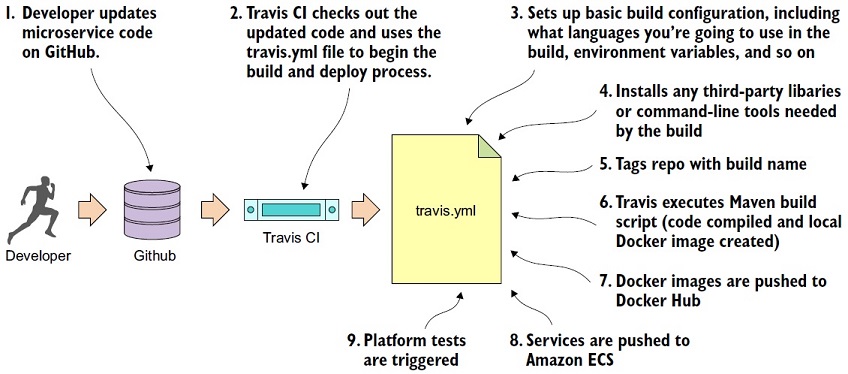 Figure 10.17. The concrete steps undertaken by the .travis.yml file to build and deploy your software
- Tagging the Build: The source code is tagged with a build name.
- Building Services: The servers and Docker images are built using Maven.
- Deploying to Docker Hub: The Docker images are pushed to Docker Hub.
- Deploying to Amazon ECS: The services are started in an Amazon ECS container.
- Triggering Platform Tests: A separate Travis CI project is initiated to run platform tests against the development environment.
By automating these steps, Travis CI ensures a consistent and reliable build and deployment process, enhancing the overall efficiency of software development projects.
FAQ (Frequently asked questions)
What is Travis CI used for in the context of EagleEye microservices?
How does Travis CI integrate with other tools?
What is the role of Travis CI in building and deploying pipelines?
What configuration file does Travis CI use?
Which version control systems does Travis CI support?
What is the purpose of Travis CI in software projects?
How does Travis CI help developers?
What does Figure 10.17 illustrate in the context of Travis CI?
What is the purpose of the .travis.yml file in Travis CI?
What programming language is specified in the .travis.yml file?
What services are required in the .travis.yml configuration?
What does the 'before_install' section in .travis.yml do?
What is the purpose of the 'script' section in the .travis.yml file?