User Registration in the Course Tracker Application
User registration in the Course Tracker application is a crucial feature that allows new users to create accounts and access the application's functionalities. This process involves several components, including a user registration HTML page, a data transfer object (DTO) for capturing user details, and a mechanism for persisting these details in the database. Additionally, the registration process includes validation, password encoding, and integration with Spring Security for secure login.
User Registration Page
The user registration page is the interface where users enter their details to create a new account. This page captures basic user information, which is then saved into the CT_USERS table. Figure 6.2 illustrates the user registration page.
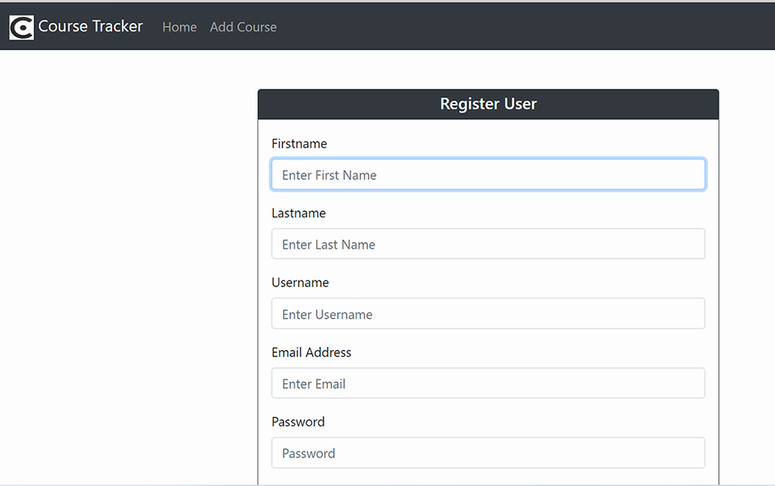 Figure 6.2 User registration page. This page contains basic user details, which are saved into the CT_USERS table.
Registration Process
The registration process begins when a user accesses the registration page via the /adduser endpoint. This is managed by the RegistrationController, as shown in Listing 6.13.
Listing 6.13 RegistrationController
package com.manning.sbip.ch06.controller;

//imports

@Controller
public class RegistrationController {

    @Autowired
    private UserService userService;
    @GetMapping("/adduser")
    public String register(Model model) {             #1
        model.addAttribute("user", new UserDto());
        return "add-user";
    }

    @PostMapping("/adduser")
    public String register(@Valid @ModelAttribute("user") UserDto userDto,
➥ BindingResult result) {                            #2
        if(result.hasErrors()) {
            return "add-user";
        }
        userService.createUser(userDto);
        return "redirect:adduser?success";
    }
}
- GET Endpoint: The
adduserHTTP GET endpoint returns theadd-user.htmlpage and initializes an emptyUserDtoobject to bind the data entered by the user. - POST Endpoint: The
adduserHTTP POST endpoint handles the form submission. It validates theUserDtoobject to ensure all required fields are filled. If validation fails, the user is returned to the registration page with error messages. If successful, the user details are persisted in theCT_USERStable.
Email Verification
After a user submits their registration details, the application sends a verification email containing a link to activate the account. This step ensures that the email address provided is valid and belongs to the user. The account remains disabled until the user clicks the verification link, completing the registration process.
Security and Persistence
The application uses Spring Security to manage user authentication and password encoding. Once a user successfully registers and verifies their email, their details, including an encoded password, are stored securely in the CT_USERS table. This ensures that user credentials are protected and that only verified users can access the application.