Accessing in JavaScript
Accessing properties and elements in JavaScript is a fundamental concept that allows developers to interact with objects and arrays effectively. This page provides an overview of how to access object properties and array elements using JavaScript.
Accessing Object Properties
In JavaScript, objects are collections of key-value pairs, where each key is a string (or Symbol) and each value can be any data type. To access the values of an object's properties, you can use dot notation. This method involves joining the name of the variable to the name of the property with a period or dot. For example, if you have an object representing a first-aid kit, you might access its properties like this:
kit.antiseptickit.scissorskit.bandages
Similarly, for a book object, to access the author property, you would write:
book.author
This method is straightforward and helps manage program complexity by treating objects as single entities until specific details are needed.
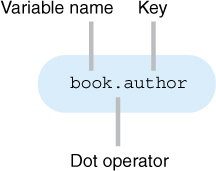 Figure 3.4. Accessing object properties using dot notation
When an object is passed to a function, JavaScript assigns it to the parameter in the function's definition, enabling access to its properties. The function can then read, modify, or add new properties to the object, allowing for dynamic manipulation of data.
Accessing Array Elements
Arrays in JavaScript are ordered collections of elements, and each element can be accessed using an index. The index is a whole number starting from 0, representing the position of the element in the array. To access an element in an array, you use square brackets with the index of the element you want to retrieve. For example:
array[0]accesses the first element of the array.array[1]accesses the second element, and so on.
This method allows for efficient retrieval and manipulation of data stored in arrays, making it a powerful tool for handling lists and collections in JavaScript.
FAQ (Frequently asked questions)
How do you access object properties in JavaScript?
Why is dot notation useful in JavaScript?
What is an example of using dot notation to access object properties in JavaScript?
How can a function access properties of an object argument in JavaScript?
What can a function do with an object argument's properties in JavaScript?
How do you access elements in a JavaScript array?
What does the index represent when accessing array elements in JavaScript?