Adding Tax in JavaScript
Overview
A common task in programming is to add tax to a price to calculate the total cost. This involves calculating the tax amount and adding it to the original price. The process is often repeated in programs, making it a prime candidate for function use. By encapsulating the tax calculation in a function, you can easily reuse the logic across different parts of your application, ensuring consistency and reducing the potential for errors.
Functions for Adding Tax
In JavaScript, you can create functions to handle the tax calculation and display the sale details. For instance, you might have a calculateTax function to compute the tax amount based on a given rate and a displaySale function to show the details of each transaction, including the original price, tax amount, and total cost.
Example Program
The following listing demonstrates a program that adds tax for three different transactions. The program uses the multiplication (*) and division (/) operators to perform the necessary calculations.
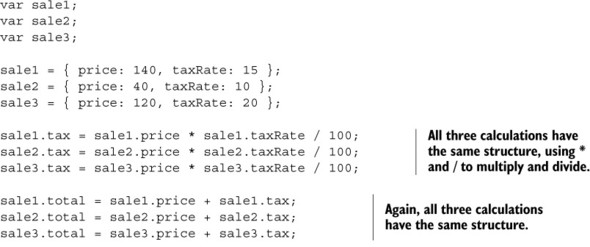 Listing 4.3. Adding tax to find the total cost (http://jsbin.com/kawocu/edit?js,console)
In this example, the program calculates the tax for each transaction and adds it to the original price to determine the total cost. This approach ensures that the tax is consistently applied across all transactions, making it easier to manage and update if the tax rate changes.
FAQ (Frequently asked questions)
What is a common task in programming related to prices?
How is the total cost calculated when adding tax?
Why is adding tax a good candidate for function use in programming?
What does Listing 4.12 demonstrate in the book?
Which functions are used to handle tax calculation and sale display?