addMessage Function
The addMessage function is a utility function in JavaScript used to dynamically add messages to a web page. It achieves this by creating a new list item (li) element, setting its text content to the specified message, and appending it to a given parent element in the Document Object Model (DOM).
Function Definition
The addMessage function is defined as follows:
function addMessage(element, message){
  var messageElement = document.createElement("li");
  messageElement.textContent = message;
  element.appendChild(messageElement);
}
Explanation
- Creating a List Item: The function begins by creating a new
lielement usingdocument.createElement("li"). - Setting Text Content: It then sets the text content of this new element to the provided
messageusingmessageElement.textContent = message. - Appending to Parent: Finally, the newly created list item is appended to the specified parent element using
element.appendChild(messageElement).
Usage Example
The addMessage function is typically used in a script to add messages to a specific part of a web page. Here is an example of how it can be used:
var first = document.getElementById("first");
addMessage(first, "Page loading");
In this example, the addMessage function is called with two arguments: a reference to a DOM element with the ID first, and the message "Page loading". This results in a new list item with the text "Page loading" being added to the element with the ID first.
Visual Representation
The following figure illustrates the state of the DOM after executing the JavaScript code that includes the addMessage function:
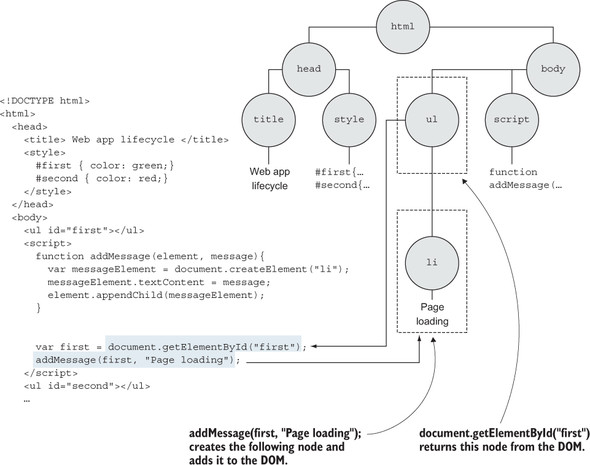 Figure 2.7. The DOM of the page after executing the JavaScript code contained in the script element
This figure shows how the DOM is modified by the addMessage function, with a new li element added to the specified parent element.