Arrays in JavaScript
Arrays in JavaScript are fundamental data structures that allow developers to store and manage collections of data. They are versatile and come with a variety of methods and properties that make them powerful tools for data manipulation and management.
Overview
Arrays are a type of object in JavaScript that can store ordered lists of elements. These elements can be of any data type, including numbers, strings, objects, or even other arrays. Arrays are created using square brackets [] or the Array constructor, and they have a length property that indicates the number of elements they contain. Arrays support a variety of methods for adding, removing, and manipulating items, making them a fundamental part of JavaScript programming.
Creating Arrays
Arrays can be created using two main approaches: array literals and the Array constructor.
Array Literals
Array literals provide a concise way to create arrays using square brackets []. For example:
const ninjas = ['Kuma', 'Hattori', 'Yagyu'];
Array Constructor
The Array constructor is another method to create arrays in JavaScript. However, using array literals is generally preferred for simplicity and reliability:
const samurai = new Array('Oda', 'Tomoe');

Accessing Elements
To access elements in an array, use square brackets with the index of the element you want to retrieve. Array indices are zero-based, meaning the first element is at index 0. For example, to access the third element in the scores array, you would use:
scores[2]
Manipulating Arrays
Adding and Removing Items
- Adding Items: Use
pushto add items to the end of an array andunshiftto add items to the beginning. - Removing Items: Use
popto remove items from the end of an array andshiftto remove items from the beginning. - Splice Method: The
splicemethod allows for adding or removing items at any location within an array.
Mapping Arrays
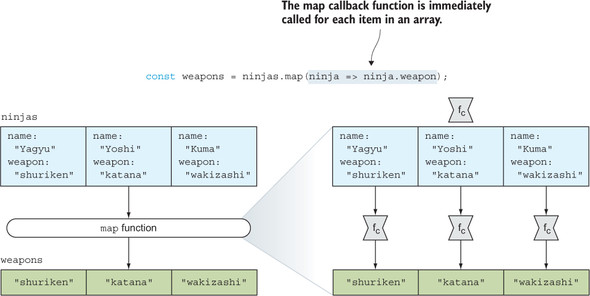
Mapping is a common operation where each item from one array is transformed into a new item in a new array. JavaScript provides the map function for this purpose.
const ninjas = [
  {name: "Yagyu", weapon: "shuriken"},
  {name: "Yoshi", weapon: "katana"},
  {name: "Kuma", weapon: "wakizashi"}
];

const weapons = ninjas.map(ninja => ninja.weapon);
Testing Arrays
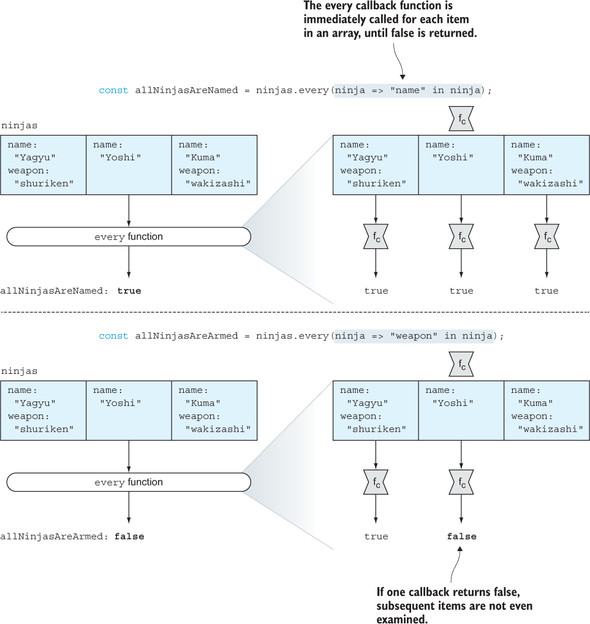
JavaScript arrays have built-in methods like every and some to test whether all or some items in an array satisfy certain conditions.
const ninjas = [
  {name: "Yagyu", weapon: "shuriken"},
  {name: "Yoshi" },
  {name: "Kuma", weapon: "wakizashi"}
];

const allNinjasAreNamed = ninjas.every(ninja => "name" in ninja);
const allNinjasAreArmed = ninjas.every(ninja => "weapon" in ninja);
Advanced Features
Flat API
The flat API is a powerful feature of arrays that enables the flattening of nested arrays into a single, continuous array. This is particularly useful when dealing with multi-dimensional arrays or arrays containing other arrays.
FlatMap API
The flatMap API is an extension of the map operation, combining it with the flat operation to provide a more streamlined approach to handling arrays.
Streamable Arrays
Streamable arrays introduce a novel concept by extending traditional arrays to support push semantics. This is achieved by using an internal EventEmitter to fire events whenever a new value is added to the array.
Searching Arrays
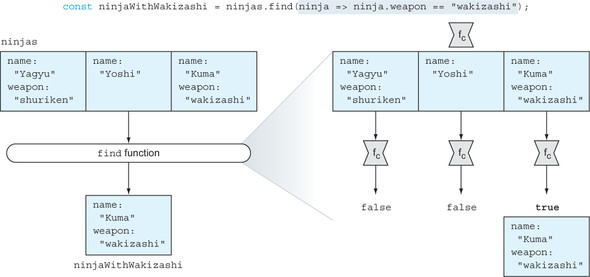
The find method is used to locate a specific item in an array that satisfies a given condition. If no such item is found, it returns undefined.
const ninjaWithWakizashi = ninjas.find(ninja => {
  return ninja.weapon === "wakizashi";
});
Finding Array Indexes
To find the index of a particular item, the indexOf and lastIndexOf methods are used. The findIndex method can also be used to find the index of an item that satisfies a specific condition.
const ninjas = ["Yagyu", "Yoshi", "Kuma", "Yoshi"];

assert(ninjas.indexOf("Yoshi") === 1, "Yoshi is at index 1");
assert(ninjas.lastIndexOf("Yoshi") === 3, "and at index 3");
Arrays in JavaScript are powerful tools for managing collections of data, offering a wide range of methods for creation, manipulation, and searching. For more detailed information, you can refer to the Secrets of the JavaScript Ninja, Second Edition, Get Programming with JavaScript, Designing Scalable JavaScript Applications, and The Joy of JavaScript.
| Book Title | Usage of array | Technical Depth | Connections to Other Concepts | Examples Used | Practical Application |
|------------|----------------|-----------------|-------------------------------|---------------|-----------------------|
| [Secrets of the JavaScript Ninja, Second Edition](https://www.manning.com/books/secrets-of-the-javascript-ninja-second-edition) | Discusses array creation, manipulation, and methods like `push`, `pop`, `map`, `find`, and `splice`. | Covers array expansion, mapping, testing, and searching with methods like `every`, `some`, and `findIndex`. | Connects arrays to concepts like object manipulation and callback functions. | Provides detailed examples with assertions to demonstrate array operations. | Emphasizes practical use cases like managing collections of data. [more](https://www.manning.com/books/secrets-of-the-javascript-ninja-second-edition) |
| [Get Programming with JavaScript](https://www.manning.com/books/get-programming-with-javascript) | Introduces arrays as ordered lists and covers basic operations like adding, removing, and iterating. | Focuses on fundamental array methods such as `push`, `pop`, `splice`, and `slice`. | Links arrays to iteration and data management concepts. | Uses simple examples to illustrate array creation and manipulation. | Highlights efficient data handling and manipulation. [more](https://www.manning.com/books/get-programming-with-javascript) |
| [Designing Scalable JavaScript Applications](https://www.manning.com/books/designing-scalable-javascript-applications) | Explores array creation, sorting, and aggregation with methods like `sort` and `reduce`. | Discusses advanced array operations like sorting and reducing. | Connects arrays to scalable application design and data aggregation. | Provides examples of sorting and finding array items. | Focuses on scalable data handling and aggregation. [more](https://www.manning.com/books/designing-scalable-javascript-applications) |
| [The Joy of JavaScript](https://www.manning.com/books/the-joy-of-javascript) | Covers advanced array features like flattening and streamable arrays. | Explores the flat and flatMap APIs for handling nested arrays. | Connects arrays to stream processing and real-time data updates. | Demonstrates flattening and streamable array operations. | Applies arrays in real-time data scenarios and stream processing. [more](https://www.manning.com/books/the-joy-of-javascript) |
FAQ (Frequently asked questions)
What does the flat API do in JavaScript arrays?
Can the flat API handle infinite depth in arrays?
Does the flat API affect nonarray objects or empty slots?
What is the purpose of the flatMap API in JavaScript arrays?
Why are arrays considered pull data structures?
What are streamable arrays?
How do streamable arrays behave like a stream?
What are arrays in JavaScript?
How can arrays be created in JavaScript?
What property do arrays have in JavaScript?
What operations can be performed on arrays in JavaScript?
How can arrays be sorted in JavaScript?
What does the sort method in JavaScript arrays require?
How does the callback function in the sort method work?
What is the reduce method used for in JavaScript arrays?
How does the reduce method work?
What is an array in JavaScript?
What types of elements can be stored in a JavaScript array?
How do you create an array in JavaScript?
What actions can you perform on elements in a JavaScript array?
How do you create an array using square brackets in JavaScript?
Can you provide examples of arrays in JavaScript?
How do you access elements in a JavaScript array?
How do you access the third element in a JavaScript array?
How do you create and assign an array to a variable in JavaScript?
What are arrays in JavaScript used for?
What built-in methods do JavaScript arrays have?
What methods does JavaScript provide for working with arrays?
How can you manipulate elements within a JavaScript array?
What does the slice method do in JavaScript arrays?
What does the splice method do in JavaScript arrays?