Arrow Function in JavaScript
Arrow functions, introduced in ECMAScript 6 (ES6), offer a concise and elegant syntax for writing functions in JavaScript. They are also known as lambda expressions and provide a succinct alternative to traditional anonymous functions. Arrow functions are particularly useful in functional programming, as they encourage the use of functions as first-class citizens and support the concept of returning values directly from expressions.
Syntax and Definition
Arrow functions are defined using the => syntax, which eliminates the need for the function keyword, braces, and return statements in simple cases. The basic structure of an arrow function can be seen in the following figure:
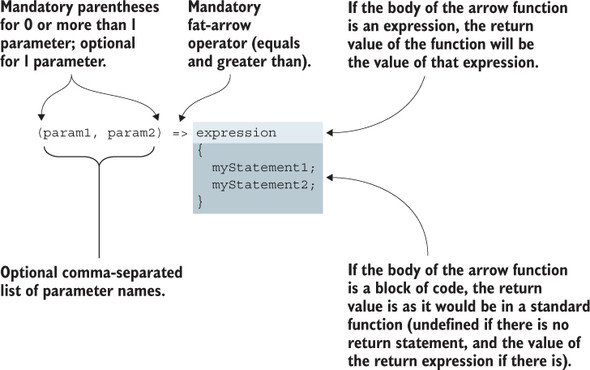 Figure 3.6. The syntax of an arrow function
The arrow function definition starts with an optional comma-separated list of parameter names. If there are no parameters, or more than one parameter, this list must be enclosed within parentheses. However, if there is only a single parameter, the parentheses are optional. This list of parameters is followed by a mandatory fat-arrow operator (=>), which indicates that the function is an arrow function.
Example
A simple example of an arrow function is:
() => console.log('Hello, World!');
This arrow function takes no parameters and logs "Hello, World!" to the console.
Comparison with Function Expressions
Arrow functions provide a more succinct syntax compared to traditional function expressions. Consider the following comparison:
var greet = name => "Greetings " + name;                  // A
assert(greet("Oishi") === "Greetings Oishi", "Oishi is properly greeted");

var anotherGreet = function(name){                        // B
  return "Greetings " + name;                             // B
};                                                        // B
assert(anotherGreet("Oishi") === "Greetings Oishi",
       "Again, Oishi is properly greeted");
// A - Defines an arrow function
// B - Defines a function expression
In this example, the arrow function greet is more concise than the equivalent function expression anotherGreet.
Context and this Binding
One of the key features of arrow functions is their handling of the this keyword. Unlike regular functions, arrow functions do not have their own this value. Instead, they inherit this from the surrounding lexical context. This makes them particularly useful for callback functions, where maintaining the correct this context can be challenging.
Example: Callback Context
Consider the following example, which demonstrates using arrow functions to handle callback function contexts:
<button id="test">Click Me!</button>
<script>
  function Button(){                                             // B
    this.clicked = false;
    this.click = () => {                                         // C
      this.clicked = true;
      assert(button.clicked,"The button has been clicked");      // D
    };
  }
  var button = new Button();
  var elem = document.getElementById("test");                    // E
  elem.addEventListener("click", button.click);                  // E
</script>
In this example, the arrow function click is used as an event handler for a button click. Because it is defined within the Button constructor, it inherits the this value from the Button instance, allowing it to correctly update the clicked state.
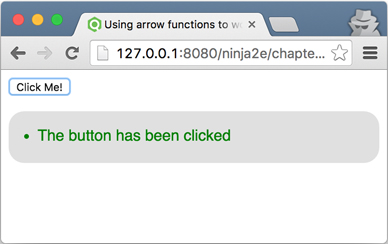 Figure 4.6. Arrow functions don’t have their own context. Instead, the context is inherited from the function in which they’re defined. The this parameter in our arrow function callback refers to the button object.
Pitfalls: Global Context
However, if an arrow function is defined within an object literal in global code, it will inherit the global this value, which can lead to unexpected behavior. This is illustrated in the following example:
<button id="test">Click Me!</button>
<script>
  assert(this === window, "this === window");                        // A
  var button = {                                                     // B
    clicked: false,
    click: () => {                                                   // C
      this.clicked = true;
      assert(button.clicked,"The button has been clicked");          // D
      assert(this === window, "In arrow function this === window");  // E
      assert(window.clicked, "clicked is stored in window");         // F
    }
  }

  var elem = document.getElementById("test");
  elem.addEventListener("click", button.click);
</script>
In this case, the click arrow function is defined as a property of an object literal in global code, causing this to refer to the global window object, rather than the button object.
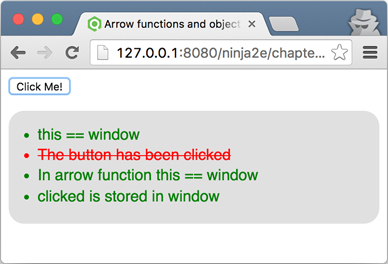 Figure 4.7. If an arrow function is defined within an object literal that’s defined in global code, the value of the this parameter associated with the arrow function is the global window object.
Functional Programming and Arrow Functions
Arrow functions are particularly suited for functional programming, as they encourage the use of functions as first-class citizens and support the concept of returning values directly from expressions. The compact notation of an arrow function is syntactic sugar for a function that takes parameters and implicitly returns a value. This makes them ideal for scenarios where a simple transformation or computation is needed.
Examples
-
Mapping an Array: The following example demonstrates how to use an arrow function to map over an array and compute the square of each number:
[0, 1, 2, 3, 4, 5, 6, 7, 8, 9].map(num => Math.pow(num, 2)); //-> [0, 1, 4, 9, 16, 25, 36, 49, 64, 81] -
Extracting a Property: This example shows how to use an arrow function to extract a property from an object:
const name = p => p.fullname;
console.log(name(p1)); //-> 'Haskell Curry'
In these examples, the arrow function provides a clear and concise way to express the desired computation or transformation, highlighting its utility in functional programming paradigms. Arrow functions not only simplify the syntax but also enhance the readability and maintainability of the code.
For more detailed information, you can refer to Secrets of the JavaScript Ninja, Second Edition and Functional Programming in JavaScript.
| Book Title | Usage of Arrow Function | Technical Depth | Connections to Other Concepts | Examples Used | Practical Application |
|------------|-------------------------|-----------------|-------------------------------|---------------|-----------------------|
| [Secrets of the JavaScript Ninja, Second Edition](https://www.manning.com/books/secrets-of-the-javascript-ninja-second-edition) | Discusses arrow functions as a concise syntax for writing functions, highlighting their use in scenarios requiring succinct syntax. [more](https://www.manning.com/books/secrets-of-the-javascript-ninja-second-edition) | Explores the syntax, comparison with function expressions, and `this` binding in depth. [more](https://www.manning.com/books/secrets-of-the-javascript-ninja-second-edition) | Connects arrow functions to concepts like lexical `this` and callback contexts. [more](https://www.manning.com/books/secrets-of-the-javascript-ninja-second-edition) | Provides examples comparing arrow functions with traditional function expressions and using them in event handling. [more](https://www.manning.com/books/secrets-of-the-javascript-ninja-second-edition) | Demonstrates practical use in event handling and callback functions, emphasizing `this` context. [more](https://www.manning.com/books/secrets-of-the-javascript-ninja-second-edition) |
| [Functional Programming in JavaScript](https://www.manning.com/books/functional-programming-in-javascript) | Highlights arrow functions as a succinct alternative to anonymous functions, suitable for functional programming. [more](https://www.manning.com/books/functional-programming-in-javascript) | Discusses the compact notation and implicit return values, focusing on their role in functional programming. [more](https://www.manning.com/books/functional-programming-in-javascript) | Links arrow functions to functional programming paradigms, emphasizing their use as first-class citizens. [more](https://www.manning.com/books/functional-programming-in-javascript) | Includes examples of mapping arrays and extracting properties using arrow functions. [more](https://www.manning.com/books/functional-programming-in-javascript) | Illustrates practical applications in array transformations and property extraction, enhancing code readability. [more](https://www.manning.com/books/functional-programming-in-javascript) |
FAQ (Frequently asked questions)
What are arrow functions in JavaScript?
How can arrow functions be used with the map method in JavaScript?
What is the purpose of arrow functions in ES6?
What are lambda expressions in JavaScript?
What is the structure of an arrow function in JavaScript?
How do you use an arrow function to access an object's property?