BMP180 Sensor Integration
The BMP180 is a versatile temperature and pressure sensor that can be easily integrated with various microcontroller platforms, such as the Espruino Pico and Raspberry Pi. It is compatible with the BMP085 module, facilitating straightforward data retrieval using the I2C interface.
Wiring Diagrams
Espruino Pico and BMP180
To connect the BMP180 sensor to the Espruino Pico, refer to the wiring diagram in Figure 10.11. This diagram illustrates the necessary connections for integrating the sensor with the Pico using the I2C interface.
 Figure 10.11. Wiring diagram for the Espruino Pico and BMP180 sensor
Raspberry Pi and BMP180
For connecting the BMP180 directly to a Raspberry Pi, Figure 11.16 provides a clear wiring diagram. This setup is essential for ensuring proper communication between the sensor and the Pi.
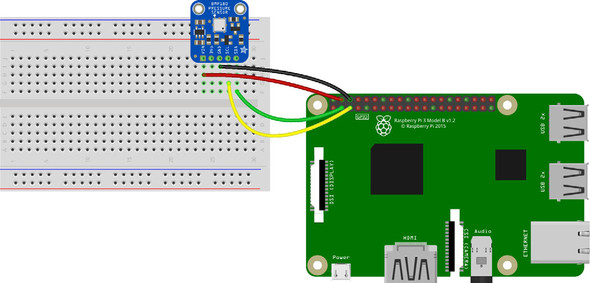 Figure 11.16. Wiring diagram for the BMP180, showing direct connections to the Pi
Code Examples
Using the BMP085 Module with Espruino Pico
The following code snippet demonstrates how to use the BMP085 module with the Espruino Pico to read temperature and pressure data:
I2C1.setup({ scl: B6, sda: B7});                                // 1
var bmp = require('BMP085').connect(I2C1);                      // 2
setInterval(function () {
  bmp.getPressure(function (readings) {                         // 3
    console.log('Pressure: ' + readings.pressure + ' Pa');
    console.log('Temperature: ' + readings.temperature + ' C');
  });
}, 1000);                                                       // 4
- 1: Sets up the Pico’s first I2C interface (I2C1), using pins B6 for SCL and B7 for SDA.
- 2: Requires the BMP085 module and invokes its connect function, using the I2C1 interface.
- 3: The
getPressuremethod of the instantiatedbmpobject is asynchronous; it registers a callback to handle the sensor data. - 4: Performs sensor reads every second (1000 ms).
Testing BMP180 with Raspberry Pi and Johnny-Five
The following code demonstrates how to use the BMP180 sensor with a Raspberry Pi using the Johnny-Five library and the raspi-io plugin:
const five = require('johnny-five');
const Raspi = require('raspi-io');

const board = new five.Board({
  io: new Raspi()                     // 1
});

board.on('ready', () => {
  const bmp180 = new five.Multi({
    controller: 'BMP180'
  });
  bmp180.on('change', () => {
    var temperature = bmp180.thermometer.fahrenheit.toFixed(2);
    var pressure    = bmp180.barometer.pressure.toFixed(2);
    console.log(`${temperature}°F | ${pressure}kPa`);
  });
});
- 1: Uses the raspi-io plugin for I/O operations on the Raspberry Pi.
Sample Output
When running the above script, you should see temperature and pressure data logging to the console, similar to the following:
>> 77.54°F | 98.05kPa
77.54°F | 98.05kPa
77.54°F | 98.05kPa
77.54°F | 98.05kPa
77.54°F | 98.06kPa
77.54°F | 98.05kPa
77.72°F | 98.06kPa
77.72°F | 98.06kPa
77.54°F | 98.05kPa
These examples and diagrams provide a comprehensive guide to integrating and using the BMP180 sensor with both the Espruino Pico and Raspberry Pi platforms.
FAQ (Frequently asked questions)
What is the BMP180 sensor used for?
Is the BMP180 compatible with the BMP085 module?
How does the BMP180 connect to devices?
Where can I find a wiring diagram for the Espruino Pico and BMP180 sensor?
How do you set up the I2C interface for the BMP180 on the Espruino Pico?
How do you connect the BMP085 module in Espruino?
How often does the Espruino Pico read sensor data from the BMP180?
Where can I find a wiring diagram for connecting the BMP180 to the Pi?
How do you test the BMP180 with a Raspberry Pi using Johnny-Five and raspi-io?
What does the BMP180 sensor output when using Johnny-Five?