Box in JavaScript Programming
In JavaScript programming, the concept of a "box" can be implemented as a function that formats text within a specified boundary, often using characters to create a visual box around the text. This is particularly useful for displaying information in a structured and visually appealing way on the console.
Box Function Implementation
The box function is designed to format text by surrounding it with a border made of a specified character. This function is part of a larger namespace called spacer, which provides various methods for formatting console output. Below is the implementation of the box function:
box: function (text, length, character) {
  var boxText = spacer.newLine();
  boxText += spacer.line(length, character) + spacer.newLine();
  boxText += spacer.wrap(text, length, character) + spacer.newLine();
  boxText += spacer.line(length, character) + spacer.newLine();
  return boxText;
}
Explanation
spacer.newLine(): This method is used to add a new line to the console output, ensuring that the box is neatly separated from other text.spacer.line(length, character): This method creates a line of a specified length using the given character. It forms the top and bottom borders of the box.spacer.wrap(text, length, character): This method wraps the text within the box, padding it with the specified character to ensure it fits within the defined length.
The box function returns a single string that spans multiple lines, creating a visual box around the text when displayed on the console.
Application in Web-Based Interfaces
In web-based applications, user interactions can be enhanced by moving input from the console to the web page. For instance, in a game like The Crypt, players can enter commands via a text box on the web page. This transition is illustrated in the following figures:
[Figure 18.6](https://livebook.manning.com/book/get-programming-with-javascript/chapter-7/133)
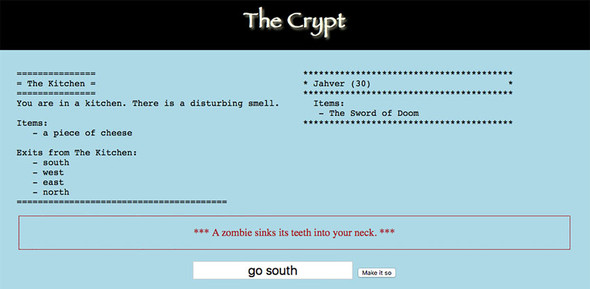 Figure 18.6. Commands are now entered into a text box at the bottom of the page.
[Figure 18.7](https://livebook.manning.com/book/get-programming-with-javascript/chapter-7/133)
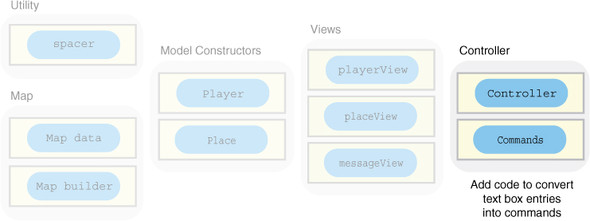 Figure 18.7. Modules for The Crypt, including a Commands module to execute commands via a text box
These figures demonstrate how user input can be integrated into a web page, allowing for a more interactive and user-friendly experience. The text box serves as an interface for players to enter commands, which are then processed by the game's modules. This setup not only enhances the user experience but also maintains the functionality of the existing game logic.
FAQ (Frequently asked questions)
What is the purpose of the 'box' function in JavaScript?
How does the 'box' function format text in JavaScript?
What methods are used within the 'box' function?