Buffer in Data Wrangling with JavaScript
In the context of data wrangling with JavaScript, a Buffer is a crucial component when dealing with binary data, especially in Node.js environments. This page explores how buffers are used to read from and write to binary files, using the example of earthquake data stored in a binary format.
Reading Binary Data with Buffers
When working with binary files, such as earthquakes.bin, a Buffer object in Node.js can be used to read and interpret the data. The process of reading records from a binary file using a Buffer is illustrated in Figure 4.9.
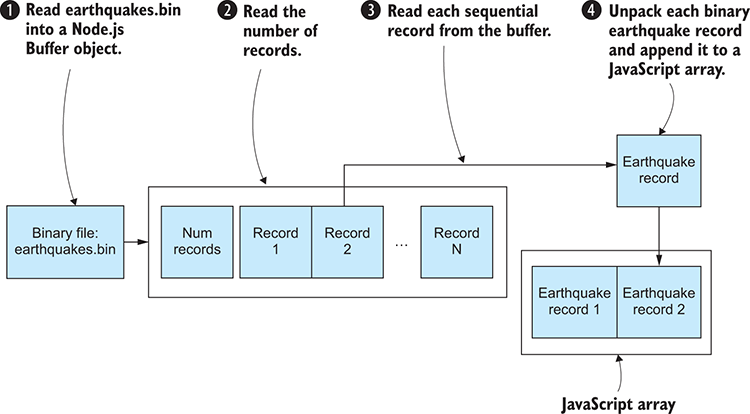 Figure 4.9 Reading records from earthquakes.bin using a Node.js Buffer object
Unpacking Binary Files
The code to unpack earthquakes.bin is straightforward. Listing 4.3 demonstrates how to read the binary file into a Buffer and extract the data:
Listing 4.3 Unpacking the earthquakes.bin binary files with a Node.js Buffer object (listing-4.3.js)
const fs = require('fs');
const buffer = fs.readFileSync("./data/earthquakes.bin");    #1

const numRecords = buffer.readInt32LE(0);    #2

let bufferOffset = 4;
const records = [];

for (let recordIndex = 0; recordIndex < numRecords; ++recordIndex) {    #3

 const time = buffer.readDoubleLE(bufferOffset);    #4

 const record = {    #4
 Time: new Date(time),    #4
 Latitude: buffer.readDoubleLE(bufferOffset + 8),    #4
 Longitude: buffer.readDoubleLE(bufferOffset + 16),    #4
 Depth_Km: buffer.readDoubleLE(bufferOffset + 24),    #4
 Magnitude: buffer.readDoubleLE(bufferOffset + 32),    #4
 };    #4

 bufferOffset += 8 * 5;    #5

 records.push(record);    #6
}    #3

console.log(records);    #7
- The binary file is read into a
Bufferobject. - The number of records is extracted from the buffer.
- A loop iterates over each record, reading the data fields and constructing a JavaScript object for each earthquake.
- The buffer offset is adjusted after reading each record to ensure the next record is read correctly.
- The constructed objects are collected into an array and printed to the console.
Writing Binary Data with Buffers
Writing data to a binary file involves packing JavaScript objects into a Buffer. This process is essentially the reverse of unpacking. Figure 4.11 illustrates how fields from a JavaScript object are packed into a buffer.
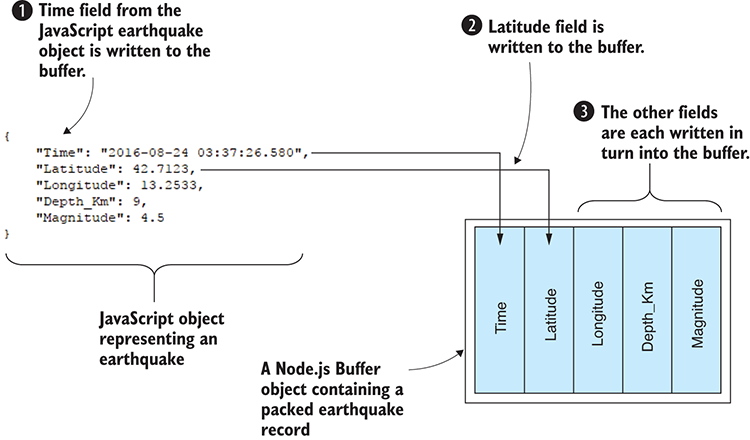 Figure 4.11 Packing fields from a JavaScript earthquake object into a Node.js buffer
Packing Binary Files
Listing 4.4 shows how to pack earthquake records into a binary file using a Buffer:
Listing 4.4 Packing the binary file earthquakes.bin using a Node.js buffer (listing-4.4.js)
const fs = require('fs');
const moment = require('moment');

const records = JSON.parse(  #1
 fs.readFileSync("./data/earthquakes.json", 'utf8')    #1
);    #1

const bufferSize = 4 + 8 * 5 * records.length;    #2
const buffer = new Buffer(bufferSize);    #3

buffer.writeInt32LE(records.length);  #4

let bufferOffset = 4;

for (let i = 0; i < records.length; ++i) {    #5

    const record = records[i];
 const time = moment(record.Time).toDate().getTime();    #6
 buffer.writeDoubleLE(time, bufferOffset);    #6
 bufferOffset += 8;    #6

 buffer.writeDoubleLE(record.Latitude, bufferOffset);    #6
 bufferOffset += 8;    #6

 buffer.writeDoubleLE(record.Longitude, bufferOffset);    #6
 bufferOffset += 8;    #6

 buffer.writeDoubleLE(record.Depth_Km, bufferOffset);    #6
 bufferOffset += 8;    #6

 buffer.writeDoubleLE(record.Magnitude, bufferOffset);    #6
 bufferOffset += 8;    #6
}    #5

fs.writeFileSync("./output/earthquakes.bin", buffer);    #7
- The JSON file containing earthquake data is loaded and parsed.
- The buffer size is calculated based on the number of records and their size.
- A
Bufferobject is created to hold the binary data. - The number of records is written to the buffer.
- Each record is packed into the buffer, with fields written sequentially.
- The buffer is written to the binary file
earthquakes.bin.
This process ensures that the data is efficiently stored in a binary format, which can be easily read back using the unpacking method described earlier.
FAQ (Frequently asked questions)
What is Figure 4.9 in the book 'Data Wrangling with JavaScript' about?
How do you read a binary file using Node.js?
How can you determine the number of records in a binary file using a Buffer in Node.js?
How do you extract data from a Buffer object in Node.js?
What is the purpose of the bufferOffset variable in the Node.js Buffer example?
How do you store extracted records from a binary file in Node.js?
How can you print deserialized records from a binary file in Node.js?