Build Task
Overview
Build tasks are automated processes designed to handle specific operations within a software development workflow. These tasks can include actions such as linting, testing, building, and managing database schema updates. They are often idempotent, meaning that executing them multiple times should yield the same results. This ensures consistency and reliability in the development process.
Grunt and Build Tasks
Grunt is a popular task runner that facilitates the execution of commands, running JavaScript code, and configuring tasks using JavaScript. It allows developers to define build flows and tasks, which can be configured using the grunt.initConfig method. Grunt tasks are predefined operations that automate processes like minifying files, compiling code, or running tests. These tasks are configured using plugins and can be executed via the Grunt CLI.
Example: Configuring Grunt
The following example demonstrates how to configure a Grunt task to lint JavaScript files using the jshint plugin:
module.exports = function (grunt) {
  grunt.initConfig({
    jshint: {
      browser: ['public/js/**/*.js']
    }
  });
  grunt.loadNpmTasks('grunt-contrib-jshint');
  grunt.registerTask('default', ['jshint']);
};
Database Management with Build Tasks
Build tasks can also be developed to manage database operations such as creating databases, upgrading schemas, seeding data, and rolling back changes. These tasks can be executed from the command line, providing a streamlined approach to database management.
Two-Way Schema Changes
Two-way schema changes involve handling database migrations in both directions: upgrade and rollback. Automated tasks should manage these changes, allowing for database creation, schema updates, data seeding, and rollbacks. The 'db_rollback' task, for instance, serves as a backup plan when things go wrong. It takes the last upgrade script applied and executes its downgrade counterpart, updating the tracking table by deleting the last record. This allows for effective management of schema upgrades and rollbacks.
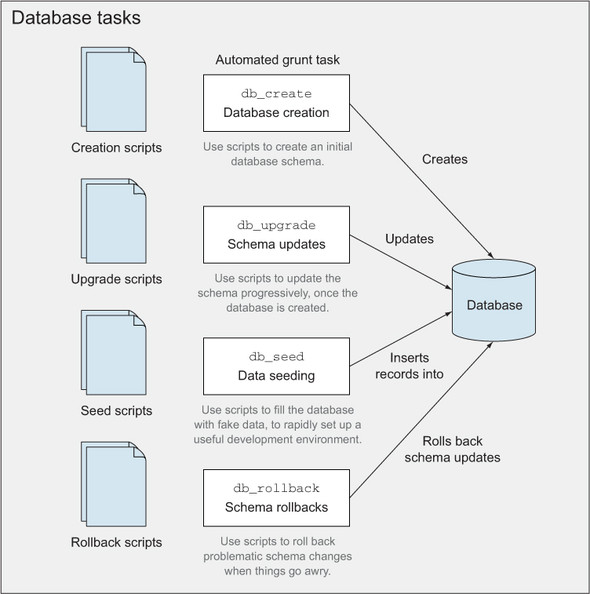 Figure 2.7. Interaction of proposed tasks with a database instance
Gulp and Build Tasks
In addition to Grunt, other tools like Gulp can be used to define build tasks. Gulp is a streaming build system that allows developers to automate tasks in their development workflow.
Example: Using gulp-header to Add License Information
The following example demonstrates how to use Gulp to automate the process of adding license information to a JavaScript file:
var gulp = require('gulp');
var uglify = require('gulp-uglify');
var size = require('gulp-size');
var header = require('gulp-header');
var pkg = require('./package.json');
var info = '// <%= pkg.name %>@v<%= pkg.version %>, <%= pkg.license %>\n';

gulp.task('build', function () {
  return gulp
    .src('./sample.js')
    .pipe(uglify())
    .pipe(header(info, { pkg : pkg }))
    .pipe(size())
    .pipe(gulp.dest('./build'));
});
This Gulp task reads a JavaScript file, minifies it using uglify, adds a header with license information, and outputs the result to a build directory.
FAQ (Frequently asked questions)
What are build tasks in Grunt?
Are build tasks in Grunt idempotent?
What is Grunt used for?
How can tasks be configured in Grunt?
What operations can build tasks handle?
Can build tasks be executed from the command line?
What are two-way schema changes?
What should automated tasks manage in terms of database changes?
What is the purpose of the 'db_rollback' task?
How does the 'db_rollback' task manage schema upgrades and rollbacks?
What is a build task in Grunt?
How are tasks configured in Grunt?
What is a build task?
Which tools can define build tasks?