Comment in JavaScript
Overview
In JavaScript, comments are an essential part of writing clear and understandable code. They serve as annotations within the code to explain what certain parts of the code do. Comments are particularly useful for other programmers who may read the code in the future, as they provide context and explanations that might not be immediately obvious from the code itself. Importantly, comments are ignored by the computer when the program is executed, meaning they have no effect on the program's functionality.
Types of Comments
There are two primary types of comments in JavaScript:
-
Single-line Comments: These comments are used for brief explanations or notes and occupy a single line. They are denoted by two forward slashes (
//). Everything following these slashes on that line is considered a comment and is ignored by the JavaScript engine.// This is a single-line comment -
Block Comments: These comments can span multiple lines and are useful for more detailed explanations or for commenting out blocks of code during debugging. Block comments are enclosed between
/*and*/./* This is a block comment that spans multiple lines. */
Usage in JS Bin
In JS Bin, a popular online JavaScript editor, comments are typically displayed in green, making them easily distinguishable from the rest of the code. This color-coding helps programmers quickly identify comments when reviewing code.
Practical Application
Comments are not only used in code for explanation but can also be part of a user interface design. For instance, in a web application, you might have a section dedicated to user comments. This can be implemented using HTML and JavaScript, as shown in the following example:
<h4>Comments</h4>
<ul id="comments"></ul>
In this example, a ul element is used to create a list of comments, and it is given an id attribute to allow JavaScript to dynamically add list items.
Example in a Web Application
In a practical scenario, such as a movie rating site, users might be allowed to add comments along with their ratings. Figure 18.5 illustrates a user interface where users can type their comments into a text box, select a rating, and submit both to be displayed on the site.
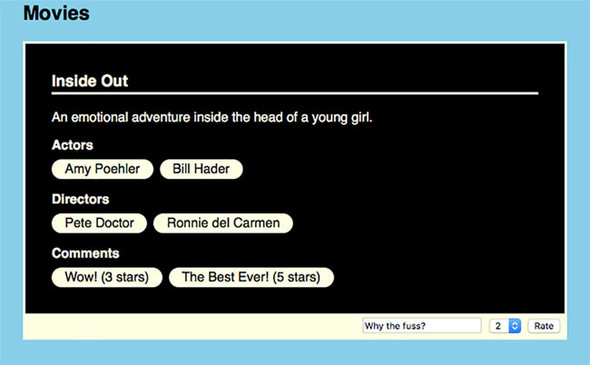 Figure 18.5. The movie has a text box to add comments and a section to display them.
In this setup, users type their comment into the text box, pick a rating from a drop-down list, and click the "Rate" button. The comment and rating are then added to the comments section for the movie, enhancing user interaction and engagement on the site.
FAQ (Frequently asked questions)
What are comments used for in JS Bin listings?
What types of comments can be used in JavaScript?
Are comments executed by the computer in a JavaScript program?