Computed Style in JavaScript
Overview
Computed styles are the culmination of all styles applied to an HTML element. This includes styles from external and internal style sheets, inline styles, and browser default styles. The computed style represents the final appearance of an element after all CSS rules, inline styles, and inherited styles have been calculated and applied.
Definition
In the context of web development, the computed style of an element refers to the final set of CSS properties that are applied to it. This includes all styles that have been calculated from various sources, such as style sheets, inline styles, and inherited styles from parent elements.
Fetching Computed Style Values
To understand how computed styles work in practice, consider the following example, which demonstrates how to fetch computed style values using JavaScript.
Example: Fetching Computed Style Values
Listing 12.8. Fetching computed style values
<style>
  div {
    background-color: #ffc; display: inline; font-size: 1.8em;
    border: 1px solid crimson; color: green;
  }
</style>
<div style="color:crimson;" id="testSubject" title="Ninja power!">    #A
  忍者パワー
</div>
<script>
  function fetchComputedStyle(element,property) {                     #B
    const computedStyles = getComputedStyle(element);                 #C
    if (computedStyles) {                                             #D
      property = property.replace(/([A-Z])/g,'-$1').toLowerCase();
      return computedStyles.getPropertyValue(property);
    }
  }
  document.addEventListener("DOMContentLoaded", () => {
    const div = document.querySelector("div");
    report("background-color: " +
           fetchComputedStyle(div,'background-color'));               #E
    report("display: " +
           fetchComputedStyle(div,'display'));
    report("font-size: " +
           fetchComputedStyle(div,'fontSize'));
    report("color: " +
           fetchComputedStyle(div,'color'));
    report("border-top-color: " +
           fetchComputedStyle(div,'borderTopColor'));
    report("border-top-width: " +
           fetchComputedStyle(div,'border-top-width'));
  });
</script>
#A - Creates a test subject with a style attribute
#B - Defines a function that will get the computed value of a style property
#C - Uses the built-in getComputedStyle method to obtain a descriptor object
#D - Replaces camel-case notation with dashes
#E - Tests that we can obtain the values of various style properties, using different notations
In this example, a div element is styled both via a style sheet and inline styles. The fetchComputedStyle function uses the getComputedStyle method to retrieve the computed styles of the element. This function can handle different notations for CSS properties, converting camel-case to dash-separated format as needed.
Visual Representation
The results of fetching computed styles are illustrated in the following figure:
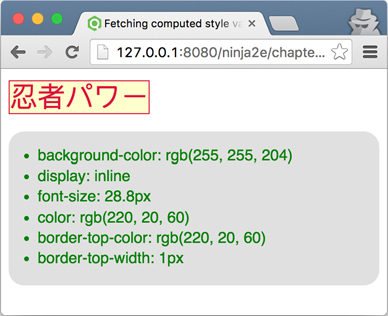 Figure 12.3. Computed styles include all styles specified with the element as well as those inherited from style sheets.
This figure demonstrates that computed styles encompass all styles specified directly on the element as well as those inherited from style sheets. Notably, when a style is specified both in a style sheet and directly on an element, the inline style takes precedence, even if the style sheet rule is marked as !important.