Container in JavaScript
In the realm of JavaScript, the term "container" can refer to different concepts depending on the context. Broadly, a container is a construct that encapsulates and isolates certain elements, whether they be applications, dependencies, or values, to ensure consistent behavior and safe manipulation. Below, we explore the concept of containers in two distinct contexts: software deployment and functional programming.
Containers in Software Deployment
In software deployment, a container is a technology that encapsulates an application along with its dependencies, settings, and environment. This encapsulation allows the application to run consistently across different devices without interference from other containers. Containers are essential in modern software development and deployment, ensuring that applications behave the same way regardless of where they are deployed.
Docker and Containers
Docker is a popular platform that utilizes container technology to package applications and their dependencies in a clean and reliable manner. By using Docker, developers can encapsulate their applications and all necessary dependencies, allowing for seamless deployment and execution on any device that supports Docker.
Creating a Docker Container
To create a Docker container for your application, you can use a Dockerfile.template. This file defines the environment and instructions for building a Docker image. Below is an example of a Dockerfile.template used in a resin.io project:
# [[base-image for node on any machine using a template variable](https://livebook.manning.com/book/javascript-on-things/chapter-12/46)](https://livebook.manning.com/book/javascript-on-things/chapter-12/46)
FROM resin/%%RESIN_MACHINE_NAME%%-node:6

# [[Defines our working directory in container](https://livebook.manning.com/book/javascript-on-things/chapter-12/26)](https://livebook.manning.com/book/javascript-on-things/chapter-12/26)
WORKDIR /usr/src/app

# [[Copies the package.json first for better cache on later pushes](https://livebook.manning.com/book/javascript-on-things/chapter-12/46)](https://livebook.manning.com/book/javascript-on-things/chapter-12/46)
COPY package.json package.json

# [[This install npm dependencies on the resin.io build server,](https://livebook.manning.com/book/javascript-on-things/chapter-12/87)](https://livebook.manning.com/book/javascript-on-things/chapter-12/87)
RUN JOBS=MAX npm install --production --unsafe-perm && npm cache clean && rm -rf /tmp/*

# [[This will copy all files in our root to the working directory in the container](https://livebook.manning.com/book/javascript-on-things/chapter-12/26)](https://livebook.manning.com/book/javascript-on-things/chapter-12/26)
COPY . ./

# [[Enable systemd init system in container](https://livebook.manning.com/book/javascript-on-things/chapter-12/26)](https://livebook.manning.com/book/javascript-on-things/chapter-12/26)
ENV INITSYSTEM on

# [[server.js will run when container starts up on the device](https://livebook.manning.com/book/javascript-on-things/chapter-12/46)](https://livebook.manning.com/book/javascript-on-things/chapter-12/46)
CMD ["npm", "start"]
Deployment with resin.io
Once a resin.io project and its devices are set up, you can develop your app iteratively. When you push changes to your resin.io Git remote, resin.io rebuilds your application’s container with the updated code and deploys that container to all of the connected, provisioned devices for that app. This process is illustrated in the following figure:
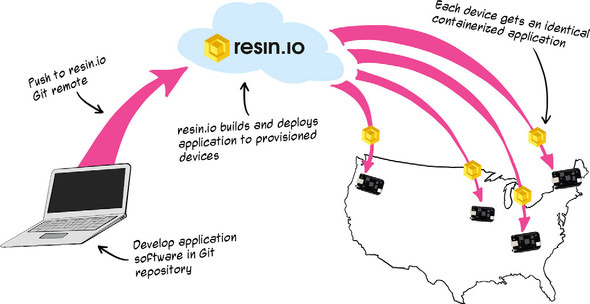 Figure 12.2. Devices that will run the application are provisioned by installing and booting a custom-tailored resin.io OS image on each. Pushing application code to a project-specific resin.io Git remote triggers the rebuilding of the app’s container and its redeployment to connected, provisioned devices.
Containers in Functional Programming
In functional programming, a container is a fundamental design pattern that acts as a safety box around potentially hazardous code. This concept allows for the safe manipulation of values without granting direct access to them. Containers are abstract data types that hold values and provide a context for operations on those values, such as mapping functions over them.
Characteristics of Containers
- Safety and Immutability: Containers ensure that values are manipulated safely and immutably, which is crucial in functional programming.
- Context for Operations: Containers provide a context for operations on the encapsulated values, allowing functions to be mapped over the values without altering the container's structure or the original value.
- Side Effect-Free Code: By using containers, developers can create code that is free from side effects, maintaining referential transparency.
Example of a Container
An example of a container is the Wrapper class, which encapsulates a value and provides methods such as map and fmap to safely manipulate the encapsulated value. These methods allow functions to be applied to the value within the container, returning a new container with the transformed value, while the original container remains unchanged.
Visual Representation
The concept of a container can be visualized through the use of a try-catch structure, which creates an invisible safety box around functions that can throw exceptions. This safety box is materialized into a container, as shown in the following figure:
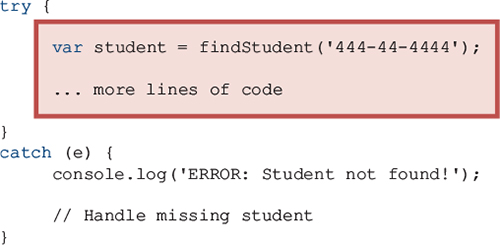 Figure 5.1. The try-catch structure invisibly creates a safety box around functions that can throw exceptions. This safety box is materialized into a container.
In summary, containers in JavaScript serve as a versatile tool, whether in the context of software deployment or functional programming, providing mechanisms for consistent application behavior and safe, immutable value manipulation.
Here's a markdown table comparing how different 'JavaScript' books discuss the term 'container':
| Book Title | Usage of Container | Technical Depth | Connections to Other Concepts | Examples Used | Practical Application |
|------------|--------------------|-----------------|-------------------------------|---------------|-----------------------|
| JavaScript on Things: Hacking hardware for web developers | Discusses containers as a technology for encapsulating applications and their dependencies, ensuring consistent behavior across devices. | Explores Docker and its role in packaging applications, with detailed instructions on creating Docker containers using Dockerfile.template. | Connects container usage to deployment processes with resin.io, highlighting the importance of consistent application behavior. | Provides a Dockerfile.template example and a figure illustrating the deployment process. | Focuses on deploying applications across multiple devices using resin.io, ensuring consistent updates and behavior. more |
| Functional Programming in JavaScript | Describes containers as a design pattern in functional programming, acting as a safety box around code. | Discusses the characteristics of containers, such as safety, immutability, and context for operations. | Highlights the role of containers in creating side effect-free code and maintaining referential transparency. | Provides an example of a Wrapper class and a visual representation using a try-catch structure. | Emphasizes the use of containers to safely manipulate values and maintain a clean codebase. more |
Each book provides a unique perspective on the concept of 'container', tailored to its specific focus area, whether it's hardware hacking or functional programming.
FAQ (Frequently asked questions)
What is a container in functional programming?
Why are containers important in functional programming?
How does the try-catch structure relate to containers?
What is an example of a container in functional programming?
What is the role of a container in functional programming?
How do containers help in creating side effect-free code?
What is a container in the context of resin.io?
How does a container ensure consistent application performance?
How are devices provisioned for running applications with resin.io?
What happens when application code is pushed to a resin.io Git remote?
How does resin.io use Docker containers?
What is the benefit of using Docker containers in resin.io?