Event in JavaScript
Events are a cornerstone of interactive web applications, allowing them to respond to user interactions and other occurrences asynchronously. They are actions or occurrences that happen within the system you are programming, and the system notifies your code about these events so it can respond accordingly. This asynchronous nature means that events can occur at unpredictable times and in an unpredictable order, requiring their handling functions to be invoked independently of the main program flow.
Overview of Events
Events, often referred to as publish/subscribe or event emitters, are a fundamental asynchronous pattern in JavaScript. They allow components within an application to emit events and pass arguments to these events. Other components, which are interested in these events, can subscribe and react accordingly. This pattern is natively supported in web browsers and can be triggered by various actions such as AJAX responses, DOM interactions, or WebSocket activities. Due to their asynchronous nature, events require careful management to ensure that the application behaves as expected.
In the context of event emitters, an event acts as a signal indicating that a particular action or occurrence has taken place. This signal can then trigger functions, known as listeners, which have been registered to respond to that specific event. This mechanism facilitates seamless communication between different parts of an application, allowing for a more modular and decoupled architecture.
Working with Events
Registering Event Handlers
Working with events involves several key concepts, one of which is registering event handlers. This is typically done using methods like addEventListener. Event handlers are functions that are executed in response to an event. For example, you can register a handler for a click event on a button element:
<button id="myButton">Click</button>
<script>
  const myButton = document.getElementById("myButton");
  myButton.addEventListener("click", function myHandler(event){
    assert(event.target === myButton, "The target of the event is also myButton");
    assert(this === myButton, "The handler is registered on myButton");
  });
</script>
In this example, the addEventListener method is used to register a click event handler on a button. The event object provides information about the event, such as the target element, which can be accessed via event.target.
Event Propagation
Events propagate through the DOM in two phases: capturing and bubbling. During the capturing phase, the event trickles down to the target element, and during the bubbling phase, it bubbles up from the target element. This is illustrated in Figure 13.15:
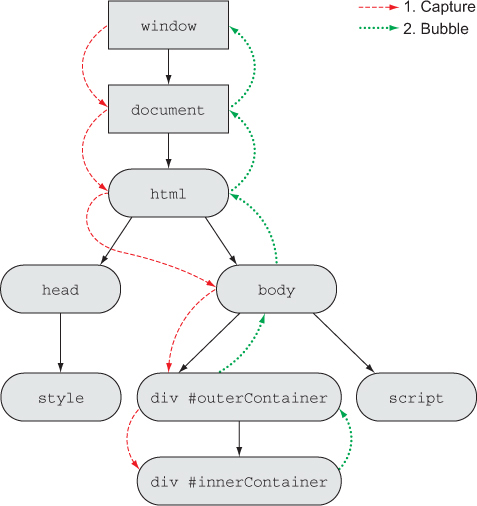 Figure 13.15. With capturing, the event trickles down to the target element. With bubbling, the event bubbles up from the target element.
Loose Coupling
Events promote loose coupling between the code that triggers an event and the code that handles it. This separation allows for more modular and flexible code, as the event trigger does not need to know about the event handlers.
Creating Custom Events
Custom events can be created using the CustomEvent constructor, which allows you to define an event type and pass additional data through the detail property. Once created, the event can be dispatched using the dispatchEvent method. This capability allows developers to create more modular and reusable code by defining and handling custom events specific to their application's needs.
Events in Functional Programming
In the context of RxJS, an event is an asynchronous occurrence that can be captured and processed using observables. Events can originate from various sources such as user interactions, system notifications, or data streams. Observables provide a powerful way to handle these events by allowing developers to subscribe to them and react accordingly. This approach enables the creation of responsive and efficient applications that can handle a wide range of asynchronous activities seamlessly.
Conclusion
Events are a powerful feature in JavaScript that enable developers to create interactive and dynamic web applications. By understanding how to detect and handle events, developers can enhance user experiences and build responsive interfaces. Whether through traditional event handling or using advanced patterns like observables, mastering events is crucial for modern web development.
Here is a markdown table comparing how different JavaScript books discuss the term 'event':
| Book Title | Usage of Event | Technical Depth | Connections to Other Concepts | Examples Used | Practical Application |
|------------|----------------|-----------------|-------------------------------|---------------|-----------------------|
| Secrets of the JavaScript Ninja, Second Edition | Discusses events as fundamental to interactive web applications, focusing on asynchronous handling and event propagation. more | Covers event registration, propagation, and custom events in detail. more | Connects events to concepts like loose coupling and modular code. more | Provides examples of event handling with addEventListener and custom events. more | Emphasizes modular and reusable code through custom events. more |
| JavaScript Application Design: A Build First Approach | Describes events as a publish/subscribe pattern, focusing on event emitters. more | Explores event emitters and their role in asynchronous patterns. more | Highlights the decoupling of application components through events. more | Includes a case study on testing event emitters. more | Focuses on ensuring correct application behavior through testing. more |
| Functional Programming in JavaScript | Defines events in the context of RxJS as asynchronous occurrences handled by observables. more | Discusses the use of observables for event handling. more | Links events to functional programming concepts like observables. more | Focuses on the use of observables to manage events. more | Highlights the creation of responsive applications using observables. more |
| Get Programming with JavaScript | Introduces events as actions or occurrences detected by programs, essential for interactivity. more | Covers basic event handling and propagation phases. more | Discusses event types and their role in dynamic web pages. more | Provides simple examples of event handling with addEventListener. more | Focuses on enhancing user interfaces through event handling. more |
This table provides a comparison of how each book approaches the concept of 'event' in JavaScript, highlighting their unique perspectives and depth of coverage.
FAQ (Frequently asked questions)
What is an event in the context of RxJS?
Where can events originate from in RxJS?
What is an event in JavaScript?
How are events used in JavaScript?
What are events in JavaScript?
How are events implemented in browsers?
Why do events require careful management?
What is an event in the context of event emitters?
How do events facilitate communication in an application?
What does the case study on event emitters demonstrate?
What is the purpose of the 'emitter' method in event emitters?
What should be verified when testing event emitters?
What should tests focus on when testing event emitters?