FilterRow in Data Wrangling with JavaScript
The filterRow function is a crucial component in data wrangling, particularly when it comes to filtering datasets. It acts as a predicate function, determining whether a specific record should be included in the final dataset. The function returns true to keep a record and false to exclude it.
Basic Usage of filterRow
The filterRow function is typically used in conjunction with JavaScript's array filter method. This method iterates over each element in an array, applying the filterRow predicate to decide which elements to retain. Below is an example of how this can be implemented:
Example: Filtering Data with JavaScript
Listing 6.4 Filtering out unwanted or bad data (extract from listing-6.4.js)
function filterRow (inputRow) {    #1
 return inputRow.country === 'Australia';    #1
}    #1

function transformData (inputData) {
 return inputData.filter(filterRow);    #2
};

#1   Your predicate function to filter out rows of data. This example is filtering out any rows from countries that aren’t Australia.
#2   Uses the JavaScript array filter function to remove rows of data that don’t match our filter criteria
In this example, the filterRow function is designed to keep only those records where the country field is 'Australia'. The transformData function then applies this filter to the input data.
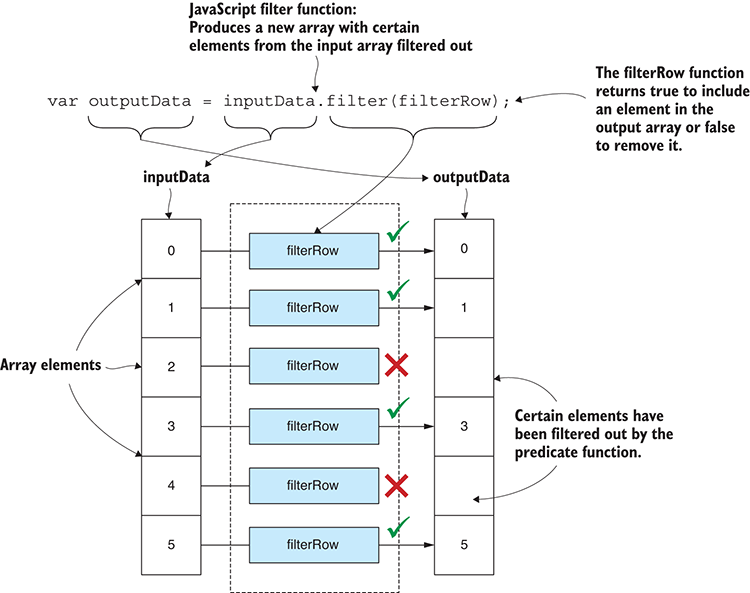 Figure 6.7 Using the JavaScript filter function to produce a new array with certain elements filtered out
General Pattern for Filtering Rows
A general pattern for filtering rows can be established, allowing for customization based on specific filtering criteria. The following template can be used to create a custom filterRow function:
Listing 6.5 General pattern for filtering out bad data (listing-6.5.js)
function filterRow (inputRow) {    #1
    // TODO: Your predicate here.
    // Return true to preserve the row or false to remove it.
    const preserveRow = true;
    return preserveRow;
}    #1

function transformData (inputData) {
    return inputData.filter(filterRow);
};

importCsvFile(inputFileName)
    .then(inputData => {
        const outputData = transformData(inputData);
        return exportCsvFile(outputFileName, outputData)
    })
    .then(() => {
        console.log("Done!");
    })
    .catch(err => {
        console.error("Error!");
        console.error(err && err.stack || err);
    });

#1   Add your predicate function here. Returns true to preserve a row of data or false to remove it
This template allows you to define your own logic within the filterRow function to determine which records to keep.
Using Data-Forge to Filter Rows
Data-Forge, a JavaScript library for data manipulation, offers an alternative to the array filter method with its where function. This function serves the same purpose but operates on DataFrames, a more structured data format.
Example: Filtering Data with Data-Forge
Listing 6.6 Using Data-Forge to filter out unwanted or bad data (extract from listing-6.6.js)
function filterRow (inputRow) {    #1
 return inputRow.country === 'Australia';    #1
}    #1

function transformData (inputDataFrame) {
 return inputDataFrame.where(filterRow);    #2
}

#1   This is the predicate function that removes records not in Australia.
#2   Uses the Data-Forge where function to filter out records that aren’t from Australia
In this example, the filterRow function is identical to the one used with the array filter method. However, the transformData function utilizes Data-Forge's where function to filter the DataFrame, resulting in a new DataFrame that only includes records from Australia. This approach is particularly useful when working with large datasets that benefit from the structured nature of DataFrames.
FAQ (Frequently asked questions)
What is the purpose of the filterRow function in data wrangling?
How does the filterRow function decide to keep or remove a record?