Game Controller
The game controller is a crucial component in the architecture of a game, responsible for initializing the game, managing user input, updating models and views, and providing an interface for players. It ensures the game runs smoothly by managing player actions and maintaining the game state.
Initializing Games
When the game first loads, the game controller is responsible for setting up the initial state of the game. It uses the Place constructor to build place models and the Player constructor to create a player model. The controller assigns the initial player location and provides a user interface for interaction. This setup is crucial for ensuring that the game environment is ready for the player to begin their journey.
Acting on User Input
During gameplay, the controller continuously monitors player actions to ensure they are valid. It updates the player and place models accordingly and passes these updated models to the views. This process allows the game to reflect the player's actions in real-time. Additionally, the controller sends feedback messages to the player and stops the game if the player's health reaches zero, ensuring a responsive and immersive gaming experience.
Starting and Stopping the Game
The game controller uses the init function to start the game. This function initializes the game by building the map, creating the player model, and setting the player's initial location. The game continues until the checkGameStatus function determines that the player's health has dropped to zero, at which point it sets the inPlay status to false, effectively stopping the game.
Integration with the Map Manager
The game controller has been updated to integrate with the Map Manager, enhancing its functionality. The init method now calls loadPlace to load the first place, and the go method retrieves a place using loadPlace. This integration allows for more dynamic and flexible management of the game environment.
[Listing 20.9: The Game Controller Using the Map Manager](https://livebook.manning.com/book/get-programming-with-javascript/chapter-20/144)
The following listing demonstrates the integration of the game controller with the Map Manager, showcasing the updated methods within the controller's context.
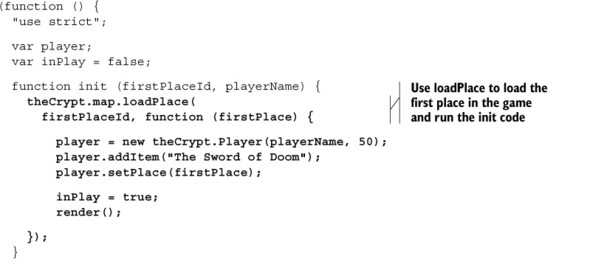 Listing 20.9. The game controller using the Map Manager (http://jsbin.com/vezaza/edit?js)
This listing illustrates how the game controller leverages the Map Manager to load and manage game places, providing a more robust and scalable game architecture.
FAQ (Frequently asked questions)
What is the purpose of the game controller in the context of the Map Manager?
Where can I find the code for the game controller using the Map Manager?
What are the functions of a game controller?
How does the game controller ensure smooth gameplay?
What does the game controller do when the game first loads?
How does the game controller manage player actions during gameplay?
How does the game controller start and stop the game?
How has the game controller been updated to use the Map Manager?